


Participant
March 13, 2018
Answered

Dimension CC - Out of bound UVs Marvelous Designer OBJ Problem

  • March 13, 2018
  • 3 replies
  • 1094 views

Hi all,

I have one question...

We work with Marvelous Designer, a 3D pattern maker for clothing wear.

So when I export the OBJ I have this window, that have also "Unify Coordinate UV"
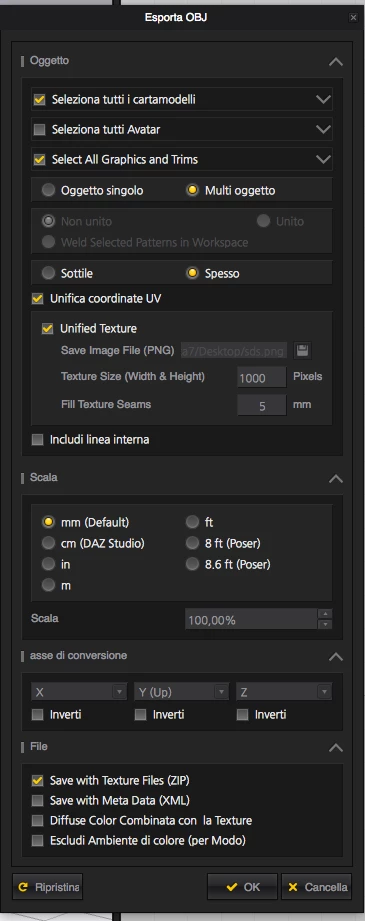
But if I export with this option on and also off the error is:

We have detected that the model has out of bound UVs.  Out of bound UVs may affect the way materials and graphics are applied to the model.  For ideal results ensure all UVs are in the 0-1 space.

So anyone can help me? I think that this software is very interesting and we want support and make some renders with it, but at now we are blocked with this error.

Thank you for the support

This topic has been closed for replies.
Correct answer JeanetteMathews

Hi everyone.  For anyone having out of bound UV errors, our next release of Dimension will identify UVs issues and ask if you want to fix them.  You can get early access and try this out on the Dimension CC Prerelease .

3 replies

JeanetteMathews
Adobe Employee
JeanetteMathewsCorrect answer
Adobe Employee
March 24, 2018

Hi everyone.  For anyone having out of bound UV errors, our next release of Dimension will identify UVs issues and ask if you want to fix them.  You can get early access and try this out on the Dimension CC Prerelease .

JeanetteMathews
Adobe Employee
Adobe Employee
March 13, 2018

Please send your exported .obj file to tickets@adobedimension.com with a reference to this discussion.  We have a team member with Marvelous Designer and I will work with him to see what's going on!  Thank you!

Inspiring
March 13, 2018

I've exported some complex Maya mappings and this mistake has already happened to me. I fixed this problem by saving all my textures with names with no special characters or no spaces.

Example:

"I used to save

"Coca-Cola Label.jpg"

-I now save

"rotulo_da_coca_cola.jpg"

That worked for me. I hope it helps!