


Participant
January 30, 2020
Answered

Distortion on Placed Decal

  • January 30, 2020
  • 2 replies
  • 783 views

Hello, new Dimension user here — I have placed and fitted a decal to the Food Pouch model, but I am finding that there are a few djagged distortions along the top and upper-right edges of the package. They are also a different color red than the background of the artwork/decal itself. Quite frankly, I'm not sure how to correct this and have tried everything I can think of (at this time). I would greatly apprecaite any help anyone can offer 🙂 I attached a screenshot for reference.
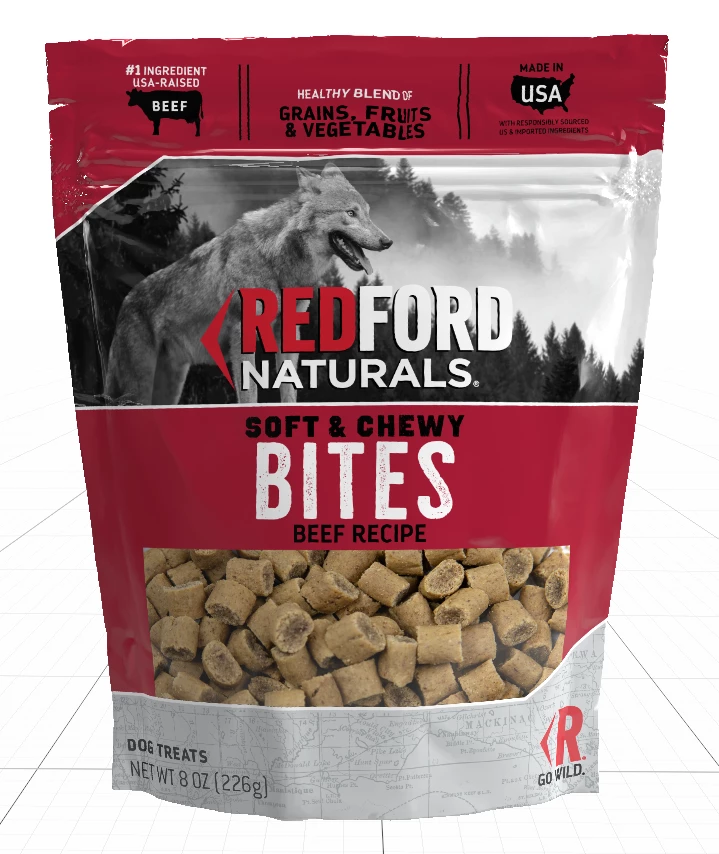
[image added ussnorway]

This topic has been closed for replies.
Correct answer Ussnorway7605025

the screengrab does help us see the issue but the file would be better for testing... is it possible to share it?


the colour change could just be lights

2 replies

Participant
January 31, 2020

It was the lights... I was trying to force something that just didnt want to work. I appreciate [both of] your help and quick feedback! Learning this program has been a working progress.

JKThree
Participating Frequently
February 4, 2020

I've had this issue before, as well.
In additon to playing witht he lights/palcement, another trick is to make the material less shiny.
By default, the food pouch is super glossy, but you can change this (even if you still want a shiny material look).
Best way that I've found:
1) add a matte material to the pouch
2) change base color back to white (unless adding a full size decal or you want semi-grey look)

3) In material properties, change roughness. I've found that about 50% still retains the "shininess", but cuts some of the glare. Note - you might think to skip steps 1 and 2 and just jump to THIS step, but unfortunately you can't adjust roughness until applying the material.

Ussnorway7605025
Ussnorway7605025Correct answer
Legend
January 30, 2020

the screengrab does help us see the issue but the file would be better for testing... is it possible to share it?


the colour change could just be lights

Ares Hovhannesyan
Community Expert
Community Expert
January 31, 2020

I agree that this can be lights. Please try to play with lights,