


Heenaaah
Known Participant
April 1, 2021
Answered

Flatlay perspective in adobe dimension

  • April 1, 2021
  • 2 replies
  • 1924 views

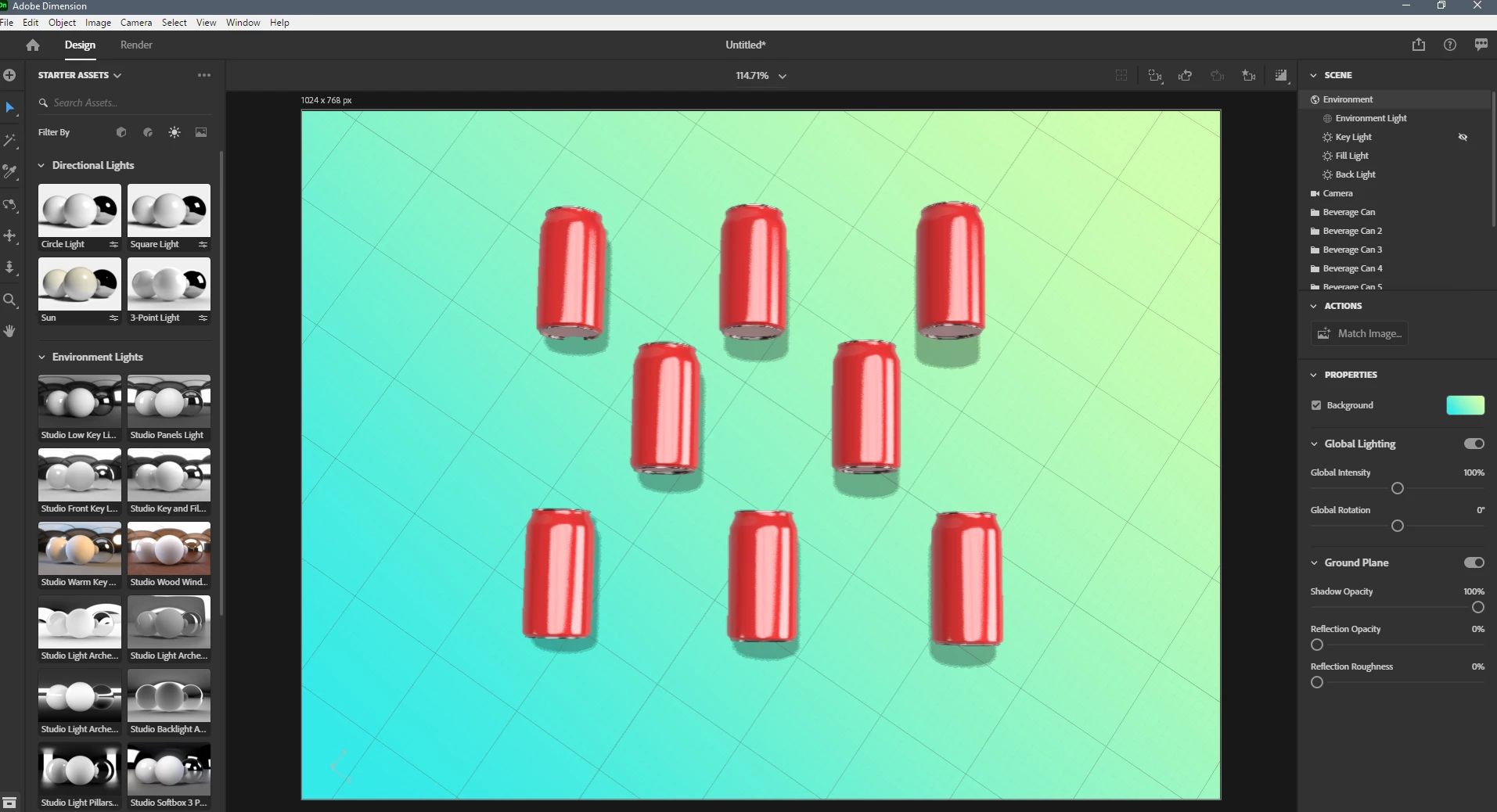
Hi, I have started working on adobe dimension. Basically, I have started graphic designing a few months back for the first time. I am unable to get a mockup design in a flat lay perspective. I need to make coffee can mockups in a flatlay perspective with shadows. Can I do that in the dimension of will I have to take it to photoshop?


This topic has been closed for replies.
Correct answer Ares Hovhannesyan

Try to use 3 Point Light from light assets to achive desired shadows properties and location with in your composition. Also use drop to ground feature for correct position for your object. After adjusting cameras for initial object just copy them or duplicate them (you can also duplicate them as instances)


2 replies

Ussnorway7605025
Legend
April 4, 2021

i agree the overhead 'sun' light is too strong and the shadows distract the eye away from the cans... a little shadow is fine because people expect to see one but it should be small


i would also lift all the cans a few mm up off the ground plan

Ussnorway7605025
Legend
April 2, 2021

flat lay = yes its possible to do with Dimension


1 blue cup on yellow background is not a good idea, you want high contrast... I'd go with black background with that colour blue

2 zoom in a bit on the cup... its a little out of focus


3 that shadow is too far so move your sunlight higher


you can turn the background on \ off in Photoshop after rendor if you like but imo it will not matter as much as the points above

Heenaaah
HeenaaahAuthor
Known Participant
April 2, 2021

Hi, thank you for your response. I completely missed mentioning that this is a google image to show what how I want the output to be like. A top view of my coffee cup with shadow. I tried on dimension but somehow I am unable to get an exact bird's view. Can you tell me how can I get that? I used the rotate tool, pan tool everything, moved them around a bit but can't get it. A sample of what I am trying to achieve(reference from Google)

Ares Hovhannesyan
Community Expert
Ares HovhannesyanCommunity ExpertCorrect answer
Community Expert
April 3, 2021

Try to use 3 Point Light from light assets to achive desired shadows properties and location with in your composition. Also use drop to ground feature for correct position for your object. After adjusting cameras for initial object just copy them or duplicate them (you can also duplicate them as instances)