


Question
How to remove unwanted material assigned to surface?
I am tagging the surfaces of a model with various materials. However, I've noticed that some parts of the model have multiple materials assigned, like this...
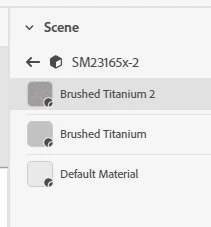
I assume the highlighted one is the material actually selected and shown in the editor and rendering. However, I don't see any way of removing the unwanted/extra ones. (There is no "trash can" icon or other means of deleting.)
I would like to clean up my model so I have only one material showing for each surface or part. Please advise on how to do that.
Thanks!
 AdChoices