


Participant
March 17, 2018
Answered

Place Material on Selection won't work on imported mesh (model)

  • March 17, 2018
  • 5 replies
  • 4952 views

I imported a mesh obtained from Turbosquid. I guess Dimension refers to it as "models", not mesh. It came with all the materials and textures needed. When I tried to import those assets, they were all grayed out. If I tried to use "Place graphic as decal" Dimension would recognize the files, but of course that doesn't work because the images have to surround the mesh, not just function as a mapped image (like a decal). Is this a limitation of Dimension?

This topic has been closed for replies.
Correct answer JeanetteMathews

Hi John!  Can you direct me to the model you're using?  I'd love to see what you're experiencing.  I'm not sure what you mean when you say they were all grayed out after importing.  What was grayed out?

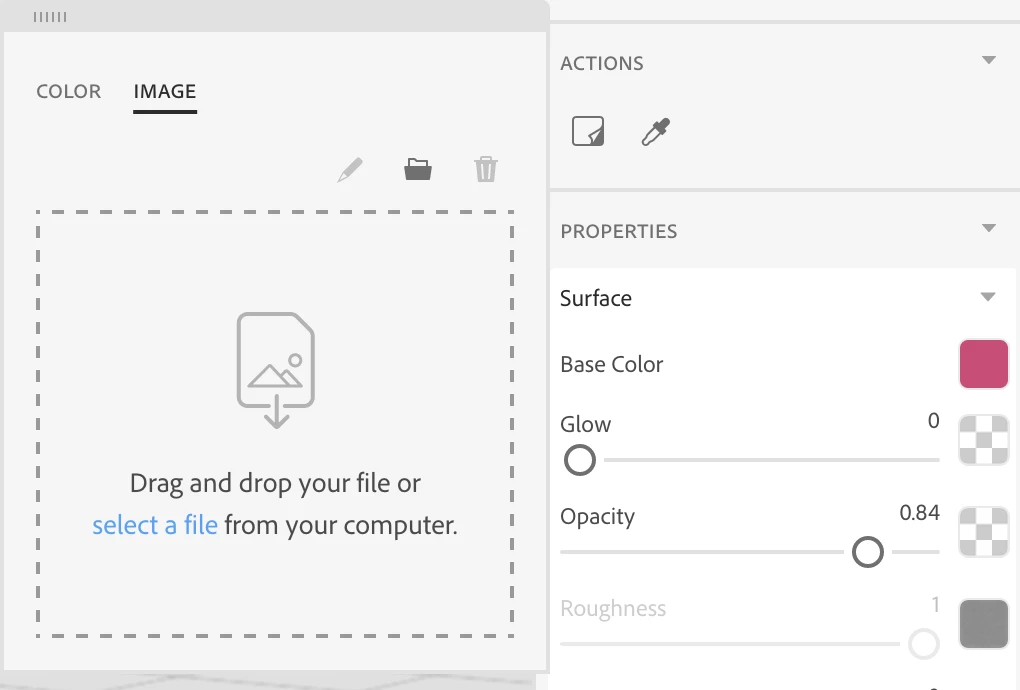
If your model comes with materials and textures you don't want to load those images as decals.  Decals are designed to 'float' on top of the material to apply isolated images like logos.  Instead you'll want to load the texture images into the base material.

Double click on an object to select the material assigned to that area.  In the properties panel you'll see the list of material properties (color, glow, roughness, etc.) . Click on the thumbnail next to each property to open a color/image browser.  Load the textures for each property here.

We are working on the import process and making sure we're bringing in data more reliably, so examples of files that don't import are the most help!  You can e-mail any files you're having issues with to tickets@adobedimension.com for review.

5 replies

Ussnorway7605025
Legend
September 9, 2020

it was two years \builds ago and had nothing to do with the name of the file or its location mate


the materials show gray when Dimension sees a file type it can't read... back then that was most files but there are still a few [like Bmp] which cause issues even now

Zhino5DE5
Participant
September 9, 2020

I had a similar problem with the .mtl file not opening, although it had the same name as the .obj file. What I had to do is this:
1. open the .mtl file with text edit and find the line that references a .jpg file.
2. If the the jpg file named here is in a different folder move it to the SAME folder where the .obj and .mtl are and then change the reference from folderX\myJPG.jpg to a simple myJPG.jpg (in the mtl text).
3. open the object (.obj) again


Hope this solves it for you too!

JeanetteMathews
Adobe Employee
JeanetteMathewsCorrect answer
Adobe Employee
March 19, 2018

Hi John!  Can you direct me to the model you're using?  I'd love to see what you're experiencing.  I'm not sure what you mean when you say they were all grayed out after importing.  What was grayed out?

If your model comes with materials and textures you don't want to load those images as decals.  Decals are designed to 'float' on top of the material to apply isolated images like logos.  Instead you'll want to load the texture images into the base material.

Double click on an object to select the material assigned to that area.  In the properties panel you'll see the list of material properties (color, glow, roughness, etc.) . Click on the thumbnail next to each property to open a color/image browser.  Load the textures for each property here.

We are working on the import process and making sure we're bringing in data more reliably, so examples of files that don't import are the most help!  You can e-mail any files you're having issues with to tickets@adobedimension.com for review.

JondamonAuthor
Participant
March 19, 2018

Hi Jeanette,

I think you'll see in my post I was referring to the materials that came with the imported model. I also indicated I know I don’t want to use a decal, but I mentioned it because that function would recognize the jpegs.

Here’s what I posted:

I imported a mesh obtained from Turbosquid. I guess Dimension refers to it as "models", not mesh. It came with all the materials and textures needed. When I tried to import those assets, they were all grayed out. If I tried to use "Place graphic as decal" Dimension would recognize the files, but of course that doesn't work because the images have to surround the mesh, not just function as a mapped image (like a decal). Is this a limitation of Dimension?

Thanks.

JeanetteMathews
Adobe Employee
Adobe Employee
March 19, 2018

I think a screenshot or the files would still be helpful in understanding what you're trying to do.  You mentioned that the files need to 'surround the mesh, not just function as a mapped image like a decal' so I assumed you meant you were applying the textures to the whole thing (which is what the base color textures do).

If you're trying to layer another image as a decal that wraps around the whole object, Dimension can't really do that very well right now.  Decals are intended to float and have mixed results when wrapping around edges depending on the complexity of the object.

Inspiring
March 18, 2018

I've exported some complex Maya mappings and this mistake has already happened to me. I fixed this problem by saving all my textures with names with no special characters or no spaces.

Example:

"I used to save

"Coca-Cola Label.jpg"

-I now save

"rotulo_da_coca_cola.jpg"

JondamonAuthor
Participant
March 18, 2018

Interesting. That’s kind of weird. I think it’s interesting that Adobe wants to enter the arena of 3D rendering. And I’m sure they can cover a certain segment of users. But there’s no way it’s comparable to Maya or Modo or many of the other poly-based 3D programs. But of course Maya and Modo are very expensive and Dimension is part of CC, which is great. However, I use Modo for rendering, not do much for model creation. The program is well equipped to create models, I’m just not well versed in using that function. In my situation I’ll stick with Modo instead of Dimension. I hope Adobe can work out some of these issues to allow the use of imported files. Thanks very much for your response and help.

John

Sent from my iPhone

Ussnorway7605025
Legend
March 17, 2018

Jondamon  wrote

Is this a limitation of Dimension?

yes

I load the turbosquid model into Photoshop and (fix the textures) | export as wavefront obj then open that in Dimension

turbosquid is a great source for free | cheap models but many of them need a little help to rendor correct... each model is different

JondamonAuthor
Participant
March 18, 2018

Thanks for the workaround. I’ll try it. I appreciate it.

John

Sent from my iPhone