



niklasg43692387
Participant
June 3, 2020
Question

Rendered image looks pixelated

  • June 3, 2020
  • 2 replies
  • 585 views

Hi everyone,

i am using this .obj file: https://unblast.com/free-apple-watch-series-5-3d-model-max/

The 3D model was originally created in 3Ds MAX. I can easily import the .obj file in dimension and also assign materials. But when I render the image, it looks like this, even though the resolution is 2048x2048px:
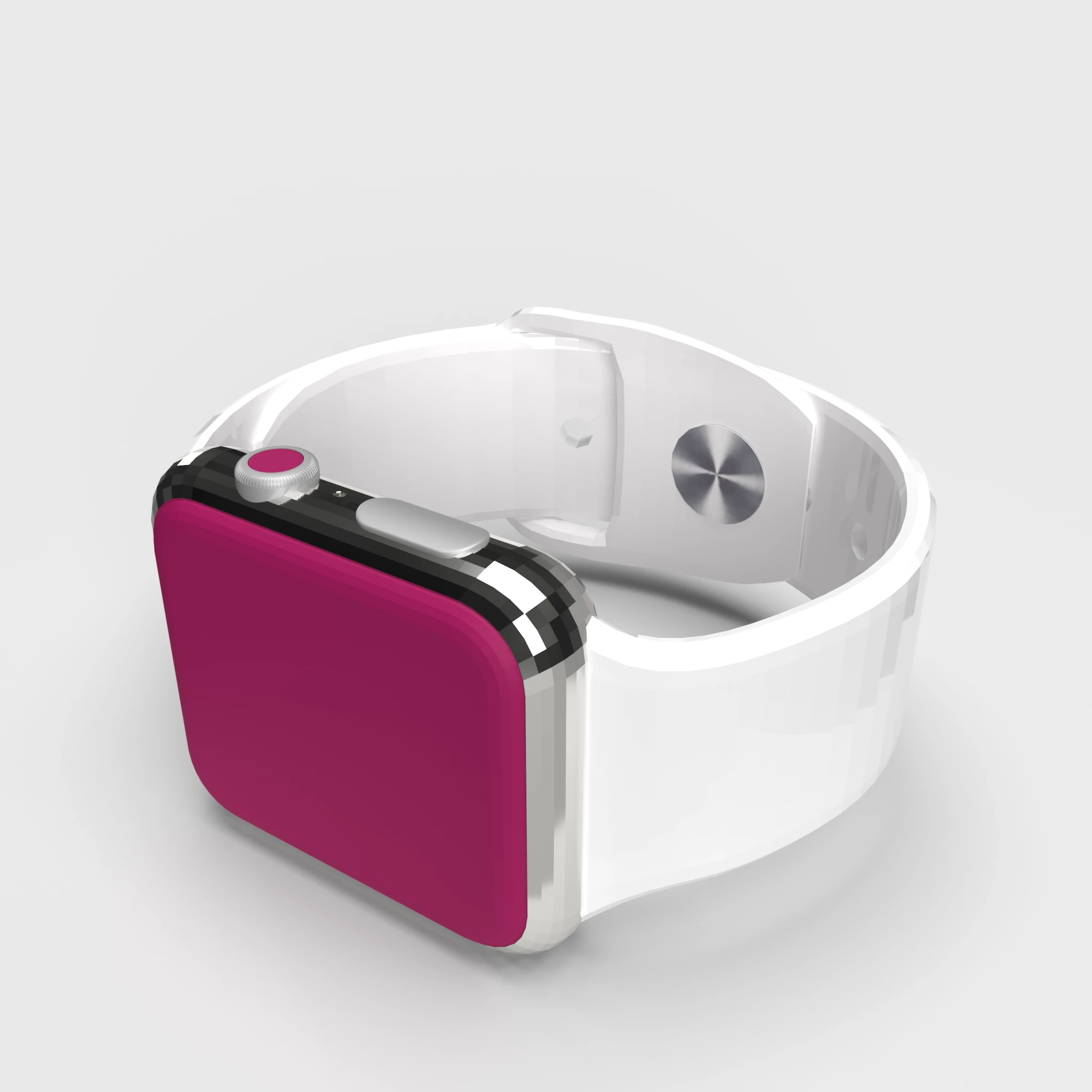
 

Of course I set the render quality to high

Why does the result look so bad compared to the original rendered image with 3Ds MAX?

What am I doing wrong? How can I improve the result?


I haven't changed my scene. All standard.

Thanks for your answer

This topic has been closed for replies.

2 replies

Ussnorway7605025
Legend
June 4, 2020

I don't see anything "pixelated"?

however imo the case looks better with square mesh faces if the pin hole isn't a deal buster


[edit] p.s, another simple option is to add grain... this does use up more Cpu + Ram however

Ares Hovhannesyan
Community Expert
Community Expert
June 3, 2020

Please review https://helpx.adobe.com/dimension/using/supported-file-types.html where you can find what kind pf polygons , normals ussed Dn and how to care about imported files quality before importing into Dn. Hope this can help to solve the problem