
Participant
June 13, 2020
Question

Application starting error (0x000007b)

  • June 13, 2020
  • 1 reply
  • 247 views

I recently updated my windows to windows ten, and now every single time I try to open any of the adobe apps including the creative cloud itself and get the error:
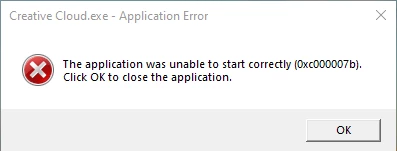
So I deleted all the adobe apps, reinstalled them and it didnt even work on the creative cloud

after that I tried downloading downloading the Microsoft Visual C++ Redistributable Packages for Visual Studio 2013. but that didnt work either


anybody know how to solve this' I would really apreciate it

    This topic has been closed for replies.

    1 reply

    John T Smith
    Community Expert
    Community Expert
    June 13, 2020

    Several ...07b Problems https://community.adobe.com/t5/Premiere-Elements/Premier-Elements-12-will-not-open-error-message-0xe000007b/td-p/5687971

    or

    Be sure to remain signed in with your Adobe ID before accessing the link below
    -you must also allow 'cookies' in your web browser for this to work
    https://helpx.adobe.com/contact/support.html
    -click the chat icon at the bottom right of the page to open a chat session
    -the chat icon looks like '3 dots inside a circle' at the lower right
    -type AGENT into the chat window to connect directly to a person rather than the AI
    Do be aware that Adobe's staffing is impacted by the virus, so wait times are long