
Participant
April 26, 2019
Question

color picker not showing right

  • April 26, 2019
  • 2 replies
  • 274 views

Hello 🙂

Can someone help me solving this issue:

When I choose the fill colour dialog box, my view is this (not the hole spectrum of colours in the bar at right side)
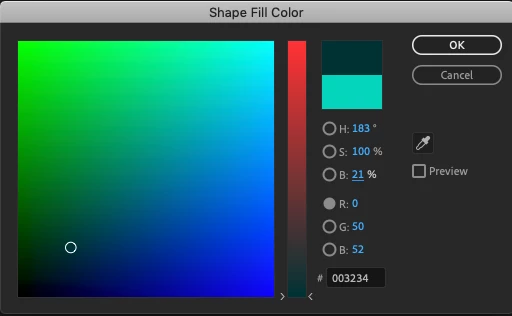
What I want is this below: (the rainbow bar of colours in the bar at right side)
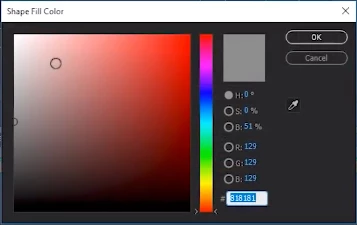
Tried to switch to "use system color picker" in preferences - not working - driving me nuts

Best regards Lene

This topic has been closed for replies.

2 replies

AbeabeAuthor
Participant
April 26, 2019

Abambo​        off course - THANK YOU so very much. Best regards Lene

Abambo
Community Expert
Community Expert
April 26, 2019

First image:

You are selecting a RED colour tone (currently at 0 so it's no red part). Therefore you have the red ramp, because you can select any nuance of red to add to your mix.

Second image:

You are selecting the HUE which is basically the colour. Therefore you have the spectrum, because you can select any colour.

ABAMBO | Hard- and Software Engineer | Photographer