
Participant
November 13, 2013
Answered

Creative Cloud app loads then freezes with empty dialog box.

  • November 13, 2013
  • 10 replies
  • 25500 views

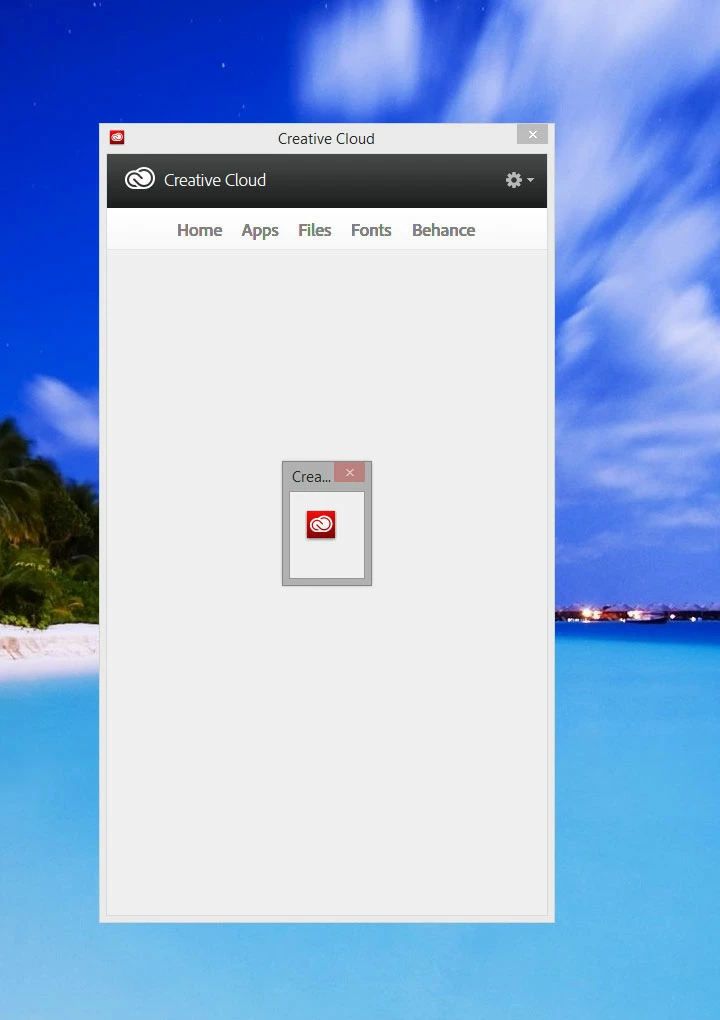
When I click on the create cloud app in the tray or launch it from the menu the app loads, then a small empty dialog box appears with a small creative cloud logo in the middle. Then nothing happens. I can't close the window and nothing responds. I have to force the application closed.

The system is running a fresh copy of windows 8.1 and a fresh installation of adobe creative cloud.

The only thing i did was change my adobe account password after requested to.

The applications I have installed still work but I can't add anything or update any of the apps.

This is what it looks like.
This topic has been closed for replies.
Correct answer Kayvan

I updated the client from here

https://creative.adobe.com/products/creative-cloud

and it fixed the issue.

10 replies

Participant
August 11, 2021

After 2 days of surrering, I fixed it by doing the following:
- uninstall anything related to "Adobe".
- removing and file or folder contains the word "adobe"
- deleting anything in the registry that related to "adobe"
- making sure nothing in my PC has the word "adobe"
- restart 
- update windows & McAfee
- restart
- download Adobe XD (not creative cloud desktop)

By default, it downloaded (creative cloud desktop) and things are fine now !!

I have Windows 10


CJB_001
Inspiring
January 26, 2021

2021 and I'm having this issue with all the apps. Can't open Illustrator, photoshop, nothing.


Participant
August 9, 2021

exact same thing 😞

Participant
January 5, 2019

just re enstall it. then it will work creative cloud

Participating Frequently
January 6, 2019
djrichie97
Participant
October 14, 2014

So I uninstalled a third time and reinstalled from this link; Free Creative Cloud | Download Adobe Creative Cloud free trial

Still the blue spinning wheel. What a complete waste of time. I was going to buy their product, but if I can't even connect... how can I. You would think they could resolve such a basic connection issue.

Jeffrey_A_Wright
Community Manager
Community Manager
October 14, 2014

Djrichie97 this discussion originally started in November of 2013.

I would recommend reviewing App doesn’t open | Progress wheel spins continually as it is relevant to the current error you are experiencing.

Participant
November 19, 2013

Having the exact same problem. Have had it earlier too, always happends when there are updates involved. Last time i had to reinstall both Creative Cloud and all programs. The solution from Romsinha did not work for me either.

Jeffrey_A_Wright
Community Manager
Community Manager
November 19, 2013

OleF please see Creative Cloud desktop missing text | Windows 8.1 - http://helpx.adobe.com/creative-cloud/kb/creative-cloud-desktop-missing-text.html for information on how to check the version of the Creative Cloud desktop application which you have installed.

RaphaelP you have responded to two separate discussions which do not appear to be related to your current difficulties.  I would recommend that you either create your own discussion topic with the steps you have performed and the errors you are receiving; or continue to work with our support team to resolve your difficulties.

Participant
November 19, 2013

If you see the screenshot that Kayvan has posted, this is what happends when i try to open Creative Cloud desktop. I get a messagebox with no info, and i cant exit the messagebox in any way. I cant click on the gear icon or any other buttons either due to the messagebox. The only way to actually close the program again is force closing it through task manager/CTRL+ALT+DEL.

Edit: Uninstalled Creative Cloud and installed it again, seems to be working ok now, but this happends every time there are new updates.

raphaelP
Inspiring
November 19, 2013

Similar issue... I follwed the instructions in another post, namely:

1. uninstalled CC desktop app, rebooted

2. downloaded, reainstalled latest CC desktop app

3. deleted entire set of preference files in OOBE folder

4. relaunched adobe CC desktop, logged in fine. Then I just get blue spinning wheel... been like this for an hour. I can get to the "apps" tab, but not the home tab, I can't set my folders, nor see the fonts tab. It seems I'm having connectivity issues with the cloud part? My internet access is working fine, btw. Is this service giong over an unusual port that a firewall might block. I'm not blocking outgoing connections, mind you, so I'm perplexed.

Participant
November 19, 2013

Same problem here: W8.1 64bit

Please fix this!

Participant
November 17, 2013

Same problem here - Win 8.1, 64 bit...

Adobe, you have to get off your collective butts and fix this problem!

(Not you, Romit, you've been very helpful to me in the past - this is a programmer problem )

e.reed.rogers
Inspiring
November 18, 2013

Same type of problem Win7 64 but when the CC app loads I get a never ending blue circle (of death). Tried everything. Uninstall, Adobe Cleaner, Deleting OOBE folder & files. All this with a "tech" (and I use that term very, very loosely) and I still have this problem. It happened with the latest update to the CC App.

Participant
August 3, 2014

Same here too.

I end up having to remove CC Desktop from Control Panel/Programs and re-install.  happened on both my machines.  What a bloody waste of my time.

Participant
November 14, 2013

Having exactly the same issue,

Win8 64bit

No new programs or changes made to CC program. Please fix this asap

Romsinha-9KMEUt
Adobe Employee
Adobe Employee
November 14, 2013

Hi Kayvan,

Please navigate to C/Users/User Name/AppData/Local/Adobe/OOBE/opm.db and delete it. Right click on CC destop and run as admin. Try to sign in and let me know if the issue still persists.

Regards,

Romit Sinha

KayvanAuthor
Participant
November 14, 2013

Hi Romit Sinha,

I followed your instructions, and deleted opm.db. I ran CC as administrator and it did ask me to re-enter my user name and password, but the same problem occurs.

The only change that occured since it stopped working was windows update which applied the following updates,

Security Update for Windows 8.1 for x64-based Systems (KB2862152)

Security Update for Windows 8.1 for x64-based Systems (KB2876331)

Cumulative Security Update for Internet Explorer 11 for Windows 8.1 for x64-based Systems (KB2888505)

Cumulative Security Update for ActiveX Killbits for Windows 8.1 for x64-based Systems (KB2900986)

Security Update for Internet Explorer Flash Player for Windows 8.1 for x64-based Systems (KB2898108)

Windows Malicious Software Removal Tool for Windows 8, 8.1 and Windows Server 2012, 2012 R2 x64 Edition - November 2013 (KB890830)

Update for Windows 8.1 for x64-based Systems (KB2887595)

Security Update for Windows 8.1 for x64-based Systems (KB2868626)

Regards,

Keyvan