


Participant
October 28, 2023
Answered

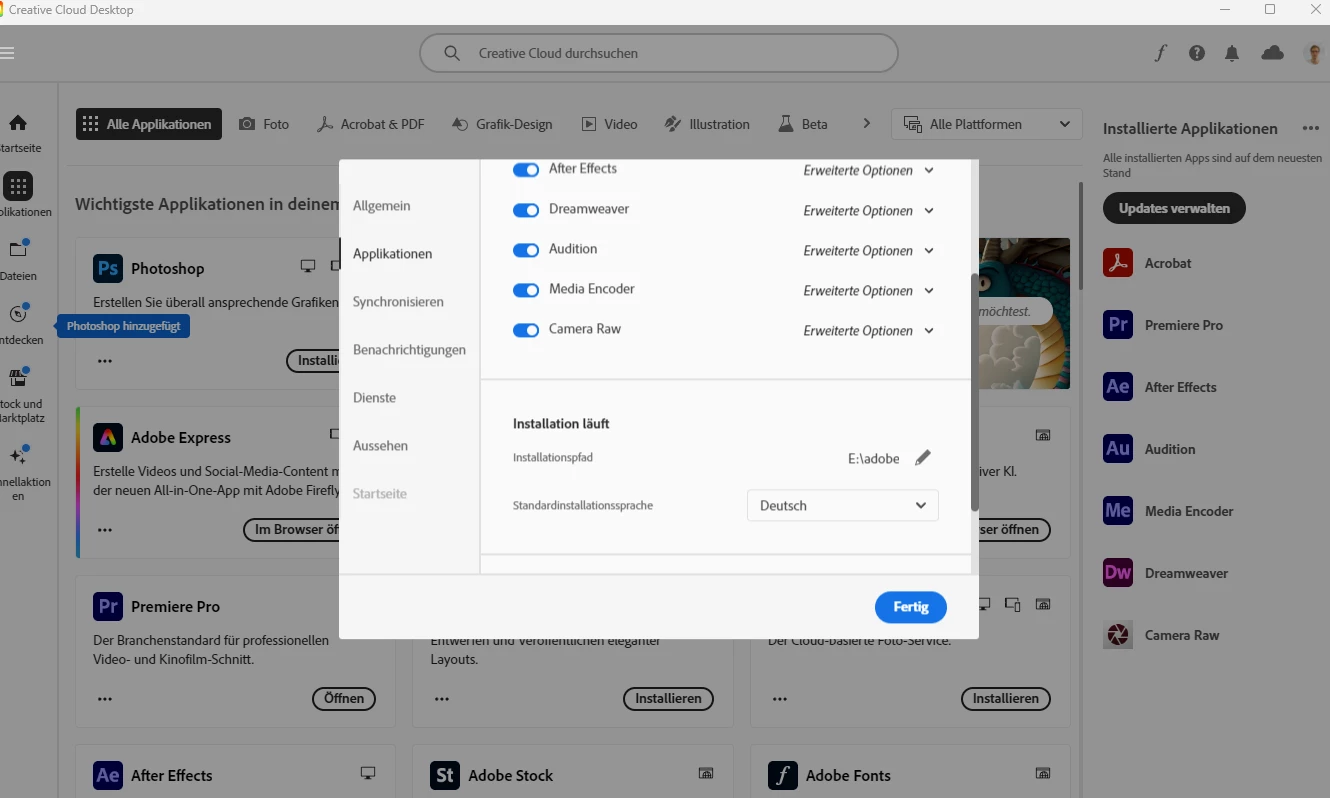
Creative Cloud installiert Programme an falschem Ort

  • October 28, 2023
  • 2 replies
  • 283 views

Ich habe in der Creative Cloud eingestellt, dass er alle Aplikationen in E:// installieren soll aber er installiert es immernoch in C:// Dabei habe ich den PC schon einmal neu gestartet etc.

weiß jemand, wie ich den Fehler beheben kann? Hatte vorher alle Programm auf C und da er nach dem Ändern die Programme nicht automatisch rüber kopiert hat habe ich manuel die Programme auf E geschoben in der Hoffnung, dass die Creative Cloud diese erkennt, aber Pustekuchen. Er dachte ich hätte sie nicht installiert und dann wollte ich diese neu installieren, aber er hat sie immer wieder auf C gepackt

This topic has been closed for replies.
Correct answer kglad

to move your adobe apps you must uninstall before changing the installation location, then change the installation location and install to the new location.

2 replies

kglad
Community Expert
kgladCommunity ExpertCorrect answer
Community Expert
October 28, 2023

to move your adobe apps you must uninstall before changing the installation location, then change the installation location and install to the new location.

Participant
October 28, 2023

ok ich teste mal

kglad
Community Expert
Community Expert
October 28, 2023

sounds good.

John T Smith
Community Expert
Community Expert
October 28, 2023

The program manager must install on the boot drive

Install on non-boot drive (with a picture) https://community.adobe.com/t5/download-install-discussions/creative-cloud-installation/td-p/12455173