


March 13, 2014
Answered

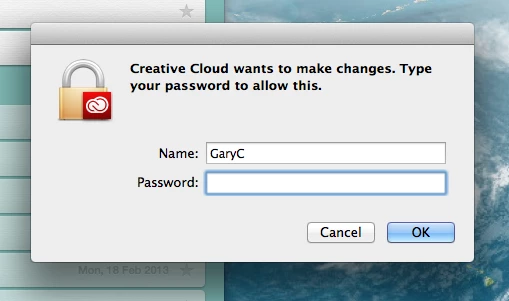
Creative cloud wants to make changes

  • March 13, 2014
  • 16 replies
  • 48869 views

I get an annoying popup that tells me "Creative Cloud wants to make changes" and asks for my CC password. But when I enter the password it won't accept it. But if I press CANCEL, the popup returns in five seconds. I know the password is correct because I can log into CC and also my adobe account.

I thought maybe it was a virus, but if so, it has infected both my work and home Macs. The only way to rid myself of this popup (which sits on top of everything) is to quit creative cloud. I have asked Adobe for help but they've shrugged their shoulders.

Anyone else had this issue?
Correct answer Abhijit_Kr_


Hi Gary,

This screen is asking for your Computer Password to make the necessary changes. It's Mac mechanism to authenticate whether you are the Admin user or not.

Please enter your Mac password to complete the changes.

Regards,

Abhijit

16 replies

Participant
December 25, 2020

Thank you! It worked ...This was driving me crazy. Yes the pop up after downloading installer is requesting your Mac password same one you sign onto your MacBook every time you login after charging 

shawnl14523116
Participant
November 17, 2017

Thank you!!!!!

Participant
June 19, 2017

Thank you! I was beginning to think I was going mad! My computer password worked first go.

DejaVuYou
Participant
July 30, 2015

I have to enter my password 150 times and it still fails.

Participant
August 1, 2014

I am having a similar problem.  I just signed up for CC because I recently switched to a MacBook Pro running Mavericks from a MacBook Pro running OSX 106 [old but it worked, yo].  I just wanted photoshop and illustrator because those were my most used programs on my old laptop.  I download the disk image and double click to install but stall out on the password thing.  I have tried entering my password up to 15 times and still nothing.  I can't even install the CC program because I get this password popup!  It's very frustrating. :C

Jeffrey_A_Wright
Legend
August 1, 2014

When Romance Smoked did you migrate your applications and files to your new Mac?  If so then it is likely you are facing permission issues.  Please run all available uninstallers in the Applications/Utilities/Adobe Installers folder.  You will then want to follow this with using the CC Cleaner Tool.  You can find details on the use of the CC Cleaner Tool at Use the CC Cleaner Tool to solve installation problems | CC, CS3-CS6 - http://helpx.adobe.com/creative-suite/kb/cs5-cleaner-tool-installation-problems.html.

In the future please make sure to only migrate your documents and settings.  Adobe Creative applications are not designed to be copied from one computer to another.

Inspiring
September 10, 2015

Jeff How do you uninstall if you can't actually uninstall?  If you get this password popup all the time and can never clear it?

Participating Frequently
June 30, 2014

I don't reboot my mac very often, but I've had to do so recently due to some other issues. I also get the repeated, annoying popup window regarding admin rights. It happens every time I reboot. I can try ignoring it as DeonOJ suggested, but it's still annoying...

Inspiring
June 30, 2014

Dear Ken,

I double clicked on the window and signed in with my Mac administrator password, and the window has gone away, at least it hasn't reappeared for the last few days.  I hope that signing in did it, but it may come back.  Have you signed in with you Mac password?

Participating Frequently
July 1, 2014

I did click on the notice and entered my password. That stopped it for the moment, but the popup comes back every time I reboot or logout/login.

Participating Frequently
June 25, 2014

I'm on a Mac OS 10.8.5 and now this is happening to me every time I start up. It says Admin...rights are required to complete Adobe add ons....etc. but it is not popping up with a place for me to enter Admin rights. Very annoying. June  23, 2014. It seems like Adobe should have already posted me an easy solution.

I'm not liking this.

Inspiring
June 25, 2014

Dear Lawremce46,

As I hoped it would, the "Adobe wants to make changes" sign in box has finally gone away for me with the new 2014 updates, but the new "Administrator rights are required" box is now appearing.  When this box comes up, double click it and the administrator sign in box should appear.  Sign in (you're actually using your regular Mac Administrator sign in, not Adobe sign in), and that should make both of the boxes disappear!  At least that's how it has worked for me.  I hope this solves the problem.

Small Town Gal

DeonOj
Known Participant
June 25, 2014

The sign in box every time I boot up has also went away for me with this latest update. Hurrah!

But I also now have the "Admin rights required..." message popup every time I restart the Mac. Ugh! The message pops up and displays for a few seconds and then fades but it popups again after about 10-20 seconds. Of course I would try to click it as I'm used to interacting with messages displaying errors on my computers. When I was able to click it before it faded the "Sign in" window would appear and now I'm back to having to sign in again everyday but now I have to click the popup to get the sign in window to appear. So it looked like they fixed it, kinda sorta not really.

BUT... today I booted up and received a call right away and I noticed the "Admin Rights..." popup and disappear about 6 times or so, as I was busy I didn't interact with it... and it finally just stopped appearing. I clicked the CC panel and it opened up fine, no login required. So even though it seems counter-intuitive NOT to interact with an error message that keeps popping up on your screen I recommend ignoring it and it might go away after a couple of minutes and log you in just fine.

Adobe magic! 

Participant
April 22, 2014

Here we are 12 days after my first post. I have spent every mornings manually quiting the CC application immediately after startup and then hitting cancel on the "Create Cloud wants to make..." dialog box.

This morning I cleared out "~/Library/Caches" completely and ran the CC updater where it installed 4 updates. But as soon as I restarted the machine the "Create Cloud wants to make changes. Type an administrator's name and password to allow this." dialog box pops back up. <sigh>

Back to quiting the CC app and hitting cancel everytime I start-up the machine. I has a sad.

Participant
April 30, 2014

I'm going through this at every restart. I don't want to empty my cache and lose my settings as I do a lot of work in various apps so is there nay other colution yet?

It's a hassle to sign in TWICE each time you turn on the computer simply because Adobe requires it.

Inspiring
May 1, 2014

Dear Design Gal,

Sorry to report the same old same old -- no solutions yet from Adobe.  Sign in required every time computer is started up after shut down.  We'll just have to wait to see how Adobe handles it, but it really is a big pain.

Small Town Gal

Participant
April 10, 2014

This issue has just started for me today. This morning I updated 7 apps and now ANYTIME that CC is running I get prompted to login as admin to make changes.

I am using Adobe CC Team on Mavericks and do not have admin rights on this machine, so it requires opening a ticket with IT and waiting for them to enter the ID/password for me.

This is really drustrating because the dialog box sits on top of all other windows and anytime I dismiss it, it reappears in 30 seconds or so.

P.S.

I cleared out all of the user caches I that I could without admin rights. The only thing left in the cache folder with adobe in the name is "com.adobe.air.ApplicationInstaller".

Inspiring
April 10, 2014

Hi, All,

The issue still remains here, too, even with the latest updates of last week.  It really sloooooooowwwwws everything down and pretty much locks everything else up while it's making its changes...can't even get mail to work...a real pain in the neck!

Small Town Gal

dSparks
Inspiring
April 10, 2014

I have finally got mine to stop. I went with the suggestion of clearing out my user cache (~/Library/Caches).

At first, I just cleared out anything that had to do with Adobe but no luck. I had to empty the ENTIRE folder. Then, restarted, and when the pop up showed, I finally entered the password with the reasoning that if there are any security issues from this, I'll just hold Adobe liable noting that I copied this entire thread and the responses from the staff. It never showed again.

I work from home and I'm my own admin. I also pride myself on my speedy turnarounds and this was killing me. In this industry nowadays, speed is everything!

My biggest gripe of this whole thing is the lack of communication from Adobe. Even a short email, explaining what was happening and why, would have calmed a lot of anxiety. Just having this pop up out of nowhere with no explanation and nothing from Creative Cloud itself, raises all kinds of alarms. Especially due to all the security issues companies have been having lately. And, of course, we have a new one with the Heartbleed...so much for the safety of the "cloud".

Adobe, please, please, PLEASE get your act together and at least communicate with us.

Just put up something on a newsfeed/email/blog/forum/facebook/twitter/etc. that says something like:

"We're rolling out a new code today for stability. You will see a dialog on your computer asking for your password so that CC can have access to make changes. Don't freak out. It's legitimate. Please enter your password for access. If you have problems, clear out your user cache and try again. If you still encounter this dialog, please contact support. For more information on this change, please read here."

Is that so f**king hard?? With all of the forms of communication available, and the ease of use, in this social media, digital age, your customer relation/communication skills suck @$$...except when you try to sell us something.

April 5, 2014

I typed in my password but it doesn't go away, especially once you reboot. I also tried the library cache suggestion, without success. If you cancel the request for your password (takes a few times) and shut down Creative Cloud, you can reopen CC without getting the request. My guess? It's something in the last InDesign update. I haven't updated it on my second computer and I'm not having any problems. Is anyone at Adobe trying to address this?

Participating Frequently
April 6, 2014

catker, you might be right about the latest InDesign update. My Mac's /Library/Logs/Adobe/Installers/Adobe InDesign 9.2.1 log file tells me that I Installed the InDesign update on 3/25/14, which is around the time I started seeing Creative Cloud requesting my password everytime I booted up. I've recently opened the Mac's Console utility and watched it as I enter the password when Creative Cloud asks for it. What I see is this:

Apr  6 15:53:18 Larrys-Mac-Pro authexec[406]: executing /Applications/Utilities/Adobe Creative Cloud/CoreExt/../Utils/Creative Cloud Helper

Apr  6 15:53:18 Larrys-Mac-Pro ReportCrash[410]: DebugSymbols was unable to start a spotlight query: spotlight is not responding or disabled.

Apr  6 15:53:20 Larrys-Mac-Pro ReportCrash[410]: Saved crash report for ExManEscalatedPrivilegeServer[409] version 7.1.2.17 (7.1.2.17) to /Library/Logs/DiagnosticReports/ExManEscalatedPrivilegeServer_2014-04-06-155320_localhost.crash

Apr  6 15:53:24 Larrys-Mac-Pro Core Sync[267]: setting security information: Operation not permitted

Apr  6 15:53:24 Larrys-Mac-Pro Core Sync[267]: open on /Library/Application Support/Adobe/InDesign/Version 9.0/en_US/Extensions/REMOVED_CC/idcc_Alignment Panel.mxi: File exists

Apr  6 15:53:25 Larrys-Mac-Pro ReportCrash[410]: Saved crash report for ExManEscalatedPrivilegeServer[412] version 7.1.2.17 (7.1.2.17) to /Library/Logs/DiagnosticReports/ExManEscalatedPrivilegeServer_2014-04-06-155325_localhost.crash

Apr  6 15:53:25 Larrys-Mac-Pro ReportCrash[410]: Removing excessive log: file://localhost/Library/Logs/DiagnosticReports/ExManEscalatedPrivilegeServer_2014-04-05-211712_localhost.crash

Apr  6 15:53:30 Larrys-Mac-Pro Core Sync[267]: setting security information: Operation not permitted

Apr  6 15:53:30 Larrys-Mac-Pro Core Sync[267]: open on /Library/Application Support/Adobe/InDesign/Version 9.0/en_US/Extensions/REMOVED_CC/idcc_Article Panel.mxi: File exists

Apr  6 15:53:31 Larrys-Mac-Pro ReportCrash[410]: Saved crash report for ExManEscalatedPrivilegeServer[417] version 7.1.2.17 (7.1.2.17) to /Library/Logs/DiagnosticReports/ExManEscalatedPrivilegeServer_2014-04-06-155331_localhost.crash

Apr  6 15:53:31 Larrys-Mac-Pro ReportCrash[410]: Removing excessive log: file://localhost/Library/Logs/DiagnosticReports/ExManEscalatedPrivilegeServer_2014-04-05-211718_localhost.crash

Apr  6 15:53:36 Larrys-Mac-Pro Core Sync[267]: setting security information: Operation not permitted

Apr  6 15:53:36 Larrys-Mac-Pro Core Sync[267]: open on /Library/Application Support/Adobe/InDesign/Version 9.0/en_US/Extensions/REMOVED_CC/idcc_Asset Library Panel.mxi: File exists

Apr  6 15:53:37 Larrys-Mac-Pro ReportCrash[410]: Saved crash report for ExManEscalatedPrivilegeServer[419] version 7.1.2.17 (7.1.2.17) to /Library/Logs/DiagnosticReports/ExManEscalatedPrivilegeServer_2014-04-06-155337_localhost.crash

Apr  6 15:53:37 Larrys-Mac-Pro ReportCrash[410]: Removing excessive log: file://localhost/Library/Logs/DiagnosticReports/ExManEscalatedPrivilegeServer_2014-04-05-211725_localhost.crash

Apr  6 15:53:42 Larrys-Mac-Pro Core Sync[267]: setting security information: Operation not permitted

Apr  6 15:53:42 Larrys-Mac-Pro Core Sync[267]: open on /Library/Application Support/Adobe/InDesign/Version 9.0/en_US/Extensions/REMOVED_CC/idcc_Asset PubLibrary.mxi: File exists

Apr  6 15:53:43 Larrys-Mac-Pro ReportCrash[410]: Saved crash report for ExManEscalatedPrivilegeServer[423] version 7.1.2.17 (7.1.2.17) to /Library/Logs/DiagnosticReports/ExManEscalatedPrivilegeServer_2014-04-06-155343_localhost.crash

Apr  6 15:53:43 Larrys-Mac-Pro ReportCrash[410]: Removing excessive log: file://localhost/Library/Logs/DiagnosticReports/ExManEscalatedPrivilegeServer_2014-04-05-211731_localhost.crash

Apr  6 15:53:48 Larrys-Mac-Pro Core Sync[267]: setting security information: Operation not permitted

Apr  6 15:53:48 Larrys-Mac-Pro Core Sync[267]: open on /Library/Application Support/Adobe/InDesign/Version 9.0/en_US/Extensions/REMOVED_CC/idcc_Assignment UI.mxi: File exists

Apr  6 15:53:50 Larrys-Mac-Pro ReportCrash[410]: Saved crash report for ExManEscalatedPrivilegeServer[425] version 7.1.2.17 (7.1.2.17) to /Library/Logs/DiagnosticReports/ExManEscalatedPrivilegeServer_2014-04-06-155350_localhost.crash

Apr  6 15:53:50 Larrys-Mac-Pro ReportCrash[410]: Removing excessive log: file://localhost/Library/Logs/DiagnosticReports/ExManEscalatedPrivilegeServer_2014-04-05-211737_localhost.crash

Apr  6 15:53:55 Larrys-Mac-Pro Core Sync[267]: setting security information: Operation not permitted

Apr  6 15:53:55 Larrys-Mac-Pro Core Sync[267]: open on /Library/Application Support/Adobe/InDesign/Version 9.0/en_US/Extensions/REMOVED_CC/idcc_BNUI.mxi: File exists

Apr  6 15:53:56 Larrys-Mac-Pro ReportCrash[410]: Saved crash report for ExManEscalatedPrivilegeServer[427] version 7.1.2.17 (7.1.2.17) to /Library/Logs/DiagnosticReports/ExManEscalatedPrivilegeServer_2014-04-06-155356_localhost.crash

Apr  6 15:53:56 Larrys-Mac-Pro ReportCrash[410]: Removing excessive log: file://localhost/Library/Logs/DiagnosticReports/ExManEscalatedPrivilegeServer_2014-04-05-211743_localhost.crash

Apr  6 15:54:01 Larrys-Mac-Pro Core Sync[267]: setting security information: Operation not permitted

Apr  6 15:54:01 Larrys-Mac-Pro Core Sync[267]: open on /Library/Application Support/Adobe/InDesign/Version 9.0/en_US/Extensions/REMOVED_CC/idcc_Book Panel.mxi: File exists

Apr  6 15:54:02 Larrys-Mac-Pro ReportCrash[410]: Saved crash report for ExManEscalatedPrivilegeServer[430] version 7.1.2.17 (7.1.2.17) to /Library/Logs/DiagnosticReports/ExManEscalatedPrivilegeServer_2014-04-06-155402_localhost.crash

Apr  6 15:54:02 Larrys-Mac-Pro ReportCrash[410]: Removing excessive log: file://localhost/Library/Logs/DiagnosticReports/ExManEscalatedPrivilegeServer_2014-04-05-211749_localhost.crash

Apr  6 15:54:07 Larrys-Mac-Pro Core Sync[267]: setting security information: Operation not permitted

Apr  6 15:54:07 Larrys-Mac-Pro Core Sync[267]: open on /Library/Application Support/Adobe/InDesign/Version 9.0/en_US/Extensions/REMOVED_CC/idcc_Bookmark Panel.mxi: File exists

......

As you can see, there are lots of crashes of a process called ExManEscalatedPrivilegeServer, whose crash reports tell me that its parent process is Creative Cloud Helper:

Process:         ExManEscalatedPrivilegeServer [786]

Path:            /Applications/Utilities/Adobe Creative Cloud/*/ExManEscalatedPrivilegeServer

Identifier:      ExManEscalatedPrivilegeServer

Version:         7.1.2.17 (7.1.2.17)

Code Type:       X86-64 (Native)

Parent Process:  Creative Cloud Helper [406]

and also lots of repeated references to Adobe Extension Manager .mxi files in the folder /Library/Application Support/Adobe/InDesign/Version 9.0/en_US/Extensions/REMOVED_CC/, which I'm guessing are components of InDesign replaced by the latest InDesign CC updater.

I don't really know what any of this means, other than I see it happening every time I've opened Console after I've booted up and Creative Cloud requests my password, and repeated references to ExManEscalatedPrivilegeServer and old pieces of InDesign tucked away in the /Library/Application Support/Adobe/InDesign/Version 9.0/en_US/Extensions/REMOVED_CC/ folder.