Known Participant
July 22, 2026
Question

Error 190 and Windows version is up to date and Google Chrome

  • July 22, 2026
  • 7 replies
  • 205 views

Hi,
The Creative Cloud Desktop give me error 190 and can not update version … for all other product (Photoshop and Lightroom) no problem, only Creative Cloud Desktop can’t be update and after connexion, I receive pop up back to windows with error 190 and resubmit, but same result 

I have Windows 10 22H2 with all updates, Google Chrome last update all are official version 

It’s my 1st error with Adobe products. Can I do something (I do a repair option in Program installed but same result) 

Thanks you for your help 

PS ; oups I’m not in right section, you can delete this message, I recreate in good one 

    7 replies

    onazole
    Inspiring
    July 23, 2026

    I believe the problem is with Bridge; the new version 16.0.6 is no longer compatible with Windows 10, as stated in its specifications.


    Jeff_A_Wright
    Community Manager
    Community Manager
    July 23, 2026

    I appreciate that you are unable to install Bridge with Error 190, but @gerardop91 is currently trying to install the Creative Cloud Desktop app with the same Windows build.

    Please feel free to follow this discussion ​@onazole, you can see the most recent response below, asking for details from ​@gerardop91 installation logs. The solution discovered may be applicable to Adobe Bridge and your discussion at 


    onazole
    Inspiring
    July 23, 2026

    I think the Creative Cloud error is caused by Bridge, that's why I'm mentioning it.

    kglad
    Community Expert
    Community Expert
    July 23, 2026

    @gerardop91 


    i thought updating the cc desktop caused the 190 error?

    Known Participant
    July 23, 2026

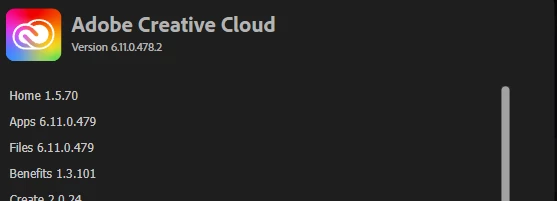
    When Cloud Desktop launch he do this : 


    But just after, 0% not change and I obtain error message :
     

    Participant
    July 23, 2026

    I had a similar issue once, and it turned out to be the Creative Cloud Desktop app rather than Windows or Chrome. Running the Adobe Creative Cloud Cleaner Tool and then reinstalling the Creative Cloud Desktop app fixed Error 190 for me. Also, temporarily disabling antivirus or VPN during the install can help if something is blocking the update. Does the error appear immediately, or only after you sign in?

    Known Participant
    July 23, 2026

    When Cloud Desktop launch he do this : 


    But just after, 0% not change and I obtain error message :


    Participant
    July 23, 2026

    I am having this exact same problem, unfortunately. I can update every app through Creative Cloud, but Creative Cloud itself keeps giving me error 190. I’m on Windows 10 22H2, as well.

    BobLevine
    Community Expert
    Community Expert
    July 22, 2026

    That is a very old operating system. While technically still supported, I strongly suggest upgrading it.

    Also, how much RAM do you have?

    Jeff_A_Wright
    Community Manager
    Community Manager
    July 22, 2026

    Thank you for posting, Gerardop91.


    I apologize for any problems you are encountering accessing and using the Creative Cloud Desktop app.


    BobLevine is correct you will to update Windows 10 further to install the Creative Cloud Desktop app. Error 190 means that the computer does not meet the minimum requirements to run the application. Please see https://adobe.ly/3TOQswd for more information about Error 190.


    Please see https://adobe.ly/3TOQt3f for more information on the minium requirements to run the Creative Cloud Desktop app. If no updates are available from Microsoft, then please use your subscription on a different computer or install Windows 11 on the computer. ^JW

    Dave Creamer of IDEAS
    Community Expert
    Community Expert
    July 22, 2026

    According to Adobe, the OS listed is covered:

    Windows 11 versions 24H2 and 23H2, and Windows 10 versions 22H2 and 21H2

    David Creamer: Community Expert (ACI and ACE 1995-2023)
    Dave Creamer of IDEAS
    Community Expert
    Community Expert
    July 22, 2026

    Uninstall the CC app through the Windows uninstall. Download a clean version and install. Sign in.

    Had to do this just the other week.

    David Creamer: Community Expert (ACI and ACE 1995-2023)
    Known Participant
    July 22, 2026


    He want not uninistall only Cloud, I need to unistall all other product before and reconfigure all … Pfffffff

     ​​​​​​

    Dave Creamer of IDEAS
    Community Expert
    Community Expert
    July 22, 2026

    Forgot… Use the Adobe CC Cleaner and choose 6. Creative Cloud only. 

    David Creamer: Community Expert (ACI and ACE 1995-2023)
    Known Participant
    July 22, 2026

    Hi,
    The Creative Cloud Desktop give me error 190 and can not update version … for all other product (Photoshop and Lightroom) no problem, only Creative Cloud Desktop can’t be update and after connexion, I receive pop up back to windows with error 190 and resubmit, but same result 

    I have Windows 10 22H2 with all last updates, Google Chrome last update. All are official version. 

    It’s my 1st error with Adobe products. Can I do something (I do a repair option in Program installed but same result) 


    Thanks you for your help