


Participant
March 3, 2021
Question

Stop auto update in metered connection

  • March 3, 2021
  • 1 reply
  • 648 views

Hello

I am sorry, but my english is not very well.
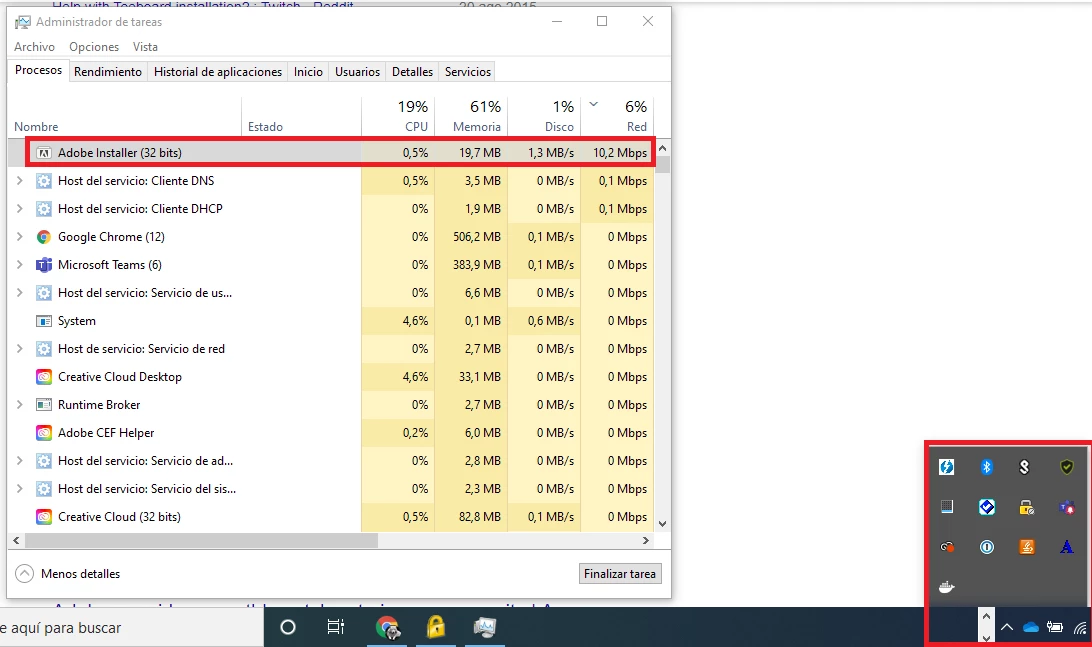
I have metered connection (limited 4G data plan) and i can't stop the auto update adobe program. I tried stoping the program from windows task manager but after a few seconds it reappears and uses up all my bandwidth. From tray icons I can't stop the program either.

I want to have control over my computer.

This is unacceptable


Regards

This topic has been closed for replies.

1 reply

Community Expert
March 3, 2021

To stop launching the CC app on startup see the following article

https://community.adobe.com/t5/download-install/how-to-stop-creative-cloud-from-launching-at-start-up/td-p/11229909

For switching the auto-update on/off see the following article

https://helpx.adobe.com/creative-cloud/help/creative-cloud-updates.html

-Manan

-Manan
Participant
October 28, 2021

How it can be, that Adobe CC is the only "savage" in Windows, that can not read the connection parameters? There are millions of people in the home office using metered mobile connection - this is not acceptable, that the Adobe CC, constatntly updating despite any settings and will destroy in a minutes the whole Mobile Data plan the user had... 

kglad
Community Expert
Community Expert
October 28, 2021

these are user-to-user forums. 


to make a suggestion/report a bug to adobe, do it here https://www.adobe.com/products/wishform.html