

Inspiring
March 13, 2017
Answered

CC Apps Panel needs Admin Rights

  • March 13, 2017
  • 3 replies
  • 18394 views

When I install the CC desktop app from an non admin account I get the following error message. Has anyone else had this issue?
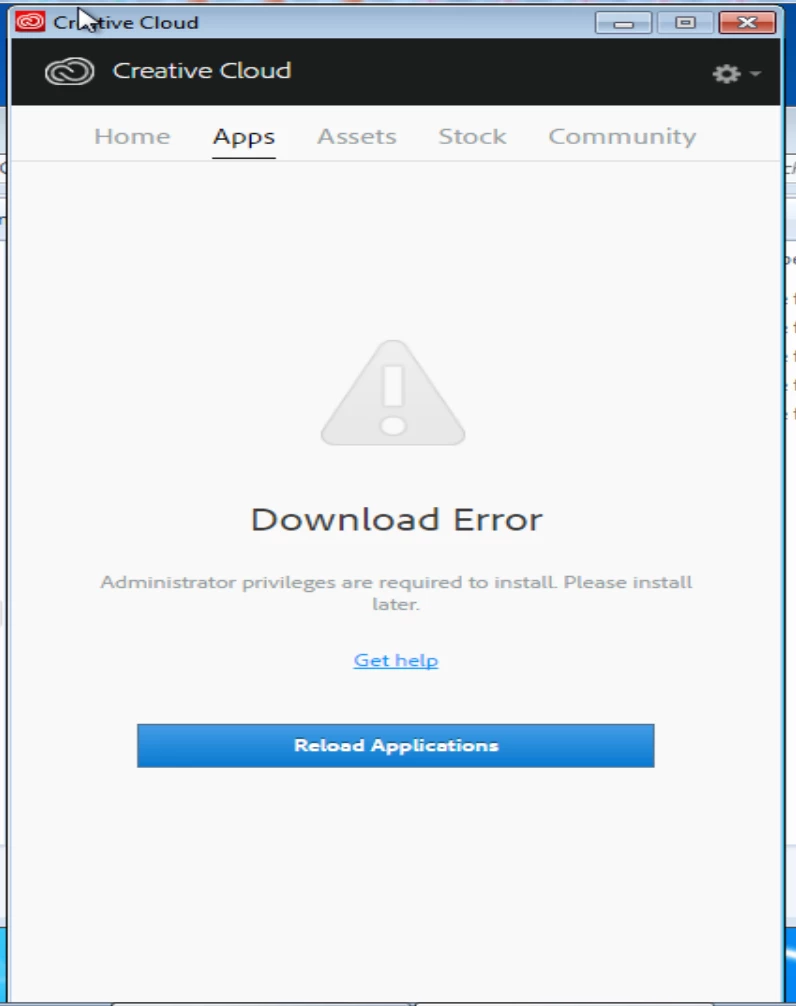

This topic has been closed for replies.
Correct answer alisterblack

alisterblack​ Any update on this?


Hi

Please try with the current build of the Creative Cloud Desktop App which is now available. Package via Creative Cloud Packager or download from the following link Download Creative Cloud desktop app

3 replies

Participant
March 21, 2017

Hi All,

I am seeing the same issue...  We are starting to get calls from users upon install that their apps for initial download within CC desktop app are blocked just like the screen cap at the start of this thread.

This is bad. Looking forward to a fix for this... I have now stopped purchasing new teams licenses due to this issue.

deleon07Author
Inspiring
March 20, 2017

alisterblack​ I looked into your suggestions and they did not fix our issue. Is there an ETA release for the bug fixes on the creative cloud app?

alisterblack
Inspiring
March 21, 2017

I can't share the release date unfortunately, but it should be days rather than weeks.

deleon07Author
Inspiring
April 4, 2017

alisterblack​ Any update on this?

kglad
Community Expert
Community Expert
March 13, 2017

why don't you install as administrator (assuming you have those rights).

deleon07Author
Inspiring
March 14, 2017

We distribute the app to all employees in our organization and majority of the users do not have admin rights. I want those that do not have admin rights to be able to download the apps that they need. If I install with my credentials (I have admin rights) the app works well, but I can't just install with my credentials on all computers.

Jeffrey_A_Wright
Legend
March 14, 2017

Deleon07 what type of Creative Cloud membership do you have?  We offer deployment options for Creative Cloud for Teams and Enterprise accounts.