Participant
October 26, 2021
Answered

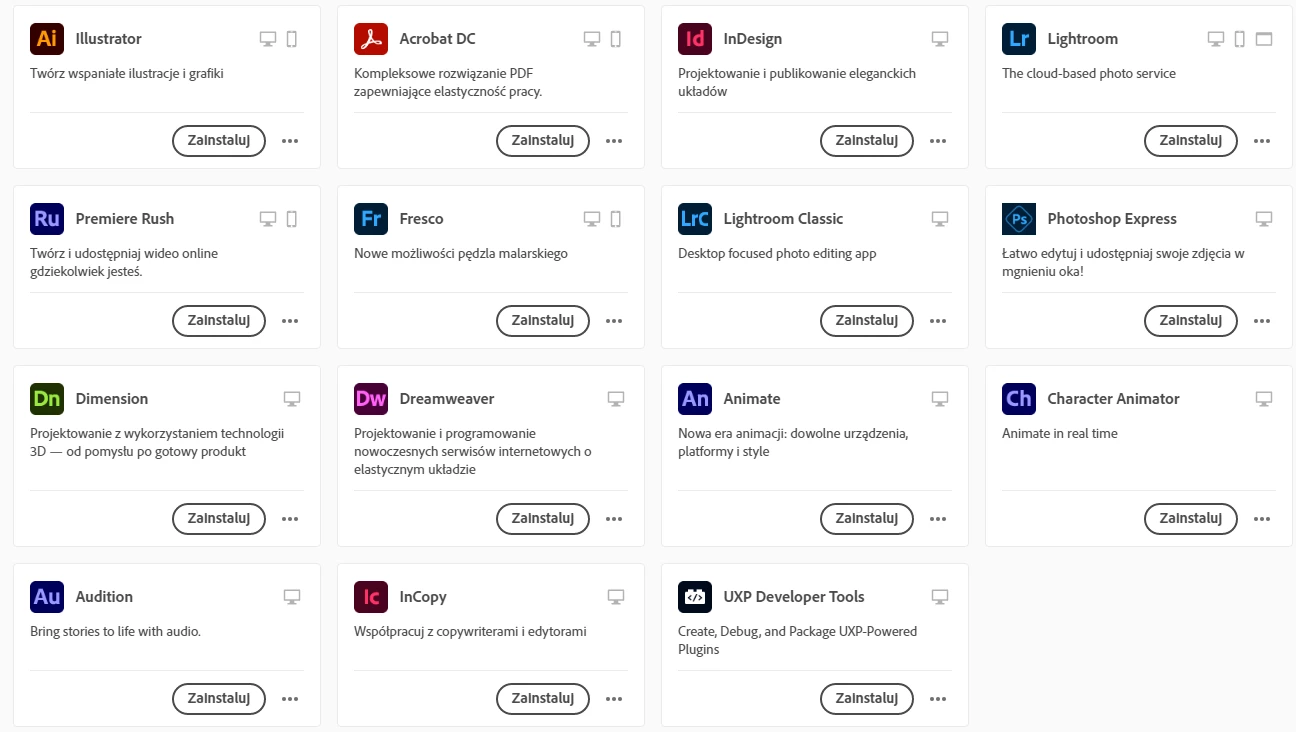
PS Icon dont show up in Creative Cloud

  • October 26, 2021
  • 5 replies
  • 4763 views

I wanted to instal PS but i dont have PS icon on my app list, about one week ago it was shown 
This topic has been closed for replies.
Correct answer rpandita

This should be resolved now, we pushed another update for Photoshop last night which takes care of this problem.

Regards

Rohit Pandita

5 replies

rpandita
Community Manager
rpanditaCommunity ManagerCorrect answer
Community Manager
November 10, 2021

This should be resolved now, we pushed another update for Photoshop last night which takes care of this problem.

Regards

Rohit Pandita

Known Participant
November 10, 2021

waht about the new compatibility issue that no one has been able to advise me on?


CC and CC web app list still tell me my computer is not compatible after putting CC into compat mode as suggested in this thread.


Why.

rpandita
Community Manager
Community Manager
November 10, 2021

That dosen't seem right.


Can you please try the steps below.


1. Revert the changes and see if that helps.

2. If not, then uninstall CCDA using - https://helpx.adobe.com/creative-cloud/help/uninstall-creative-cloud-desktop-app.html

3. Restart the Machine and then Reinstall CCDA through - https://helpx.adobe.com/download-install/kb/creative-cloud-desktop-app-download.html 


Regards

Rohit Pandita 

Bani Verma
Community Manager
Community Manager
October 28, 2021

Hi there, 


I have reported the issue with the concerned team, and in order to understand what could be causing this they need to look at the log files.

Would request you to share your logs using the log collector tool from here https://helpx.adobe.com/creative-cloud/kb/cc-log-collector.html 


Awaiting your response. 

Known Participant
October 28, 2021

So to close off this whole nightmare that has cost me a literal day in messing about with CC. Perhaps someone Adobe side fixed the bug that initially made photoshop unavailable to my account. Which from the looks of it was indeed an account based issue. That being said, Vikrant's suggestion to put CC in compatibility mode is what really led me into a timehole that blew over half a day fixing.


After compat mode was set on my AMD workstation it somehow followed my account to me laptop and told CC on my laptop to run in compat mode. Why this is, is beyond me. I "fixed" it by completely obliterating any trace of adobe on my laptop, rebooting, reinstalling a clean version of CC desktop, SIGNING IN USING A TRIAL ACCOUNT. Installing trial software, then switching back over to my main CC account that has the subscription.


It's worth noting, when I switch back to my main subscription account, photoshop is there now. I uninstalled it to see if it would disappear, and was able to reinstall it without going back to the trial account.

On my tower, because I do not have the time to do a full uninstall/reinstall with all of my plugins, I went in and just started deleting folders related to CC desktop, hoping whatever metadata was kicking around telling it to constantly boot in compat mode got nuked in the process. Rebooted. Downloaded CC desktop installer. Signed in using trial account again, installed trial photoshop. switched back over to sub account. Everything seems to work now, and CC is no longer in compat mode (though  it did boot up with a message that it was, but then once it started it was no longer showing uninstalled software as not compatible.)


Hopefully that's it.


Adobe, uncomplicate your software. Please and thanks.


Vikrant R
Community Manager
Community Manager
October 28, 2021

Hey, sorry about that. The document I shared was to indicate reasons why this could happen. Why this setting followed you around is beyond me, and I'm quite certain that it's not tied to your Adobe account as this is an OS setting. Anyway, I'm glad that you have Photoshop installed and working.

Vikrant R
Community Manager
Community Manager
October 27, 2021

Could you please review the Photoshop System Requirements and see that you computer supports it.

Also, ensure that your CC Desktop App is updated. Use Help > Check for updates.


Alternatively,  visit Creative Cloud website and try installing from there. Do you see an option to install Ps from here?

Participant
October 27, 2021

Yep my computer supports PS, my CC app is updated. I tried to install ps from site but! I got this: What mean PS isnt available for my device yet. 

Known Participant
October 27, 2021

I'm having the exact same issue I just brought up today-


CC removed Photoshop from my win10 workstation, wo... - Adobe Support Community - 12476704


Did you manage to fix this issue?

Legend
October 27, 2021

What is you exact operating system version? If you're not sure how to find out, please let us know. 

Participant
October 27, 2021

Windows 10 Pro version 20H2

Participant
October 27, 2021

I currently have the Macbook pro with the m1 pro chip and I couldn't install photoshop not I couldn't find it on my creative cloud application.

I tried to install photoshop with this link: https://helpx.adobe.com/photoshop/kb/photoshop-for-apple-silicon.html

But a message would pop up. "There was a problem installing photoshop ... Photoshop is not yet available for devices using Apple silicon"


Please help me, My previous laptop is broken and I am in a desperate need for photoshop since I am starting on my final project. 

John Waller
Community Expert
Community Expert
October 27, 2021

Photoshop has run natively on the Apple M1 chip since March 2021

https://helpx.adobe.com/photoshop/kb/photoshop-for-apple-silicon.html


In your Creative Cloud desktop app, try click on Check for updates.


Adobe is currently in the middle of its annual virtual event showcasing all new major versions of its apps. This includes the new version Photoshop 2022 (version 23.0.0) which  should be available to you via the Cloud Desktop App.

Participant
October 27, 2021

Hey John,

Photoshop is not on my CC library, I tried to install it with the link above, hence the message/error I recieved above. 


I tried clicking "Check for updates" but no luck. I tried re-installing CC, still no luck. I tried updating the MacOs software and still no luck.


I am currently on MacOs Monterey 12.0.1 and I contcted a few of my friends and some were able to have photoshop on their CC library.
