
Inspiring
December 23, 2024
Question

Are mif files considered structured?

  • December 23, 2024
  • 4 replies
  • 610 views

Hello everyone,

I recently converted my files to MIF format for a translation company using FrameMaker 2022. After receiving the translated files, I converted them back to FM format and integrated them into a new FrameMaker book.

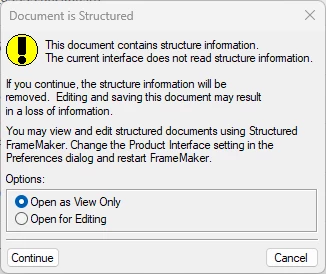
However, I encounter an issue each time I attempt to open either the MIF files or the newly converted FM files. A message appears stating that "the document contains structured information." In the Edit > Preferences menu, it shows them as FrameMaker files, but others appear as structured files. I’m concerned that this may be related to the translation process, as none of my original documents were structured.

I've tried opening each MIF to FM file and using "Save As" to create standard FrameMaker files, which allows me to make edits. However, I suspect this might be the reason my book won’t update or save as a PDF. After saving, I’ve reinserted the files back into the book, but the issue persists.

Can anyone advise whether I need to request unstructured files from the translator to resolve this problem? Any insights would be greatly appreciated!
    4 replies

    Inspiring
    December 25, 2024

       A MIF file is simply a text representation of a complete FrameMaker document, including all the formatting information and definitions as well as the text. Just as a FrameMaker document may, but need not, contain structured information, a MIF file may, but need not, contain structured information.


       Saving your Mif file as a FrameMaker document does not remove any of the structure information, which is why you are continuing to see the warning message each time you open the FrameMaker version of the file.


       Before you remove it, you may want to confirm that you don't need it. The basic unit of a structured document is an element. A structured document contains two types of structure inforrmation:


    1. Definitions of the structure elements that can be used.
    2. Elements in the document's content that use those definitions.


    If your document defines elements but never use them (and you never intend to), you are safe removing the definitions. To confirm your document doesn't use them, open the MIF file with a plain text editor such as Notepad.  Search for the string:

         <ElementBegin

    If no occurrences are found, your document doesn't use elements and you can remove any element definitions it contains.

    Russ's suggestion to use File > Import > Element Definitions from an unstructured document will remove any existing element definitions. However, I doubt that the File > Import > Element Definitions command is available in the unstructured user interface and I'm too lazy to reconfigure my copy of FrameMaker to check. 


    You can edit the MIF file to remove the element definitions. They start with a line that reads:

         <ElementDefCatalog

    and end with a line containing:

         > # end of ElementDefCatalog


    Just delete those two lines and everything between them. Be careful, them. The sample file I inspected had something like 4,000 lines in that part of the MIF file.


    Please start another thread if you'd like to know all about the advantages of structured documents.

         --Lynne


    Participant
    December 26, 2024

    Hello everyone!


    I work in a translation company as a Desktop Publisher and MM specialist and one of our clients has a similar issues and what I've found out is the following: 

    The challenge here might be that the FrameMaker options were set up to Structured FrameMaker initially and now they changed to FrameMaker or the other way around.
    Note from the website: FrameMaker Preferences / Authoring modes
    "By default, FrameMaker opens in Structured FrameMaker authoring mode. If you want to switch to unstructured authoring mode, choose FrameMaker from the list of options and restart FrameMaker." Maybe after a update the settings were changed. It's rather an product interface settings rather than a file option as its wrote in warning.

    Let me know if the issue was still present in your situation.

    Best regards,

    Mihai

    Community Expert
    December 31, 2024

    I always use the Structured authoring mode, and I can ensure you that this authoring mode does not turn any new FrameMaker file into a structured one!

    The author would have to apply structure with the Element or Structure menu.

    If you have the time, I would contact the agency and complain and ask them to deliver unstructured files and remove the structure. It's not difficult, but it's their fault.

    Legend
    December 24, 2024

    Hi, I think Bob's theory is likely correct. But you should not need to worry about it, unless structure was added to the document text which I doubt. I'm almost sure that if you select Open for Editing and just open the files, FM will automatically strip out all structure-related metadata in the document. If the document looks normal afterwards, you can just save it and you should not see that message again.


    There is also the option to select the files in the book, select File > Import > Element Definitions, and then specify any known unstructured file to import from. This will also strip out structure information. But I'm almost sure that just opening the files in unstructured FrameMaker will do that once and permanently.


    Russ

    Jeff_Coatsworth
    Community Expert
    Community Expert
    December 24, 2024

    I think what Bob has suggested has probably happened - if you didn't tell them your docs were Unstructured, they probably proceeded with their copy of Structired FM and saved out the MIF from that. I would edit them to strip out the Structure and tell them in the future that you're using Unstructured FM.

    Bob_Niland
    Community Expert
    Community Expert
    December 24, 2024

    While .mif (as for .fm and .book) have strict internal structure, there is no connection to Structured documents. A MIF can contain a Structured or an Unstructured FM document. Merely saving an unstruc as a MIF will not convert it to structured, and no similar dialog is expected on re-open.

    MIF is merely a {mostly} human-readable version of .fm binary.


    What seems to have happened here is that the outside translators imported your unstruc content into their structure templates, editted, rendered, and sent you back structured MIF. Your choices would appear to be to either:

    • collapse the document back to unstruc, or
    • elect to maintain it as structured (and they may not have sent you everything you need for structured stewardship (DTD? EDD?).

    Not having worked in structured FM, I'm not sure what external resources a project might require. And then there's the learning curve…