
terhok
Inspiring
February 25, 2022
Answered

Empty text flows in a text inset file?

  • February 25, 2022
  • 4 replies
  • 379 views

I have a Framemaker file containing all my text insets, each text is in its own text frame with a text flow name. All in one page, in one file and with different flow names. No problems using the insets. But, on the second text inset file page, there are empty text frames with the same flow names, all in the same order and all have order, sizes and locations of the original frames. Sometimes there might be more than 2 pages with empty text flow frames (idential pages with empty frames). I have no idea why they keep on appreading, nor I have succeeded to delete them. I can delete the extra frames but they keep on apperaring again while opening this inset file again. Luckily, this seems to not harm my book writing, but I am wondering if this causes some problems at background. I use the latest updated FrameMaker in unstructured mode. MIF wash did not help. I see increased stability problems after the last FM software update. What is going on here? How to fix this?
    This topic has been closed for replies.
    Correct answer Matt-Tech Comm Tools

    Agreeing with Bob...

    It sounds like the frames are created on Master Pages, and not Reference Pages.

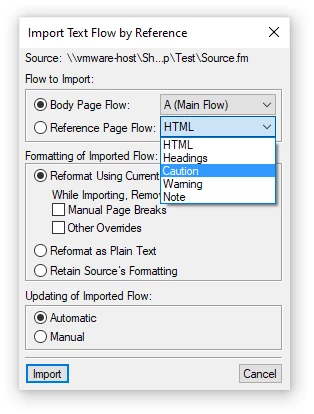
    Creating your named flows on Reference Pages allows you to import the text flow more easily using the File>Import>File functionality.

    While you can create named flows on body pages, I find the reference pages are more convenient for storing (many) text flow frames. 

    If you want to use body pages for the flows, you may need to use a master page without body page text flows (perhaps a disconnected page?) so that the master page text frames don't interfere with your individual flows.

    (Or, as I mentioned, just use one or more reference pages!)

    For more detail, see pages 444-453 in Chapter 29, Content Reuse with Text Insets in FrameMaker - Working with Content

    Hope this helps.

    -Matt

    4 replies

    Participant
    February 26, 2022

    This is a known bug that has been reported before. I have no idea how to fix this issue. If anyone knows how to fix this please let me know!

    Bob_Niland
    Community Expert
    Community Expert
    February 25, 2022

    terhok: But, on the second text inset file page, there are empty text frames with the same flow names, all in the same order and all have order, sizes and locations of the original frames.

    I'm not fully clear on what you are doing, but this sounds like:
    a. the frames with the text flows are on a Master Page, and
    b. the document is duplex (double-sided)

    Matt-Tech Comm Tools
    Community Expert
    Matt-Tech Comm ToolsCommunity ExpertCorrect answer
    Community Expert
    February 25, 2022

    Agreeing with Bob...

    It sounds like the frames are created on Master Pages, and not Reference Pages.

    Creating your named flows on Reference Pages allows you to import the text flow more easily using the File>Import>File functionality.

    While you can create named flows on body pages, I find the reference pages are more convenient for storing (many) text flow frames. 

    If you want to use body pages for the flows, you may need to use a master page without body page text flows (perhaps a disconnected page?) so that the master page text frames don't interfere with your individual flows.

    (Or, as I mentioned, just use one or more reference pages!)

    For more detail, see pages 444-453 in Chapter 29, Content Reuse with Text Insets in FrameMaker - Working with Content

    Hope this helps.

    -Matt

    -Matt Sullivan, FrameMaker Course Creator, Author, Trainer, Consultant
    terhok
    terhokAuthor
    Inspiring
    February 28, 2022

    The text inset frames and extra duplicate frames were on the body page. I am using only one two-column master page. I moved the text inset frames to the referenge page. Eveything seem to be working and no duplicate frames have appeared. I still don't know what happened but all is ok now. Thanks for the advice!

    Jeff_Coatsworth
    Community Expert
    Community Expert
    February 25, 2022

    What version of FM are you running? Since I don't really understand your problem - was this working before & now it's not?

    Ged_Traynor
    Community Expert
    Community Expert
    February 25, 2022

    Moving thread to the FrameMaker forum from Using the Community