

Answered
ExtendScript to find string matching regex and replace with substring using backref ($n)
This is what I want to accomplish:
1. Find zero or more chars inside straight or curly double quotes
2. Replace with the text inside and without the quotes
3. Make the replacement text bold
I used this as a starting point (very helpful, thanks to @Russ Ward and the community):
Solved: Re: Replace Text After Find - Adobe Support Community - 13151348
I can accomplish 1 and 2 using the GUI:
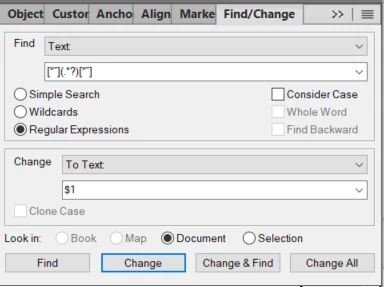
I can accomplish 1 and 3 using this script (notice I had to encode the regex as UTF-16 hex):
#target framemaker
// regex for zero or more chars inside straight or curly double quotes, Unicode txt and UTF-16 hex
// ["“](.*?)["”] = \u005b\u0022\u201c\u005d\u0028\u002e\u002a\u003f\u0029\u005b\u0022\u201d\u005d
// regex for backreference to first capturing group, Unicode txt and UTF-16 hex
// $1 = \u0024\u0031

// var regex = /\u005b\u0022\u201c\u005d\u0028\u002e\u002a\u003f\u0029\u005b\u0022\u201d\u005d/;
// var unquoted = /\u0024\u0031/;

findAndReplace("\u005b\u0022\u201c\u005d\u0028\u002e\u002a\u003f\u0029\u005b\u0022\u201d\u005d", "");

function findAndReplace(findString, replaceString)
{
    var textRange = app.ActiveDoc.TextSelection;
    if(!textRange.beg.obj.ObjectValid())
    {
      alert("No insertion point or active document. Cannot continue.");
      return;
    }
    var doc = app.ActiveDoc;

    // Set up the find parameters
    var findParams = AllocatePropVals (4);
    findParams[0].propIdent.num = Constants.FS_FindText;
    findParams[0].propVal.valType = Constants.FT_String;
    findParams[0].propVal.sval = findString;

    findParams[1].propIdent.num = Constants.FS_FindWrap;
    findParams[1].propVal.valType = Constants.FT_Integer;
    findParams[1].propVal.ival = false;

    findParams[2].propIdent.num = Constants.FS_FindCustomizationFlags;
    findParams[2].propVal.valType = Constants.FT_Integer;
    findParams[2].propVal.ival = Constants.FF_FIND_USE_REGEX;

    findParams[3].propIdent.num = Constants.FS_RegexFlavour;
    findParams[3].propVal.valType = Constants.FT_Integer;
    findParams[3].propVal.ival = Constants.FR_USE_PERL;

// Start the search
    textRange = doc.Find(textRange.beg, findParams);

    while(textRange.beg.obj.ObjectValid() && FA_errno == Constants.FE_Success)
    {

      var replaceTextRange = doc.TextSelection;
      ApplyCharFmt (doc, replaceTextRange, "Bold");
      // The search string is already selected. Delete it.
      // doc.Clear(0);

      // Add the new text.
      //  doc.AddText(textRange.beg, replaceString);

      textRange = doc.Find(textRange.beg, findParams);

    }
}

function ApplyCharFmt (oDoc, oTR, sFormat) { // ===========================================
/*            Apply character format to text range
Arguments     oDoc            Document to be handled, not necessarily the current document
              oTR             Text range to receive the format
              sFormat         Name of character format
Reference     Rick Quatro
Used in       FMnotes etc.
History       2016-02-03
              2022-06-16 check for catalogged name
*/
var oCharFmt;
  msg_01 = "Character format «%01» is not in catalogue - cannot be applied";

  oCharFmt = oDoc.FirstCharFmtInDoc;              // is it in catalogue?
  while (true) {
    if (oCharFmt.Name == sFormat) { break;}       // it's in the catalogue
    oCharFmt = oCharFmt.NextCharFmtInDoc;
    if (!oCharFmt.ObjectValid()) {                 // it's not cataloggued
      KLD_Z.Message ("E", msg_01, "ApplyCharFmt", [sFormat]);
      return false;
    }
  }

  oCharFmt = oDoc.GetNamedCharFmt(sFormat);
  oProps = oCharFmt.GetProps();
  oDoc.SetTextProps (oTR, oCharFmt.GetProps());
  return true;
} // --- end ApplyCharFmt -------------------------------------------------------------------------
How can I accomplish all three with ES? No matter how I pass the "$1" to the script it does a literal replace.
Thanks in advance for any insights.


 AdChoices