Participating Frequently
December 11, 2024
Answered

How to identify the elements from a referenced FM document

  • December 11, 2024
  • 1 reply
  • 466 views

Hi,

I am new to Adobe Framemaker scripting. So could anyone help me with this,
Consider that we have an FM document and this file imported some other FM/MIF files.
When I am traversing through all the elements in the FM document, how can I identify the element is in the main file or in referenced file.

Thanks in advance.

Correct answer frameexpert

Here is a basic example and some scripting ideas. You can see how I have this set up in the screenshot; the highlighted elements are inset an imported text inset.
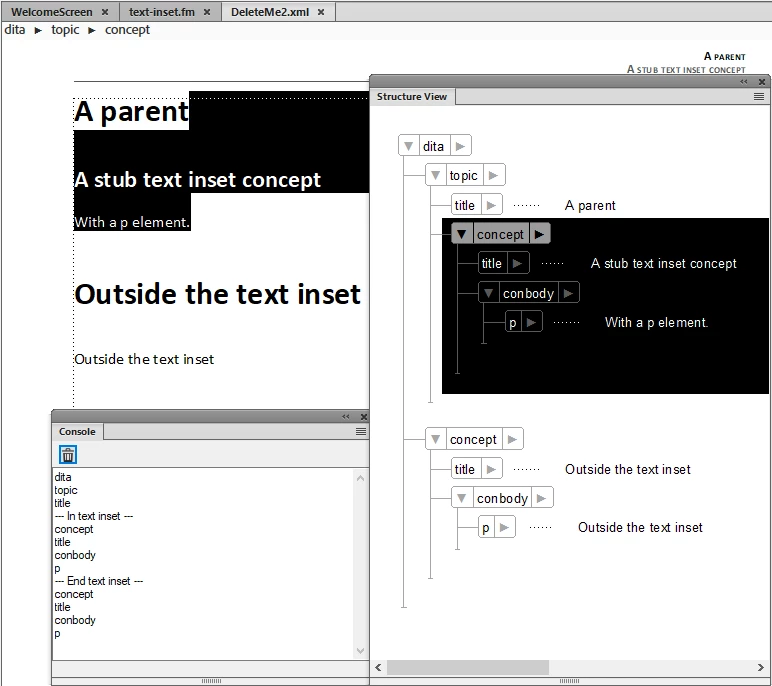


Here is the code that writes the information that you see in the Console window. You could use this to make some kind of map of the elements in your document so you could determine if a particular element is in a text inset.

main ();

function main () {

    var doc;
    
    doc = app.ActiveDoc;
    if (doc.ObjectValid () === 1) {
        element = doc.MainFlowInDoc.HighestLevelElement;
        if (element.ObjectValid () === 1) {
            processDoc (doc, element);            
        }
    }
}

function processDoc (doc, element) {
    
    var textList, count, i, inTextInset, textItem;
    
    // Get a list of elements and text insets from the document's
    // main flow.
    textList = doc.MainFlowInDoc.GetText (Constants.FTI_ElementBegin | 
        Constants.FTI_TextInsetBegin | 
        Constants.FTI_TextInsetEnd);
    
    count = textList.length;
    // Initialize a variable indicating the beginning and end
    // of a text inset.
    inTextInset = false;
    // Loop through the list of text items and check each one.
    for (i = 0; i < count; i += 1) {
        textItem = textList[i];
        // The start of a text inset.
        if (textItem.dataType === Constants.FTI_TextInsetBegin) {
            Console ("--- In text inset ---");
            inTextInset = true;
        }
        // The end of a text inset.
        else if (textItem.dataType === Constants.FTI_TextInsetEnd) {
            Console ("--- End text inset ---");
            inTextInset = false;
        }
        else { // Element begin.
            // Write the element's name to the Console.
            Console (textItem.obj.ElementDef.Name);
        }
    }
}


1 reply

frameexpert
Community Expert
Community Expert
December 11, 2024

Are your FrameMaker documents structured or unstructured?

Participating Frequently
December 12, 2024

structured

frameexpert
Community Expert
frameexpertCommunity ExpertCorrect answer
Community Expert
December 12, 2024

Here is a basic example and some scripting ideas. You can see how I have this set up in the screenshot; the highlighted elements are inset an imported text inset.


Here is the code that writes the information that you see in the Console window. You could use this to make some kind of map of the elements in your document so you could determine if a particular element is in a text inset.

main ();

function main () {

    var doc;
    
    doc = app.ActiveDoc;
    if (doc.ObjectValid () === 1) {
        element = doc.MainFlowInDoc.HighestLevelElement;
        if (element.ObjectValid () === 1) {
            processDoc (doc, element);            
        }
    }
}

function processDoc (doc, element) {
    
    var textList, count, i, inTextInset, textItem;
    
    // Get a list of elements and text insets from the document's
    // main flow.
    textList = doc.MainFlowInDoc.GetText (Constants.FTI_ElementBegin | 
        Constants.FTI_TextInsetBegin | 
        Constants.FTI_TextInsetEnd);
    
    count = textList.length;
    // Initialize a variable indicating the beginning and end
    // of a text inset.
    inTextInset = false;
    // Loop through the list of text items and check each one.
    for (i = 0; i < count; i += 1) {
        textItem = textList[i];
        // The start of a text inset.
        if (textItem.dataType === Constants.FTI_TextInsetBegin) {
            Console ("--- In text inset ---");
            inTextInset = true;
        }
        // The end of a text inset.
        else if (textItem.dataType === Constants.FTI_TextInsetEnd) {
            Console ("--- End text inset ---");
            inTextInset = false;
        }
        else { // Element begin.
            // Write the element's name to the Console.
            Console (textItem.obj.ElementDef.Name);
        }
    }
}