
Inspiring
January 13, 2025
Answered

Is it possible to set the base line offset of an anchored frame with extend script?

  • January 13, 2025
  • 2 replies
  • 409 views

I need to set the basline offset for all anchored frames to a certain amount.
I thought I can do that with :
frame.BaseLineOffset = -10; where frame is the the AFrame object  but it changes nothing, any help appreciated.
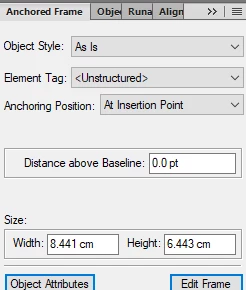
It looks to me that "Distance above Baseline" is not the same as BaselineOffset stated in the object reference under AFrame.


Here is the complete script  :

var graphic = null;
var frame = null;

var doc = app.ActiveDoc;

  if(doc.ObjectValid())
   {

    graphic = doc.FirstGraphicInDoc;
     if(graphic.ObjectValid() )
    {
      while(graphic.ObjectValid() )
      {
        frame = graphic;
        if(graphic.ObjectValid()&& graphic.constructor.name == "AFrame")
        {
       // align the the frame left change the anchor type to uinline and set the baseline to -10 pt
        frame.Alignment = Constants.FV_ALIGN_LEFT;
        frame.AnchorType = Constants.FV_ANCHOR_INLINE;

        frame.BaseLineOffset = -10;   

        }

       graphic = graphic.NextGraphicInDoc;
     }

    else if (!frame.ObjectValid() || frame.constructor.name != "AFrame")
    {
       graphic = graphic.NextGraphicInDoc;
    }

   }
  }
}

else
{
alert("No active document or no graphic or anchored frame selected. " +
"Cannot continue.");
}

alert("Script complete.");

Correct answer frameexpert

For point number 3 in my post, here is how I would have organized a script like this:

#target framemaker

main ();

function main () {
    
    var doc;
    
    doc = app.ActiveDoc;
    if (doc.ObjectValid () === 1) {
        processDoc (doc);
    }
}

function processDoc (doc) {
    
    var graphic;
    
    graphic = doc.FirstGraphicInDoc;
    while (graphic.ObjectValid () === 1) {
        if (graphic.constructor.name === "AFrame") {
            setFrameProperties (graphic, doc);
        }
        graphic = graphic.NextGraphicInDoc;
    }
}

function setFrameProperties (frame, doc) {
    
    frame.Alignment = Constants.FV_ALIGN_LEFT;
    frame.AnchorType = Constants.FV_ANCHOR_INLINE;
    // Property names are case-sensitive.
    // This value is the inverse of the interface values.
    frame.BaselineOffset = 10;
}

2 replies

frameexpert
Community Expert
Community Expert
January 13, 2025

Three things:

  1.  Property names and values are case-sensitive so you need BaselineOffset.
  2.  The values for this property are the opposite of the interface. So you need 10 instead of -10 to move the anchored frame down.
  3.  I like to put my tasks in separate functions because it makes them easier to test and troubleshoot. It also makes code reuse easier.


#target framemaker

doc = app.ActiveDoc;
frame = doc.FirstSelectedGraphicInDoc;

if ((frame.ObjectValid () === 1) && (frame.constructor.name === "AFrame")) {
    setFrameProperties (frame, doc);
}

function setFrameProperties (frame, doc) {
    
    frame.Alignment = Constants.FV_ALIGN_LEFT;
    frame.AnchorType = Constants.FV_ANCHOR_INLINE;
    // Property names are case-sensitive.
    // This value is the inverse of the interface values.
    frame.BaselineOffset = 10;
}
frameexpert
Community Expert
frameexpertCommunity ExpertCorrect answer
Community Expert
January 13, 2025

For point number 3 in my post, here is how I would have organized a script like this:

#target framemaker

main ();

function main () {
    
    var doc;
    
    doc = app.ActiveDoc;
    if (doc.ObjectValid () === 1) {
        processDoc (doc);
    }
}

function processDoc (doc) {
    
    var graphic;
    
    graphic = doc.FirstGraphicInDoc;
    while (graphic.ObjectValid () === 1) {
        if (graphic.constructor.name === "AFrame") {
            setFrameProperties (graphic, doc);
        }
        graphic = graphic.NextGraphicInDoc;
    }
}

function setFrameProperties (frame, doc) {
    
    frame.Alignment = Constants.FV_ALIGN_LEFT;
    frame.AnchorType = Constants.FV_ANCHOR_INLINE;
    // Property names are case-sensitive.
    // This value is the inverse of the interface values.
    frame.BaselineOffset = 10;
}
Inspiring
January 13, 2025

Thanks for the support and advice
@Winfried Reng: units are not possible as BaselineOffset is specified as number.
@frameexpert: Rick you are right the value is inverse as of the interface.
What I found is that
a "Distance above Baseline" of 0.0 pt in the interface corresponds to a BaselineOffset = 0
a "Distance above Baseline" of +1.0 pt in the interface corresponds to a BaselineOffset = -65536

a "Distance above Baseline" of -10 pt  corresponds to a BaselineOffset =  655360
So when i entered a value of -10 it looked like that nothing happened visible in my document.

Community Expert
January 13, 2025

Hi,

Possibly you have to add dimensions (like pt, mm).

You might also just check the value for an existing anchored frame. Then you can compare the value in the dialog and the value in the console.

Best regards, Winfried