
Known Participant
November 5, 2024
Answered

The letter 'f' violates right margin

  • November 5, 2024
  • 3 replies
  • 1253 views

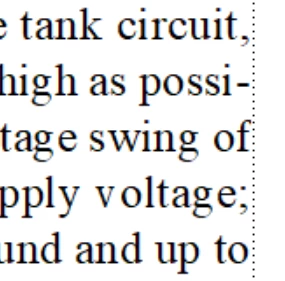
I've written a 600 page book in FM and it's ready for KDP. KDP requires a minimum 0.25" margin and that's where the text frame is set. Everything comes out fine except for any line that ends with an 'f', and the terminal of the 'f' hangs outside the frame. I suspect it's outside by only a few dots but amount doesn't matter, it generates close to 100 errors in the KDP review and won't let me proceed until I fix it.


One way to fix it is move the right edge of the text frame in slightly but that requires reformatting the whole book and I'd rather shoot myself in the head. Does anyone have an easier solution?

 

    This topic has been closed for replies.
    Correct answer Bob_Niland

    It's whatever comes with Windows 10. Earlier I tried a number of other serif fonts that are similar to Times Roman and with every one of them I can visually see that the terminal of the f hangs into the text frame. It seems like an issue with FM since I can visually see it happening in FM, and only with the f.


    re: …I tried a number of other serif fonts that are similar to Times Roman and with every one of them I can visually see that the terminal of the f hangs into the text frame.

    That would eliminate TNR as the source of the problem. The other questions arising about FM version, publish workflow and KDP workflow are leads to look into.

    As a hack, if the problem is limited to a small number of Paragraph styles, such as Body, you might try setting a very small value in
    Paragraph Designer /Basic\ Indent Right: [0.001"]
    and see if that works around it. Some reflow might be expected.

    3 replies

    Matt-Tech Comm Tools
    Community Expert
    Community Expert
    November 11, 2024

    There are those (including myself) that feel justified text decrease readability of text.

    See https://chatgpt.com/c/673258a1-ebb8-8000-a00b-5b1b1827454f


    If you remove justification, does the file process properly?


    -Matt Sullivan, FrameMaker Course Creator, Author, Trainer, Consultant
    YZZYXAuthor
    Known Participant
    November 11, 2024

    It turned out that a trailing 'f' was not the only problem, a leading 'j' did the same thing. So to fix it, I added 0.01" to the right and left indentations.

    Bob_Niland
    Community Expert
    Community Expert
    November 12, 2024

    To Matt's suggestion, is justification playing any role in the phenomenon?
    Knowing that might help Adobe fix it, if there's a bug report open on it yet.

    Inspiring
    November 6, 2024

    I also use FM to format my novels for KDP.  I save the book as PDF from FM, then upload the PDF in KDP. I've not had any issues. How do you 'get' the book from FM into KDP?

    YZZYXAuthor
    Known Participant
    November 6, 2024

    I also save as PDF.

    Bob_Niland
    Community Expert
    Community Expert
    November 6, 2024

    What's the font?
    I'm also seeing a peculiar spacing between "v" and "o" in "voltage".

    So I'm wondering if using a different serif font, of similar typeface, might have more predictable font metrics.

    YZZYXAuthor
    Known Participant
    November 6, 2024

    Times New Roman. I think the spacing is an artifact of the screen rendering, it changes depending on the zoom level and the print results are fine.

    Bob_Niland
    Community Expert
    Community Expert
    November 6, 2024

    re: Times New Roman

    What foundry, vintage & font file format?

    If it's old, such as a pre-Unicode TTF, try a newer instance.
    If it's the latest OTF, perhaps try some other instances of Times or Times Roman. This may or may not be your fix, but would be helpful in isolating the problem to FM vs. the font. Of course, switching to any other font is apt to cause re-flow, and may just move the problem spots around.
    …and it might be a bug in the KDP proofer, but I would have thought that codebase had seen a lot of TNR by now.