
Inspiring
August 12, 2024
Answered

Unexpected nesting (outline) in CHM TOC with FM 2022 (v17.0.3)

  • August 12, 2024
  • 4 replies
  • 2068 views

Hi community,

publishing a book file to chm creates an unexpected structure in the chm toc (hhc file).

In the book we use folders to control the numbering of chapters, sections, subsections. Numbering works fine in book toc. No problems when we publish PDFs. Numbering works fine in chm as expected.

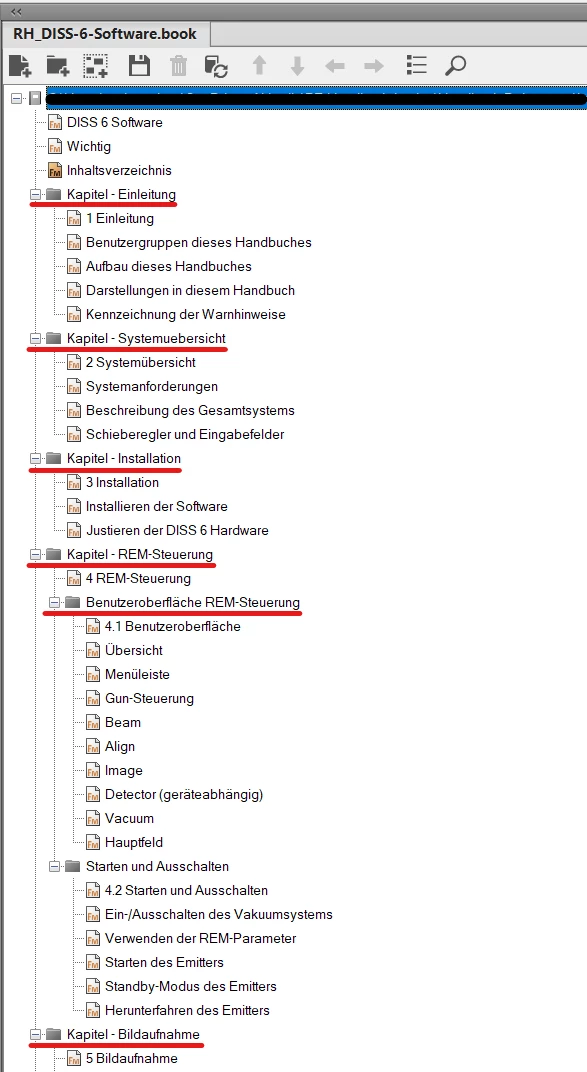
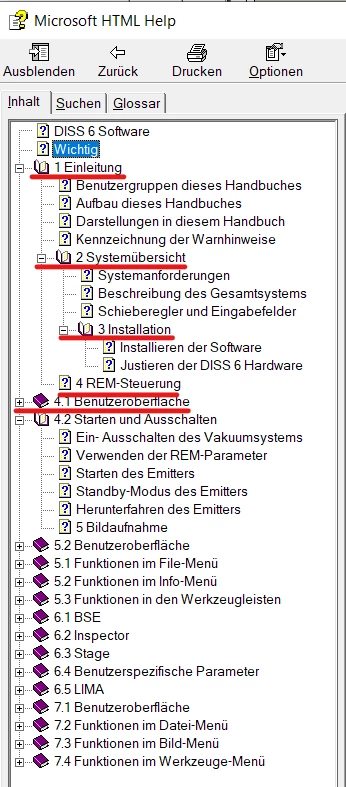
The usage of folders results in unexpected nesting in the chm toc. Here is an example:

## Given structure in the book file:
 

## Result in the chm toc:
 

We tried different approaches without success (but other unexpected outlines ;-)):

  • use of groups instead of folders
  • use of empty groups and/or folders to "reset" the outline

Our toolset:

  • WIN 10 Enterprise (v22H2, build 19045.4651)
  • FM 2022 (v17.0.3)

Unfortunately we cannot use the following workaround:

  1. Publish chm
  2. Decompile the chm
  3. Repair the hhc file
  4. Recompile the chm

Does anyone have any ideas how to fix this problem without using the workaround above?


Thank you very much in advance for your help.

Andreas

This topic has been closed for replies.
Correct answer Matt-Tech Comm Tools

Your specific output to the (very old, Windows only) CHM format is likely the issue. Moving to something more contemporary might be a better way to resolve the nesting.


4 replies

Jeff_Coatsworth
Community Expert
Community Expert
August 26, 2024

Any luck updating to Patch 4?

Inspiring
August 27, 2024

Unfortunately not. Conflicts between book's TOC levels and folder/group levels in book structure are still existing. Obscure nesting in hhc file is still existing. Critical internal FM errors while exporting HTML5 or Basic HTML are still existing. I hope for the next patch.

Jeff_Coatsworth
Community Expert
Community Expert
August 27, 2024

I'd be tempted to test the Publish to HTML5 route with something like the sample project to see if it's the FM files/book's issue or your copy of FM2022's.

Inspiring
August 14, 2024

Hi community,

here are some new findings from my research:


## Pre-conditions

  • FM 2022 latest (17.0.4)
  • FM UI (structured/unstructered -> same results)
  • Book type: unstructured (no XML)
  • FM files: unstructured (no XML)
  • Content structure: one FM file for each chapter overview, section overview and topic (structured with folders and sub-folders to control numbering with book component numbering)
  • Component numbering is used in chapters (H:<$chapnum>) and sections (H:<$chapnum>.<$sectionnum>)


## Possible problem

When publishing CHM, it seems that the levels from the book TOC create conflicts with the folder structure. That leads to obscure results in CHM TOC (hhc file) -> see screenshots above.


## Approach 1

  1. Exclude TOC from book.
  2. Update book.
  3. Publish CHM.
  4. "Folders" in CHM TOC are only created, when a folder has min. one subfolder.
  5. Result = Obscure = Approach doesn't work.


## Approach 2

  1. Exclude TOC from book.
  2. Include the FMs for overviews (chapter/section) as templates in the particular folders.
  3. Update book.
  4. Publish CHM.
  5. "Folders" in CHM TOC are only created, when a folder has min. one subfolder. Folder templates are not published.
  6. Result = Obscure = Approach doesn't work.


## Approach 3

  1. Remove TOC exclusion in book.
  2. Remove all folders (not helpful/recommended for a well structured book ;-)) and move all book files to the same level.
  3. Replace component numbering for sections with the good old-fashioned automatic paragraph numbering (H:<$chapnum>.<n+>) [optional: add reset placeholder to chapter numbering H:<$chapnum>< =0>].
  4. Update numbering options for all book files.
  5. Update book.
  6. Publish CHM.
  7. Result = fine = Approach works (but hhmm, really this way?).


## Conclusion / final question

If I cannot use folders/groups to structure my books and to use book component numbering: Can anybody explain me the advantages of folders/groups.


Thank you very much in advance for your opinions/feedback.

Andreas

Matt-Tech Comm Tools
Community Expert
Matt-Tech Comm ToolsCommunity ExpertCorrect answer
Community Expert
August 15, 2024

Your specific output to the (very old, Windows only) CHM format is likely the issue. Moving to something more contemporary might be a better way to resolve the nesting.


-Matt Sullivan, FrameMaker Course Creator, Author, Trainer, Consultant
Inspiring
August 16, 2024

Hi Matt,

thank you very much for your reply. I completely agree with you that CHM is absolutely outdated. As far as I know, the last update of the HTML Workshop is 22 years old ;-). Unfortunately CHM is a major requirement from our client. The software is Windows only, desktop only.


The use of groups instead of folders leads to the same obscure results. I think the book structure conflicts with the structure of book TOC.


Publishing to other outputs like HTML5 or Basic HTML creates a new challenge: Publishing leads to FM crash with critical internal errors (FM17.0.3 - Error 17034, FM17.0.4 - Error 17044). I've reported these errors to Adobe (incl. dump files and meta text files).

Due to these errors, we can only export two formats at the moment (PDF and CHM). 😞

Inspiring
August 13, 2024

I've created a bug in Adobe tracker: https://tracker.adobe.com/#/view/FRMAKER-15040

Maybe the Adobe team can help …

Inspiring
August 13, 2024

I don't have a fix for your specific issue (I'm finding that all HTML outputs from FM are buggy at best too), but this blog from Barb Binder helped me find a new way to approach numbering in my manuals which might be worth a look? Adobe FrameMaker: Numbered headings, continued – Rocky Mountain Training

Inspiring
August 13, 2024

Hi ArmadilloC, thank you very much for your reply. The type of numbering described in the blog is very familiar to me. I have used it for many years. This solution is an "emergency solution" that I will use if I can't find another way. I hope that the classic way of numbering will solve my problem with the structure in CHM.