Barb Binder
Community Expert
Community Expert
March 14, 2025
Answered

Unicode bullet

  • March 14, 2025
  • 3 replies
  • 1261 views

Hi Fm Friends:


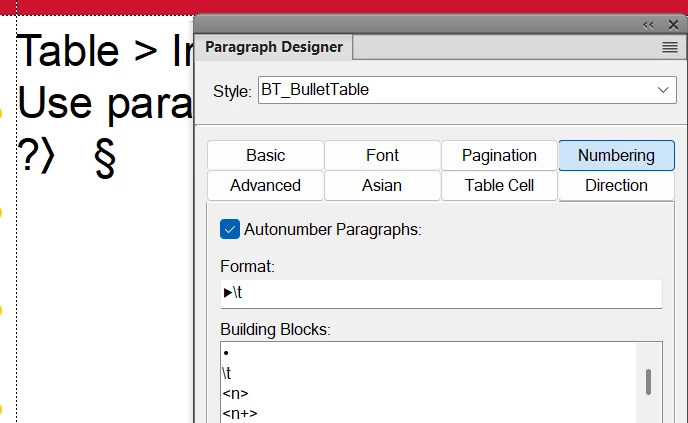
I am trying to channel my inner @Bob_Niland and designate a bullet with unicode instead of a character style to switch to an ornamental font as I have done forever, but I'm stuck.


I entered \u25b6 as per another one of your other posts, Bob and while the Para Designer understands, I can't find a font that doesn't show a question mark. I am working with Arial and Times New Roman for this job. Fm 17.0.5.725.


~Barb


    Correct answer Bob_Niland

    Barb: What is the advantage of this approach versus what I've done in the past? In either case I'm putting in a character that I have to change via a character style.

    It works to HTML.

    Pre FM8, ▶ had to be done using a codepage/overlay font. For this glyph, ▶, it would require a font that had it, and the character might be anywhere in the 00h-FFh code space.

    In Wingdings 3, it's found at \x75 (aka 75h, 0x75 in hex notation).
    For workflows that support font declarations, such as PDF, rendering a character byte with a value of 0x75, and with Wingdings3 available,
    you get a ▶.

    For sharing of the FM source to other computers lacking Wingdings3, and/or output to XML/HTML and probably eBook, that 0x75 byte will be treated as:
    u U+0075 LATIN SMALL LETTER U

    Whereas, if you use:

    ▶ U+25B6 BLACK RIGHT-POINTING TRIANGLE

    (which is the triple-byte string 0xE2 0x96 0xB6 as UTF-8)
    the rendering/display app knows it's supposed to be a ▶, even if the intended/default font doesn't populate it.

    If the font in use doesn't populate U+25B6, you can still encounter u, or ?, �, ⍰ alerts, but for HTML, many browsers will do font fallback, and use the ▶ glyph from some other font available on the platform. FM doesn't do font fallback (and you'd want it off most of the time if it did).


    For text processing apps that support all of Unicode, use Unicode. In FM, for characters in Unicode BMP (U+0000 to U+FFFF), use the Unicode code point. For glyphs in SMP planes (U+10000 and up), you still have to use legacy overlay in FM8-FM2022, or even uglier hacks


    3 replies

    Barb Binder
    Community Expert
    Community Expert
    March 15, 2025

    This is all very helpful, Bob. Thank you for taking the time to share your knowledge with me. From reading your posts over the years, I had developed a vague understanding, but this post ties it together. 


    Thanks,


    ~Barb

    ~Barb at Rocky Mountain Training
    Barb Binder
    Community Expert
    Community Expert
    March 15, 2025

    Thanks, Bob!


    So it was a font issue! I tried so many I thought it was something else I was doing wrong. 

    So now I have to ask you, Bob. What is the advantage of this approach versus what I've done in the past? In either case I'm putting in a character that I have to change via a character style. The file will output to PDF, but not to HTML. 


    ~Barb

    ~Barb at Rocky Mountain Training
    Bob_Niland
    Community Expert
    Bob_NilandCommunity ExpertCorrect answer
    Community Expert
    March 15, 2025

    Barb: What is the advantage of this approach versus what I've done in the past? In either case I'm putting in a character that I have to change via a character style.

    It works to HTML.

    Pre FM8, ▶ had to be done using a codepage/overlay font. For this glyph, ▶, it would require a font that had it, and the character might be anywhere in the 00h-FFh code space.

    In Wingdings 3, it's found at \x75 (aka 75h, 0x75 in hex notation).
    For workflows that support font declarations, such as PDF, rendering a character byte with a value of 0x75, and with Wingdings3 available,
    you get a ▶.

    For sharing of the FM source to other computers lacking Wingdings3, and/or output to XML/HTML and probably eBook, that 0x75 byte will be treated as:
    u U+0075 LATIN SMALL LETTER U

    Whereas, if you use:

    ▶ U+25B6 BLACK RIGHT-POINTING TRIANGLE

    (which is the triple-byte string 0xE2 0x96 0xB6 as UTF-8)
    the rendering/display app knows it's supposed to be a ▶, even if the intended/default font doesn't populate it.

    If the font in use doesn't populate U+25B6, you can still encounter u, or ?, �, ⍰ alerts, but for HTML, many browsers will do font fallback, and use the ▶ glyph from some other font available on the platform. FM doesn't do font fallback (and you'd want it off most of the time if it did).


    For text processing apps that support all of Unicode, use Unicode. In FM, for characters in Unicode BMP (U+0000 to U+FFFF), use the Unicode code point. For glyphs in SMP planes (U+10000 and up), you still have to use legacy overlay in FM8-FM2022, or even uglier hacks

    Bob_Niland
    Community Expert
    Community Expert
    March 15, 2025

    I  might add that it would be interesting to see how FM renders custom bullets to HTML.

    HTML is a bit obnoxious on this issue, supporting only a limited number of glyphs via list-style-type, or a graphic, but not arbitrary codepoints.
    So I wonder if FM even outputs your list as a ‹ul›.

    Bob_Niland
    Community Expert
    Community Expert
    March 14, 2025

    I used Adobe Illustrator, pasted in text ▶ and used the Properties menu to surf the installed fonts.

    ☑ Cambria [&Math]
    DejaVu [some variations]
    FreeMono & FreeSans
    Open Symbol
    Segoe UI Symbol
    Source Code, San & Serif
    have it, as do many others.


    ☒ Segoe UI Emoji
    Noto Emoji Regular
    populate it, but not as glyph you likely prefer.


    As I'm sure you're aware, you'll probably need to create a Character Format for this (perhaps Bullet), and declare it in the /Numbering\ pane for the Paragraph Format (usually Bulleted). The text after the tab does revert to the /Font\ for the format.