Susan305351693t3o
Inspiring
April 3, 2024
Answered

What is the difference between using File/Import/File vs. Insert/Image?

  • April 3, 2024
  • 2 replies
  • 2069 views

I'm a relative FrameMaker newbie. I'm having trouble figuring out how to position graphics on a page (sometimes the seem to align right, sometimes they go to the center). Instinctively, I've used Import/Image to (and "import by reference"). But recently I reviewed a training video from a couple of years ago and the trainer said to use File/Import/File to import a graphic.


I'm wondering if there is a difference?

    This topic has been closed for replies.
    Correct answer Barb Binder

    Matt: Was it me? 🤔 🤔

    Barb: Was it me? 🤔 🤔  (I know you said "he" Susan, but if you said "she", I'd be immediately busted. 😂)


    I know this question was already answered, but just in case, you know the old dogs, new tricks idiom—all the helpers here are long-time users, and it's hard to break old habits unless there is a compellng reason. I don't see a compelling reason to switch personally, because I can scale/set resolution on the way with File > Import > File (Esc fif), while Insert > Image (don't even know the shortcut!) tries to do it automatically and in my experience, doesn't always figure it out, so I have to adjust the scaling in Object Properties anyway. Plus, from a training perspective, I like to emphasize that File > Import > File works for whatever you want to import into a FrameMaker layout: text, images/artwork, and text insets. 


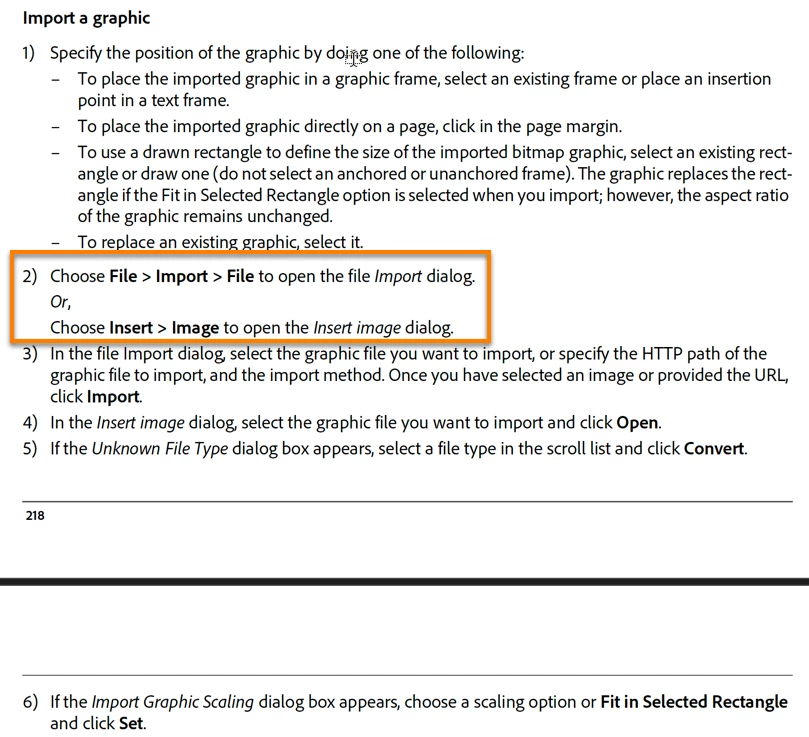
    And for what it's worth, this is an excerpt from the Fm 2022 Help manual:


    Just in case. 😉


    ~Barb

    2 replies

    Barb Binder
    Community Expert
    Barb BinderCommunity ExpertCorrect answer
    Community Expert
    April 3, 2024

    Matt: Was it me? 🤔 🤔

    Barb: Was it me? 🤔 🤔  (I know you said "he" Susan, but if you said "she", I'd be immediately busted. 😂)


    I know this question was already answered, but just in case, you know the old dogs, new tricks idiom—all the helpers here are long-time users, and it's hard to break old habits unless there is a compellng reason. I don't see a compelling reason to switch personally, because I can scale/set resolution on the way with File > Import > File (Esc fif), while Insert > Image (don't even know the shortcut!) tries to do it automatically and in my experience, doesn't always figure it out, so I have to adjust the scaling in Object Properties anyway. Plus, from a training perspective, I like to emphasize that File > Import > File works for whatever you want to import into a FrameMaker layout: text, images/artwork, and text insets. 


    And for what it's worth, this is an excerpt from the Fm 2022 Help manual:


    Just in case. 😉


    ~Barb

    ~Barb at Rocky Mountain Training
    Susan305351693t3o
    Inspiring
    April 3, 2024

    Hi Barb,


    It was not you :-)! Thank you for the information!

    Barb Binder
    Community Expert
    Community Expert
    April 3, 2024

    Phew!  😂 


    ~Barb

    ~Barb at Rocky Mountain Training
    Matt-Tech Comm Tools
    Community Expert
    Community Expert
    April 3, 2024

    I could be mistaken on the version, but File > Import > File is the method used prior to Fm 2020.

    The Insert Image option imports based on the setting specified in your preferences.

    There's no appreciable difference in result/quality I'm aware of between using these two methods.

    For context, it would help to know the training video you watched...Who was the trainer in the video...me?


    -Matt Sullivan, FrameMaker Course Creator, Author, Trainer, Consultant
    Susan305351693t3o
    Inspiring
    April 3, 2024

    I was personally trained by an Adobe-certified trainer (wasn't you). I was just reviewing a recording of one of our training sessions.

    So what he told me was not incorrect. It's possible he was so used to using the File/Import/File method himself from using earlier version of FrameMaker (because he's a veteran to the program) that he just taught me what his fingers know to do automatically. 

    If there is no appreciable difference in the two methods, then it's fine, and you answered my question. Thank you.

    Matt-Tech Comm Tools
    Community Expert
    Community Expert
    April 3, 2024

    I can relate to the muscle memory involved! I use Alt key combinations to do much/most of my navigating...things like Alt+f i o to import formats, and Alt+f i e to import element definitions.

    I'm sure many of the menu locations for tasks have changed over these 17 versions of FrameMaker.

    I find that it reduces the fatigue that can come with mousing when performing complicated tasks. 

    -Matt Sullivan, FrameMaker Course Creator, Author, Trainer, Consultant