
Participating Frequently
November 19, 2022
Answered

[How To] Giving each animation layer its own frame rate

  • November 19, 2022
  • 1 reply
  • 320 views

Hello everyone, 

Imagine I'm trying to loop a 8 frame loop of a simple sea background animation, that would play at 8 frame/sec

Now imagine I want to create a longer animation of a character, that would play above this layer, and its frame rate would be 12 frame/sec. 

In AfterEffects I'd just set the global framerate to 12 frame/sec and posterize time on the one I want to play at 8 frame/sec

How would you do it in Fresco ? 

Have a nice day !


[Renamed by Mod]
This topic has been closed for replies.
Correct answer Imaginerie

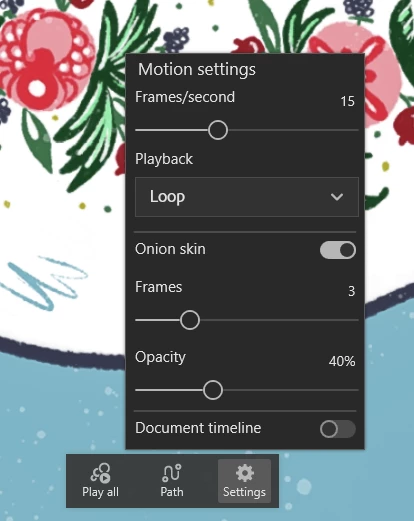
There is a frame rate setting for each layer that you can access through the cog wheel in the animation contextual menu:

It can be set individually...

1 reply

Imaginerie
Community Expert
ImaginerieCommunity ExpertCorrect answer
Community Expert
November 20, 2022

There is a frame rate setting for each layer that you can access through the cog wheel in the animation contextual menu:

It can be set individually...