
Participating Frequently
October 9, 2019
Answered

Adobe Illustrator CC 2019 slow & not using eGPU (radeon VII) in Mac OS Catalina

  • October 9, 2019
  • 7 replies
  • 8179 views

Hi, 


I have recently come into some performance issues with Illustrator following updating my mac to Catalina. When panning around on the screen the frame rate is very low, and zoom features similar issues. I have noticed similar latency issues with simple functions, pen tool, artboards etc. I have an eGPU to improve my systems performance I ran activity monitor when working in Illustrator and all of the load is being carried on the Intel Iris Plus Graphics 655 and not the radeon VII.


Full system setup is provided below:

MacBook Pro (13-inch, 2018, Four Thunderbolt 3 Ports)

Processor: 2.7 GHz Quad-Core Intel Core i7

Memory: 16 GB 2133 MHz LPDDR3

dGPU: Intel Iris Plus Graphics 655 1536 MB

Display: Single LG UltraFine Display (5120 X 2880). Laptop in clamshell mode. 


I have run several tests on the eGPU in other programs (Heaven Benchmark, Photoshop, Geekbench) and can confirm it is connected and taking load. I have ticked the use external graphic box on mac as well. I have attahced the system info file from the performance section. 


    This topic has been closed for replies.
    Correct answer withayou

    So, I figured out that there IS an issue with MacOS, Illustrator (and to some degree Photoshop) and eGPU's currently (although not sure if the problem is within OSX, or Adobe, or both). 

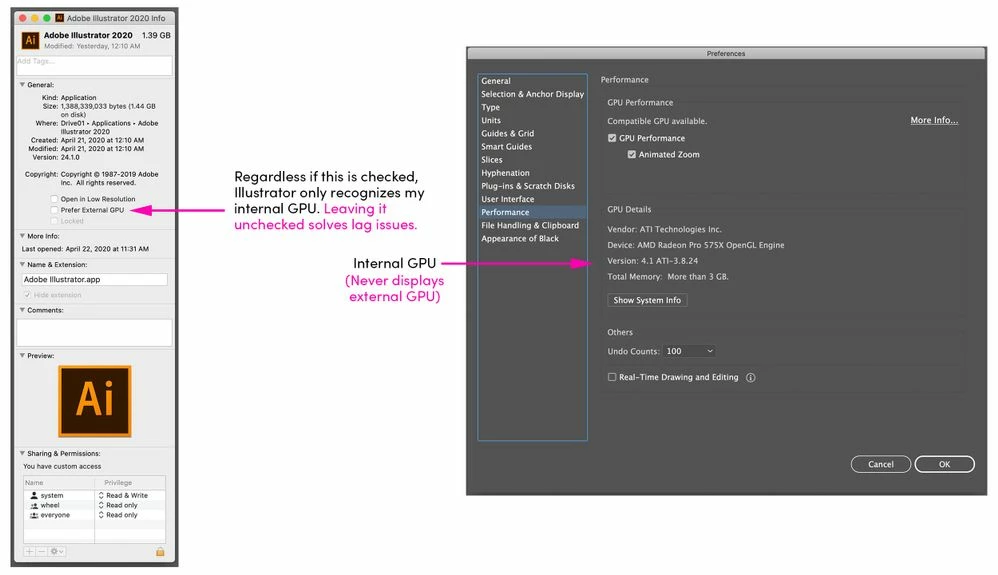
    I have an external Radeon RX 5700 XT and I had set ALL of my Adobe products to "Prefer external GPU" as I wanted them to take advantage of this powerful eGPU. 


    Well, just like the original post, my Illustrator doesn't recognize the eGPU (shows the internal GPU in the PERFORMANCE tab) and it has a ton of lag and is just unbelievably slow. 


    So I did a test. I loaded the newest Catalina and newest Illustrator on my 6 year old Macbook Pro. It ran perfectly. This meant that this issue had something to do with my eGPU or my iMac / OSX.


    So, I unchecked the "Prefer external GPU" on my iMac, restarted Illustrator, and it ran perfectly. 


    So, even though Illustrator wasn't showing my eGPU in the Performance tab, something was causing a conflict and ruining performance. 


    So anyone with this issue should test this. Turn off "Prefer external GPU" and restart Illustrator. See if it's fast. There is some issue with Mac OSX, and Adobe, and maybe particular eGPUs.

    What I would love to know is what's causing this. Is it something in OSX? Is it Adobe? Is it particular eGPU's that haven't been optimized? If I had time and money I'd simply load other GPU's into my external enclosure and find out, but I have design work to do. The frustrating thing is I bought an iMac with the cheapest GPU specifically because I knew I was going to keep an external one (so I could upgrade whenever). It sucks that I'm now only using that internal GPU on the software I use the most. 

    7 replies

    kamalboucetla
    Participant
    February 16, 2021

    So I think I might possibly have a solution for this issue.

    It turns out that Adobe products will use whatever GPU is associated with your primary monitor.

    I have a 2014 iMac 5k with 2 external 4k monitors attached either side via my eGPU (Razer Core X Chroma + AMD RX 5700XT).

    If I have my primary monitor set to my iMac then Photoshop/Lightroom/Illustrator detects my internal GPU as the graphics card to be used for acceleration. However, if I set one of my external monitors (running on the eGPU) to be my primary monitor then all of the Creative Cloud apps pick up my eGPU as the one to use.

    I've run activity monitor to check which one is being used and it does appear to be my eGPU which is running illustrator regardless of which monitor I have the window open on.

    So I can drag the illustrator window onto my iMac display and it will still use the eGPU.


    It's a little annoying as my notifications , applications etc all open on my external monitor rather than on my iMac display, but thats a small price to pay for the performance improvements.

    Participating Frequently
    February 16, 2021

    Thanks for this. I don't have a second monitor and intitially got the eGPU thinking that OSX would just always use it instead of the internal card by default. Turns out, that's just not the case. 

    That said, I got one of those ghost/dummy display port plugs in the eGPU now so my iMac thinks there is a second display. Illustrator now shows BOTH the internal and external cards listed, but I can't tell if there is much in the way of a performance boost yet. 

    Lots of random information online showing various levels of performance increases with eGPUs depending on how many displays you fake with these ghost / dummy plugs. The only downside is my cursor can get lost off the far left of my screen where my iMac thinks there is another monitor. 

    Participant
    September 10, 2020

    Yup I'm hiting a similar problem with Photoshop. I running on an iMac2019, i9, 64gig with a Radeon Vega 64 on an eGPU. Responsiveness was shaky and sluggish when the eGPU was enabled. As soon as I got back to the native GPU it was fine. When I gaming with the eGPU I get 60 fps at 4k with no problems. So it's nothing with Apple and the Razor Core.

    I tried the different levels of (Basic to Advanced) in the GPU settings, and tried ticking different stuff on and off. Nothing made it better.

    Participant
    September 10, 2020

    I'm trying this out with a Vega 64 in a Razor Core enclosure.

    withayouCorrect answer
    Participating Frequently
    April 25, 2020

    So, I figured out that there IS an issue with MacOS, Illustrator (and to some degree Photoshop) and eGPU's currently (although not sure if the problem is within OSX, or Adobe, or both). 

    I have an external Radeon RX 5700 XT and I had set ALL of my Adobe products to "Prefer external GPU" as I wanted them to take advantage of this powerful eGPU. 


    Well, just like the original post, my Illustrator doesn't recognize the eGPU (shows the internal GPU in the PERFORMANCE tab) and it has a ton of lag and is just unbelievably slow. 


    So I did a test. I loaded the newest Catalina and newest Illustrator on my 6 year old Macbook Pro. It ran perfectly. This meant that this issue had something to do with my eGPU or my iMac / OSX.


    So, I unchecked the "Prefer external GPU" on my iMac, restarted Illustrator, and it ran perfectly. 


    So, even though Illustrator wasn't showing my eGPU in the Performance tab, something was causing a conflict and ruining performance. 


    So anyone with this issue should test this. Turn off "Prefer external GPU" and restart Illustrator. See if it's fast. There is some issue with Mac OSX, and Adobe, and maybe particular eGPUs.

    What I would love to know is what's causing this. Is it something in OSX? Is it Adobe? Is it particular eGPU's that haven't been optimized? If I had time and money I'd simply load other GPU's into my external enclosure and find out, but I have design work to do. The frustrating thing is I bought an iMac with the cheapest GPU specifically because I knew I was going to keep an external one (so I could upgrade whenever). It sucks that I'm now only using that internal GPU on the software I use the most. 

    Srishti Bali
    Community Manager
    Community Manager
    April 25, 2020

    Thank you so much for sharing this here. 


    Regards!

    Participating Frequently
    February 6, 2020

    Hello Adobe, 


    I'd like to join this thread as well. I have an Apple aproved eGPU encloser and an Apple approved GPU (AMD 5700 XT) and Illustrator seems to only recognize my internal card. Photoshop recognizes the external card (as does Premiere and InDesign). Only Illustrator doesn't. 

    Screen grab attached showing the card Illustrator recognizes (the internal) and the menu bar showing the 5700 XT connected. 


    I'm using the newest verions of Illustrator CC (24.0.3) and the most up-to-date Catalina OSX (10.15.3)


    Thanks in advance, 

    Brad 


    青王28643662
    Participant
    March 31, 2020

    I have the same problem

    I'm using the newest version of Illustrator CC (24.1) and the most up-to-date Catalina OSX (10.15.4)

    Srishti Bali
    Community Manager
    Community Manager
    April 1, 2020

    Hi there,


    We are sorry to hear about this. We'd need a couple of other information to be able to help you with this scenario:

    1. AISniffer file - You will find it within the Illustrator Preferences folder. The location of that folder is in the User library. Users/username/Library/Preferences/Adobe Illustrator #(version Number)Settings > AISniffer
    2. Your system information file - You can generate it from Apple icon > About This Mac > System Report > save it and send it over DM.


    Regards,

    Srishti

    Srishti Bali
    Community Manager
    Community Manager
    October 9, 2019

    Hi Alex,


    Thanks for reaching out and highlighting this issue. I would request if you can share a few more details like:


    • Exact version of Illustrator?
    • Do you see eGPU in the Preferences panel (Illustrator > Preferences > Performance)?

    • You can share this information on https://illustrator.uservoice.com/ as well (as suggested by Monika).


    Regards,

    Srishti

    Participating Frequently
    October 9, 2019
    Hi Srishti,
    Participating Frequently
    October 9, 2019
    I have attached a copy of my GPU details window below the original file I attached is the system info link from the performance pane.
    Legend
    October 9, 2019

    https://helpx.adobe.com/x-productkb/global/fix-macos-64-bit-compatibility-errors.html

    "these apps weren't designed or fully tested for Catalina. We recommend that you continue to use the macOS versions noted in the system requirements for each app."

    Participating Frequently
    October 9, 2019
    Got it thanks, so I have to rollback and wait for Adobe to update their software to the new OS requirements.
    Monika Gause
    Community Expert
    Community Expert
    October 9, 2019
    It's not about the OS, it's about the graphic card.