
Amir Mahdi Moslehi
Participant
June 10, 2021
Answered

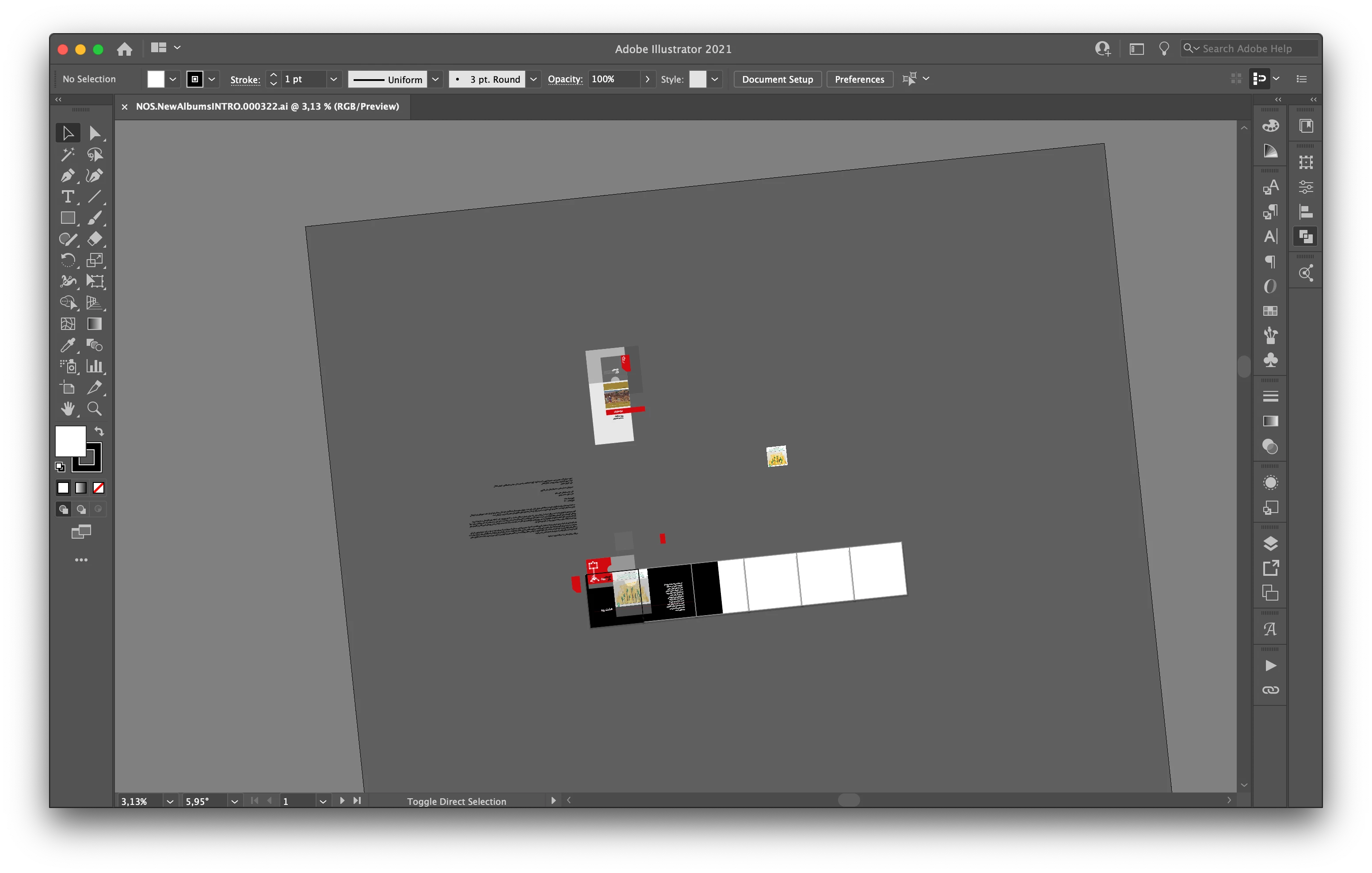
Artboard Rotation while using touchpad for zoom in Illustrator 25.3

  • June 10, 2021
  • 64 replies
  • 122651 views

Hi, recently I faced a new problem. When I use the trackpad for zoom-in/out the artboard keeps rotating. I don't know how can I fix this problem.

Correct answer joannem27208843

Hi I solved this problem by going to macbook System Preferences> Track Pad >Scroll and Zoom > Rotate and uncheck rotate with two fingers .


Hope this helps if there isn't already another solution that i have missed. 

Jo 


64 replies

Participant
June 28, 2021

I have removed the shortcut to rotate view (shift +h) but holding shift and hitting space changes the hand to the rotate tool as well and I cannot find a place to turn this off.  Unforutnately I use shift + alt frequently to adjust my art and oftentimes my finger might hit the space key instead and my view starts moving which is really frustrating to me.  Would love a way to lock view or turn off this feature entirely to me as for my workflow its simply an annoyance.

Any assistance would be greatly appreciated.

Participant
June 28, 2021

Hi there Adobe and fellow Adobe users,

I would like to recommend an idea to introduce a Rotate View Lock. As this new feature was introduced, I realized how I never needed it before and how frustrating it is that it gets accidentally activated every time I zoom in on trackpad (which I do most of my work on). This feature is quite annoying for me already, I'm not sure about everyone else's opinion, but I'd love to deactivate it.

Doug A Roberts
Community Expert
Community Expert
June 28, 2021

Staff appear to be aware; please vote on this topic and hopefully something will be implemented in the next few updates:


https://illustrator.uservoice.com/forums/601447-illustrator-desktop-bugs/suggestions/43637925-canvas-rotation-feature-is-obstructing-regular-pin

Participant
June 27, 2021

Hi there,


Does anyone know of a way to switch off the ability to rotate view completely? 

It's not just unecessary for me, it's also inconvenient as the gesture I usually use to zoom in is too similar to the new gesture for rotation in the update, so the view keeps rotating when I don't want it to!


Can I get rid of it? 


Any help would be much appreciated,


Thank you,


Kia

Participant
June 27, 2021

I meant to say I'm talking about Adobe Illustrator, not Photoshop


Thanks

Doug A Roberts
Community Expert
Community Expert
June 25, 2021

Staff are aware, but I would suggest anyone who wants this changed should go to the uservoice post to vote and comment:


https://illustrator.uservoice.com/forums/601447-illustrator-desktop-bugs/suggestions/43637925-canvas-rotation-feature-is-obstructing-regular-pin

Participant
June 25, 2021

PLEASE add a feature to disable or lock the rotation. I use a trackpad and this is slowing my workflow like crazy. 

Participant
June 25, 2021

I just had to create a post for this because it's been driving me crazy. I use my Macbook Pro touch/trackpad almost exclusively when zooming in and out and it used to be no problem at all. Now, almost EVERY SINGLE TIME it will try to rotate the artboard instead of zooming. 


If it happened once or twice a session, no big deal I guess, just a mild aggrevation. This happens a couple of times A MINUTE when I'm working at my normal pace and it's extremely frustrating. 


No, I don't want to turn rotation off for my entire computer using the two-finger gesture because all my other applications don't have trouble distinguishing the pinch motions from the rotation motions. I want to be able to lock the orientation of the artboard so that it just won't rotate unless I unlock it. Or at least be able to tell Illustrator that I only want the artboard to rotate if I go to the Hand tool and specifically use the artboard rotation tool.

Please make it a priority to try and patch this soon because it's frustrating when it happens SO FREQUENTLY.

Doug A Roberts
Community Expert
Community Expert
June 25, 2021

There is a uservoice post on the issue, marked 'Under Review' by staff. I suggest you vote and comment there:


https://illustrator.uservoice.com/forums/601447-illustrator-desktop-bugs/suggestions/43637925-canvas-rotation-feature-is-obstructing-regular-pin

Participant
June 25, 2021

I am having the exact same problem and I really, really, really hope they fix this soon. I use my MacBook Pro touchpad to zoom in and out almost exclusively and the fact that the only solution is "turn off rotation for your entire computer" instead of just being able to lock the artboard orientation is kind of ridiculous.

Known Participant
June 24, 2021

Is there a way to disable this feature?

I spend most of time in Illustrator and my workflow doesn't need it. It's annoying.

I couldn't find it on shortcuts keys menu to delete it.

windows 10

----------------First Photoshop 2.5 (1994)
marliton
Community Expert
Community Expert
June 24, 2021

Hi. Apparently, is not possible to disable the Rotation View feature.

Just for curiosity: why does that feature botter you? It doesn't seem to be intrusive.


Marlon Ceballos
Known Participant
June 24, 2021

While alternating from Ctrl + SPACE (zoom) to SPACE (move) usualy my second finger rest over SHIFT and sometimes is pressed.


if u press SHIFT + SPACE, BINGO! u have your artboard rotated.


it is probally muscle memory from MODO (3D software), but I can't help to avoid it, meanwhile I should be able to deactivate the rotation view shortcut.

----------------First Photoshop 2.5 (1994)
Participant
June 23, 2021

I'm having this same problem. Please allow us to lock the rotate view. I'm having to reset it every single time I zoom in and out, which is A LOT! It's so sensitive.

Participant
June 23, 2021

Rotate view should be optional. With a key command.

It can be very useful, but only quite seldom.


Having it active all the time is extremely frustrating.

Disabling the computer by removing the rotation gesture is not a good solution at all.

Legend
June 23, 2021

Hello,

you can setup your own keyboard shorcuts for Rotate view

Regards,

Mike

Participant
June 23, 2021

Thanks, Mike. That helps.

I have a lot of work with triangular symmetry, so rotations at multples of 60 degrees help.

I'll use the keys though to come back to 0.

A lot of rotations are unwanted, accidental when the dragging fingers move a bit off.