

Known Participant
February 10, 2020
Question

brush curve design

  • February 10, 2020
  • 1 reply
  • 578 views

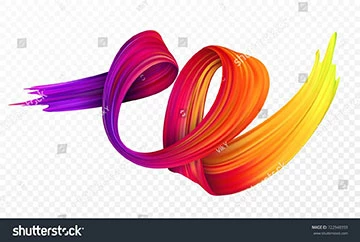
Hi, i need help on how to create this curved brush in Illustrator!
Im not interested in creating a brush to paint things, i just need to design one like the attached pic 🙂

 

This topic has been closed for replies.

1 reply

Mylenium
Legend
February 10, 2020

Good luck with that. This would take ages to do in AI with gradients, blends and a million paths with feathered strokes. The image clearly has ben done with a pixel-based painting app or by mapping a texture on a 3D object. Posing the question alone indicates that you don't really know AI (no offense) so it's likely out of the question for you to even try. You really should rather look into apps like Photoshop, Flamepainter, ArtRage and that anmd their offerings for "natural medium" brushes. Perhaps you're evedn lucky and find the exact preset this stock image is based on.


Mylenium

genikAuthor
Known Participant
February 11, 2020

I checked with Shutterstock and the file is a vector format file, so it surelly isnt created by a pixel-based app. As far as i can tell there must be a good chance that its created in illustrator.

Monika Gause
Community Expert
Community Expert
February 11, 2020

This requires several different techniques to create it. As Mylenium wrote: Gradients, blends and a million paths.


If you want to learn how this has been created: go ahead and buy the file, then deconstruct it and learn from it.


THis is a gradient mesh, could be the base of it:


THis is a 2 minute job, I didn't adjust anything or clean it. You can gt this much better when you invest more time.