Known Participant
November 4, 2022
Answered

Color difference between CPU/GPU previews

  • November 4, 2022
  • 11 replies
  • 36619 views

Hi,

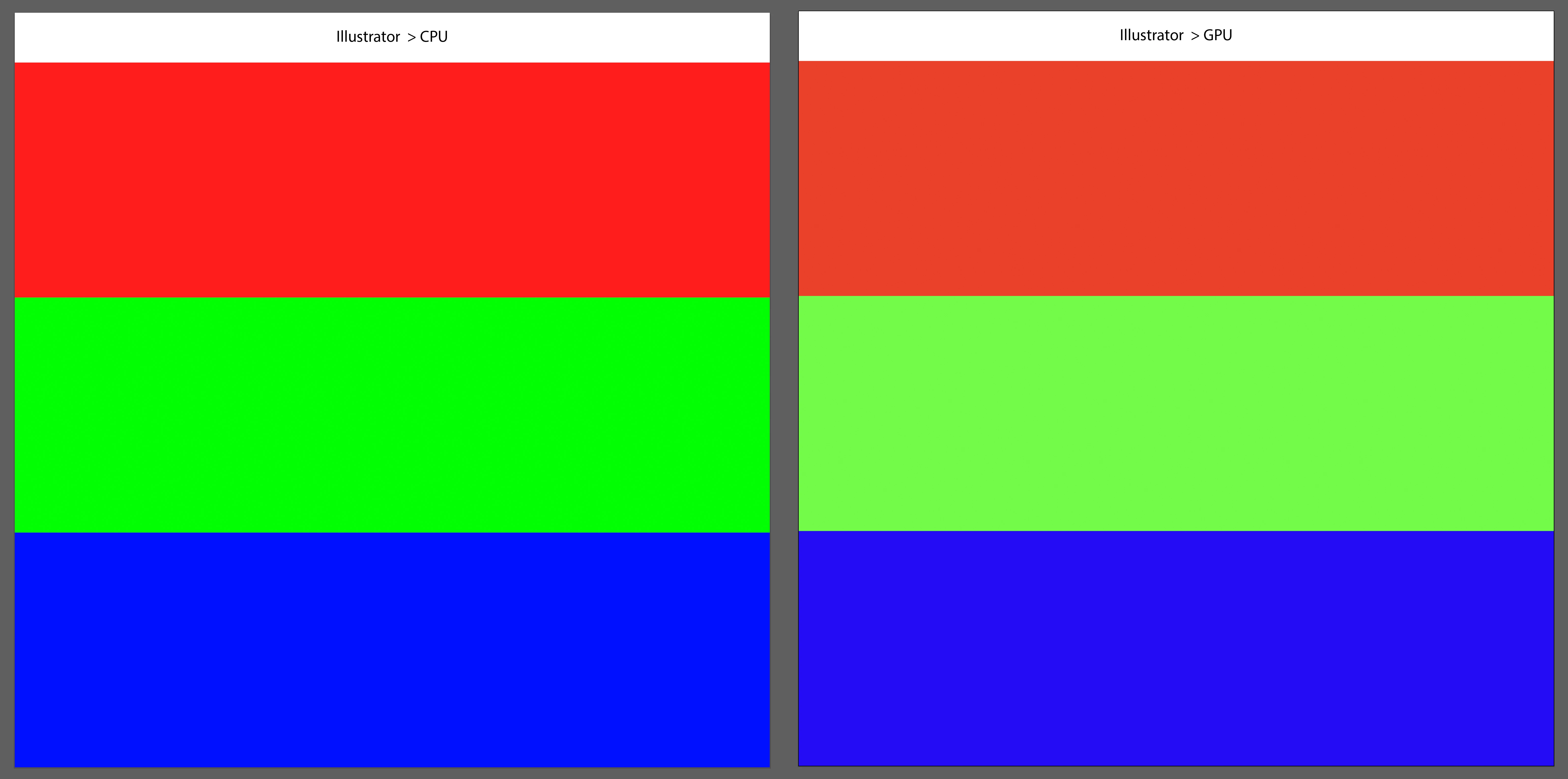
I have a big color problem between CPU/GPU previews.
In GPU preview, the colors become dull, bland. I didn't have this issue before the latest updates when switching between the two.
I tried to reinstall an older version, but the problem persists.
I am having the problem on both indesign and illustrator.
Do you have a solution ?

Correct answer Anshul_Saini

I have the same problem with my 2021 16-inch MacBook Pro M1 MAX w/ 32GB running Ventura 13.0.1 (22A400).  On both the laptop and external monitors, GPU preview is dull, especially noticable when dealing with colors outside CMYK gamut. Color picker colors are correct, but when shown on the artboard, they are dull and washed out. 


Hi Jeff,


Sorry for the trouble! This issue has been fixed in the Ventura update, v13.1. Many users have reported that this update has resolved the color difference between CPU/GPU previews on the internal MacBook display.


I suggest that you update your Ventura to the latest version and see if it resolves the issue for you as well.

If you have any other questions or concerns, please feel free to ask.


Best,

Anshul Saini

11 replies

Known Participant
August 9, 2024

Not sure if this is still relevant, but I finally got this to work on my iMac with the latest 2024 version of Illustrator. I used Bridge to sync the color setting across Adobe products. Bridge>Edit>Color Settings> North American Prepress2. This seems to have fixed the GPU/CPU color discrepancy.

marcelk96723337
Participant
April 4, 2025

Hi @Anubhav M,


I'm still getting this issue:


Macbook M1 Pro

Sonoma 14.7.1

Indesign 20.2

It happens on the Macbook screen and an external LG monitor,


Any advice would be very welcome

Community Manager
April 4, 2025

Hello @marcelk96723337,

Could you try recalibrating your monitor(s) for sRGB (https://adobe.ly/4cmmbdJ), restarting your computer, and then relaunching Illustrator to see if it helps?


Looking forward to hearing from you.


Anubhav

Inspiring
February 9, 2024

I have the same problem on windows 10 with Illustrator 28.2 (64bit) GPU/CPU Preview change the colors.

Other colors i see when use preview GPU (Nivida) then with CPU.

This is a big bug. Please help.


Community Manager
February 12, 2024

Hello @DutchAlex,

Sorry to hear about your experience. Would you mind trying the suggestions shared in this community post (https://adobe.ly/3SV2D80) and checking if they help?

Looking forward to hearing from you.


Thanks,

Anubhav

AXXXXXXXXX
Inspiring
August 1, 2023

Still happening for me! 


Macbook Pro M1 MAX

Ventura 13.1 

Ai 2023

Community Manager
August 19, 2023

Hello @AXXXXXXXXX,


We understand how frustrating it can be to experience issues with color consistency in Illustrator, especially when working across multiple monitors. I hope the suggestions shared above helped resolve the problem. If not, we may need to troubleshoot this on a live session. Please head here (https://helpx.adobe.com/contact.html?rghtup=autoOpen) and select the chat button in the lower-right corner of the page. We can help troubleshoot faster that way.


Thanks,

Anubhav

Participating Frequently
April 26, 2023

Hi, I have the same problem. I updated everything last night (Adobe and OS) but it doesn't change anything.

The dull colors can be seen when switching from GPU to CPU on the external screen, on the main inbuilt screen it's fine.

Macbook Pro 14 M1 Max

Ventura 13.3.1 

Illustrator 27.4

External Apple LED Cinema Display 


Please advise, 

aleny51244259
Participant
June 26, 2023

Hi, I have the same problem. 

The dull colors can be seen when switching from GPU to CPU on the external screen and the main inbuilt screen.

Macbook Pro 6 M2 Max

Ventura 13.4.1 

Illustrator 27.6.1

External Apple Studio Display 


Please advise, 

Community Manager
June 26, 2023

Hello @aleny51244259,


We understand how difficult it can be to work in Illustrator when colors are inconsistent. Would you mind trying the following steps and checking if it helps:


Looking forward to hearing from you.


Thanks,

Anubhav

Participant
February 13, 2023

Problem still persists in v27.2!

Anshul_Saini
Community Manager
Community Manager
February 13, 2023

Hi @byfima,


I'm sorry to hear that you're still having trouble with v27.2. Would you mind confirming if you see the dull colors in the GPU preview on a Macbook display or external monitor(s) display? Also, please confirm the Mac specification, the exact version of macOS, and external monitor make & mode, if you are using any.


I will be looking forward to your response.


Thanks,

Anshul Saini

Jeff Wine
Participant
March 20, 2023

I have the same problem with my 2021 16-inch MacBook Pro M1 MAX w/ 32GB running Ventura 13.0.1 (22A400).  On both the laptop and external monitors, GPU preview is dull, especially noticable when dealing with colors outside CMYK gamut. Color picker colors are correct, but when shown on the artboard, they are dull and washed out. 


Participant
January 16, 2023

Same issue with GPU mode

MacOS 13.1 / Intel based MBP / Illustrator 2022 and latest 2023

Anshul_Saini
Community Manager
Community Manager
January 19, 2023

Hi @byfima,


We are sorry for the trouble. Would you mind confirming if you see the dull colors in the GPU preview on a Macbook display or external monitor(s) display?


I will be looking forward to your response.


Thanks,

Anshul Saini

Participant
January 20, 2023

Both, Macbook display and external 5K monitor.


But problem starting randomly over work time, i find some workaround:
In mac: System prefs — Displays — Color profile, change color profile to any and back to previous one


That fix the problem for me

Emmanuel van der Sloot
Participant
December 20, 2022

Hi,

I just updated to the latest Mac OS (Ventura 13.1) and the problem seems to be fixed. There is no longer a difference between CPU/GPU previews in Illustrator and Indesign. Hallelujah!

Allan Deas
Participant
December 20, 2022

Finally! 

Allan Deas
Participant
December 15, 2022

Dissapointing to see the latest update today has still not resolved this colour issue.

It's becoming a joke. I'm working on a brand new computer I bought this year and the latest operating system.

Adobe! This should not be happening.


Allan Deas
Participant
December 20, 2022

Updated OS Ventura to the latest release 13.1 today and this seems to have resolved the colour issue in illustrator. Atleast on M1 Pro chip, MacBook Pro 2021. 

Anshul_Saini
Community Manager
Community Manager
November 9, 2022

Hi @Mouchet0D4C @Dmitrymoi,


Thanks for reaching out and sharing the details. We have investigated the issue, and it has been found reproducible on our end on Apple Silicon Mac running on macOS Ventura only. This is acknowledged and will be worked on by developers in future updates.


Currently, workarounds to this are to use CPU preview or run the app using rosetta or open as Intel or as @Mouchet0D4C suggested rolling back to macOS Monterey will work.


Please check this UserVoice and upvote it: https://illustrator.uservoice.com/forums/601447-illustrator-desktop-bugs/suggestions/45876907-macos-...

By doing this, you'll get updates on the issue and help prioritize.


Thanks,

Anshul Saini

Participant
November 17, 2022

It should be the priority without having voted!


Dmitrymoi
Participant
November 8, 2022

I have the same problem. I haven't downgraded to Monterey, but the other solutions I found on the forum didn't help.