


Jacob Richard
Participating Frequently
June 27, 2021
Question

Corrupt file: Illustrator unable to recover file after Crash

  • June 27, 2021
  • 3 replies
  • 1920 views

I was working then suddenly illustrator crashed (for the first time in over 3 years) and when i opened it again,

It said something like this.
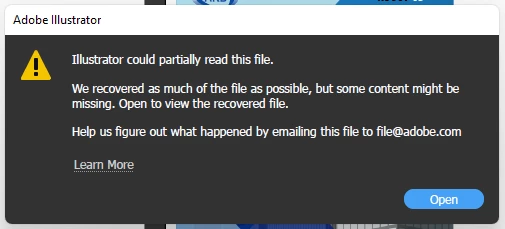


{Renamed by MOD}

This topic has been closed for replies.

3 replies

Srishti Bali
Community Manager
Community Manager
June 30, 2021

Hi all,


So sorry to hear about this trouble. We're currently investigating this issue and need a few more details from you end. For example: 


We're here to help, just need more info!


Regards,

Srishti

michelew83603738
Community Expert
Community Expert
June 27, 2021

Truthfully, if this only happened to you once in 3 years, you are truly lucky! Saving often is of course the key. I also use AstuteGraphics plug-in AutoSavior so that when I do get a crash, I don't really have any issues. 

Jacob Richard
Participating Frequently
June 28, 2021

thanks for your help! it really worked!

Regards,

Jacob

Srishti Bali
Community Manager
Community Manager
June 27, 2021

Hi there,


Sorry about this trouble. Is the issue related to a specific document? If yes, could you please share the document with us? You can upload it to the Creative Cloud (https://helpx.adobe.com/in/creative-cloud/help/share.html) and share the download link. 


I must also inform you that file recovery can't be guaranteed with a 100% success. We'll surely try our best.


Regards,

Srishti

Participant
June 27, 2021

Hello miss Bali, I have a similar problem. But I don´t saved the document as .ai file, only in .pdf file, and then immediately turned off my computer. A few hours later when I opened the pdf file in illustrator, a window appeared showing that illustrator could partially read the file, an when I opened I lost most of the work, but in the thumbnail it seems that the file is completely there. what do I do? Please help me!