
TenTin
Known Participant
January 1, 2023
Answered

Electric Polar Vector

  • January 1, 2023
  • 4 replies
  • 1445 views

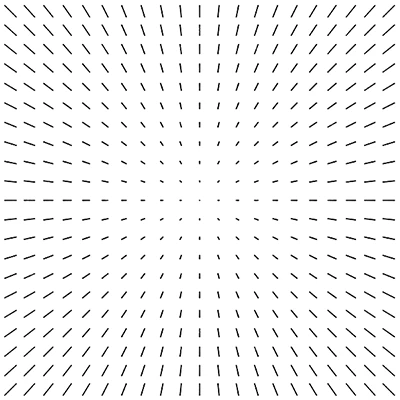
Does anybody know how to recreate this electric polar vector in Ai? (It seems the Blend tool doesn't work! Cause it reshapes the lines' thickness). I think a script would do the job. Any help?

 

This topic has been closed for replies.
Correct answer femkeblanco

I am aware of creating a script from a code and running it from Ai. I did it, but I changed the extension to JS instead of JSX. I thought I had to draw a shape (circle or rectangle) and then apply the script to it. Yes! I realized the script does not need any shape (just an open doc). Great script, many thanks. 

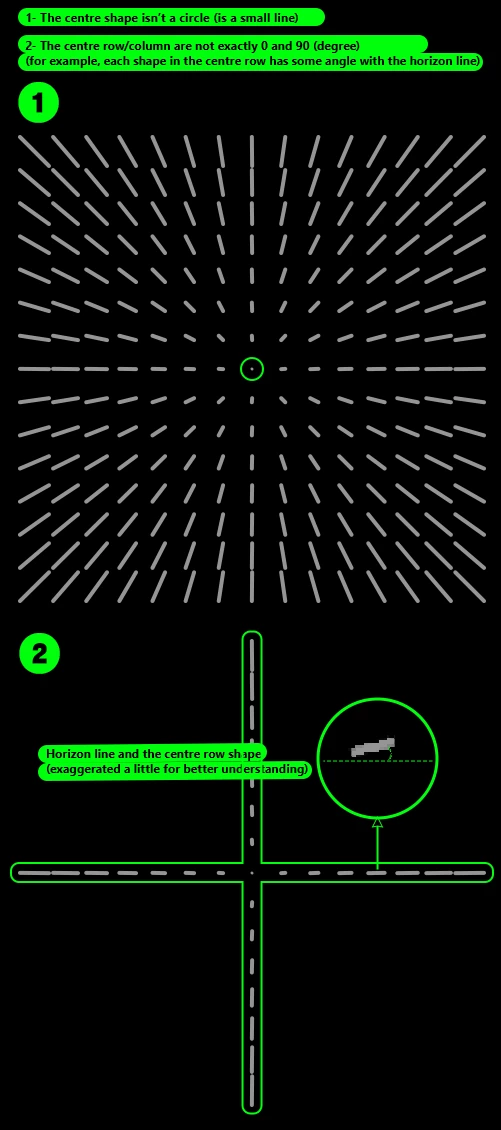
I have another question. There is a problem, even if I enter a big number like 225 (15*15), the centre column and row are not an exact horizontal/vertical (0/90 degree) line.


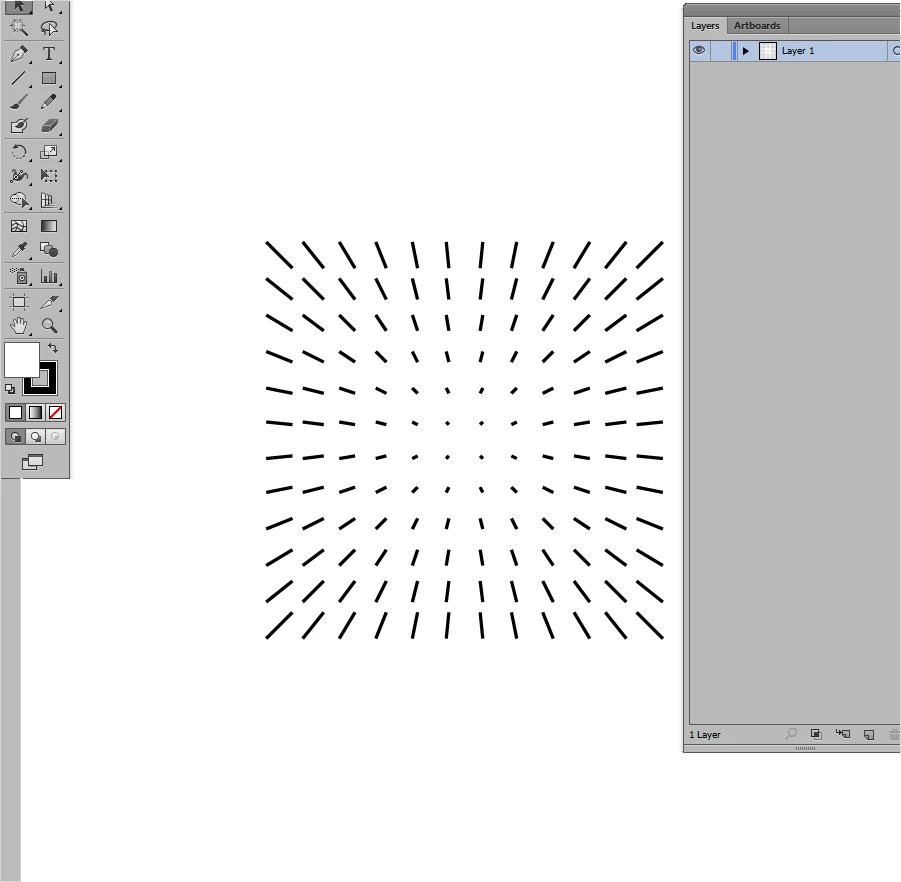
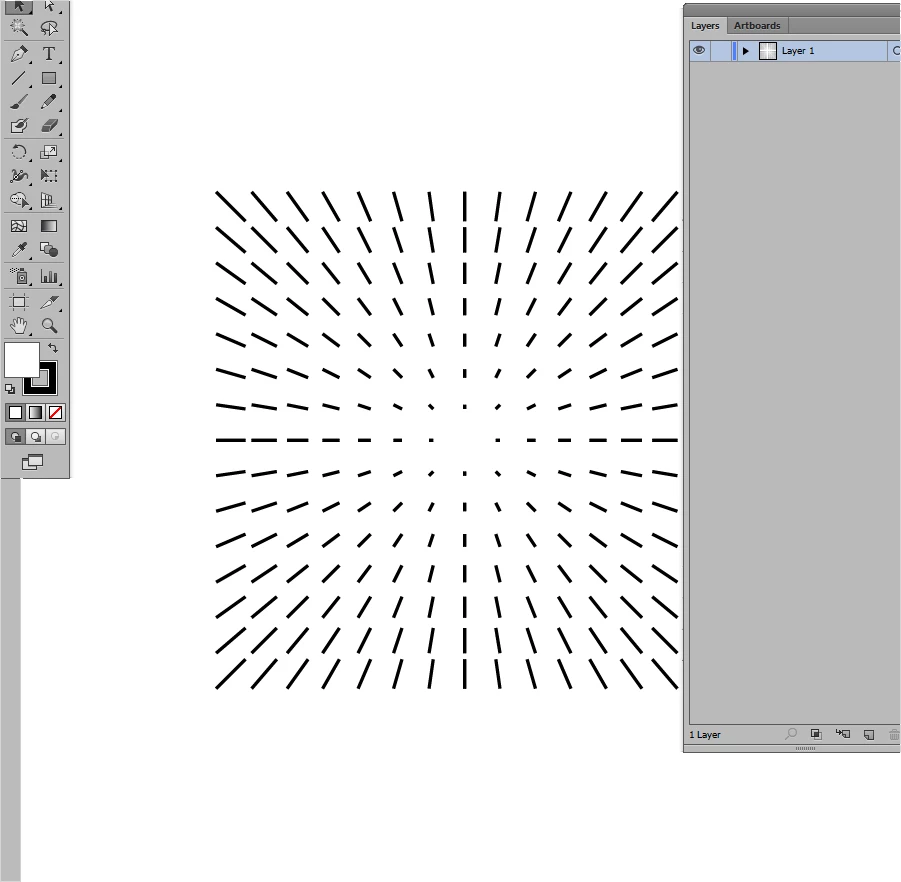
That was indeed a poor script.  Here's version 2.0. 

var n = prompt("Enter square root (side):", 15, " ");
if (n > 30) n = 30;
var distance = 10;
var increment = distance / (0.5 * n);
var doc = app.activeDocument;
var x =   doc.width / 2;
var y = - doc.height / 2;
var group = doc.groupItems.add();
if (n % 2) {
    var start1 = start2 = 0;
} else {
    var start1 = distance / 2;
    var start2 = increment;
}
drawQuadrent(-1,  1);
drawQuadrent(-1, -1);
drawQuadrent( 1,  1);
drawQuadrent( 1, -1);
function drawQuadrent(horizontal, vertical/*direction*/) {
    var x1 = x + (horizontal * start1);
    var x2 = x1 + (horizontal * (start2 * 0.5));
    for (var i = 0; i < n / 2; i++) {
        var y1 = y + (vertical * start1);
        var y2 = y1 + (vertical * (start2 * 0.5));
        for (var j = 0; j < n / 2; j++) {
            drawVector(x1, y1, x2, y2);
            y1 = y1 + (vertical * distance);
            y2 = y1 + (vertical * (increment * (j + 1)));
        }
        x1 = x1 + (horizontal * distance);
        x2 = x1 + (horizontal * (increment * (i + 1)));
    }
}
function drawVector(x1, y1, x2, y2) {
    var path1 = doc.pathItems.add();
    path1.setEntirePath([[x1, y1], [x2, y2]]);
    path1.moveToEnd(group);
}
4 replies

femkeblanco
Legend
January 1, 2023

This is not ideal but works OK with square numbers with even roots (e.g. 100 or 400). 


var doc = app.activeDocument;
var group = doc.groupItems.add();
var n = prompt("Enter number:", 100, " ");
if (n > 1000) n = 1000;
var m = Math.sqrt(n);
var x1 = 0;
var f2 = 0.1, f1 = (m / 2) * f2;
for (var i = 0; i < m; i++) {
x1 += 10;
if (i < m / 2) x2 = x1 - m * f1, f1 -= 0.1;
else x2 = x1 + m * f2, f2 += 0.1;
var y1 = 0;
var f4 = 0.1, f3 = (m / 2) * f4;
for (var j = 0; j < m; j++) {
y1 -= 10;
if (j < m / 2) y2 = y1 + m * f3, f3 -= 0.1;
else y2 = y1 - m * f4, f4 += 0.1;
var path1 = activeDocument.pathItems.add();
path1.setEntirePath([[x1, y1], [x2, y2]]);
path1.moveToEnd(group);
}
}
group.position = [
(doc.width / 2) - (group.width / 2),
(-doc.height / 2) + (group.height / 2)
];

TenTin
TenTinAuthor
Known Participant
January 2, 2023

Thanks. I think you solved it most mathematically! Can I ask for a bit more help?
I have to make a JS script from your codes and then apply it to a circle/dot. Is it right?

femkeblanco
Legend
January 2, 2023

Sorry, I don't understand the question. The script has no requirements other than having an open document.  By the off chance that you're asking how to run a script:  Copy and paste it in a jsx file. (You can create a txt file and change the extension to jsx.)  Then, while your document is open in Illustrator, go to File > Scripts > Other Script (Ctrl+F12). Find your script and open it.

Kurt Gold
Community Expert
Community Expert
January 1, 2023

A simple blend with at least one little blemish.


Electric Polar Sample Blend


TenTin
TenTinAuthor
Known Participant
January 2, 2023

Thanks. I am reverse engineering your file. That's what exactly I want.👍

Ton Frederiks
Community Expert
Community Expert
January 1, 2023

You could create a grid of dots, group it and apply the Classic 3D Extrude effect with perspective.

Larry G. Schneider
Community Expert
Community Expert
January 1, 2023

Nice one, Ton. Looks great.

Ton Frederiks
Community Expert
Community Expert
January 1, 2023

Thanks Larry, a little fireworks to start the new year 🙂

Monika Gause
Community Expert
Community Expert
January 1, 2023

It would work creating this with a blend. But before you blend them, you would have to make the dots in both groups the same size. For this, you will have to mesure one dot in each group. Then do the math. Then lock one of the groups. Ungroup the other one and then use Object  > Transform > Transform each to make the dots the same size. Then group them again.


Then unlock the other group, and blend both the groups.


And since the mention of blend can be misunderstood, here's how I interpreted it: https://shared-assets.adobe.com/link/2d3df8ea-42dd-484d-4e36-95cee60c36ff  (probably too many steps in the blend)

TenTin
TenTinAuthor
Known Participant
January 2, 2023

Too complicated (of course, for me!). I am reverse engineering your Ai file. Thanks for sharing.