


lance1006
Participant
December 16, 2018
Answered

Error 151 while downloading Illustrator on macOS.

  • December 16, 2018
  • 3 replies
  • 671 views

We have tried many times and still unable to download Illustrator, continue to get: Error Code: 151. Unable to create the symbolic link.

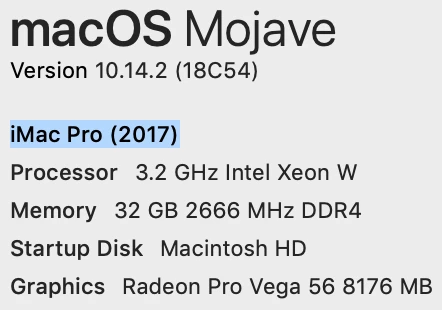
Just bought an iMac Pro...any answers or help would be greatly appreciated.
This topic has been closed for replies.
Correct answer Bill Silbert

Are you trying to install apps directly from the Adobe website? As Monica says, you need to download the Creative Cloud Desktop app first. Once that is on your machine (you will find it in your application folder), launch it and you will be asked to sign in with your Adobe ID. Once it is launched you should see the Creative Cloud logo in the upper right of your Mac’s menu bar. Clicking on that logo will make the desktop app drop down from the menu bar. Within the app that drops down you will see an apps tab. Click on that and all available Creative Cloud programs appear and will be available for install.

3 replies

Participant
August 21, 2020

I'm having the same problem.  I've scrubbed my Mac of all old CC files, and re-downloaded with the updated CC app.  All other programs (Premiere, Rush, Media Encoder) have downloaded with no issues, but Illustrator continues to give me the Error 151 message.  

Ashutosh_Mishra
Inspiring
August 22, 2020

Hi Scott,


Sorry to hear about your experience. I'd request following instructions given on help article(https://helpx.adobe.com/in/creative-cloud/kb/troubleshoot-download-install-logs.html#error151) and see if it helps. Please enter the error code in the box provided and get the instructions accordingly. I am attaching a screenshot for reference:


If it does not help, use Creative Cloud Cleaner Tool to remove the existing installation. Once done, install again using help article(https://helpx.adobe.com/in/download-install/using/download-creative-cloud-apps.html).

Hope it helps.


Regards,

Ashutosh


Bill Silbert
Community Expert
Bill SilbertCommunity ExpertCorrect answer
Community Expert
December 17, 2018

Are you trying to install apps directly from the Adobe website? As Monica says, you need to download the Creative Cloud Desktop app first. Once that is on your machine (you will find it in your application folder), launch it and you will be asked to sign in with your Adobe ID. Once it is launched you should see the Creative Cloud logo in the upper right of your Mac’s menu bar. Clicking on that logo will make the desktop app drop down from the menu bar. Within the app that drops down you will see an apps tab. Click on that and all available Creative Cloud programs appear and will be available for install.

Monika Gause
Community Expert
Community Expert
December 16, 2018

Did you install the Creative Cloud app and then install via its interface?