joshgrazier17
Participant
January 16, 2019
Answered

Folded lines graphic in illustrator

  • January 16, 2019
  • 2 replies
  • 946 views

Hi all,

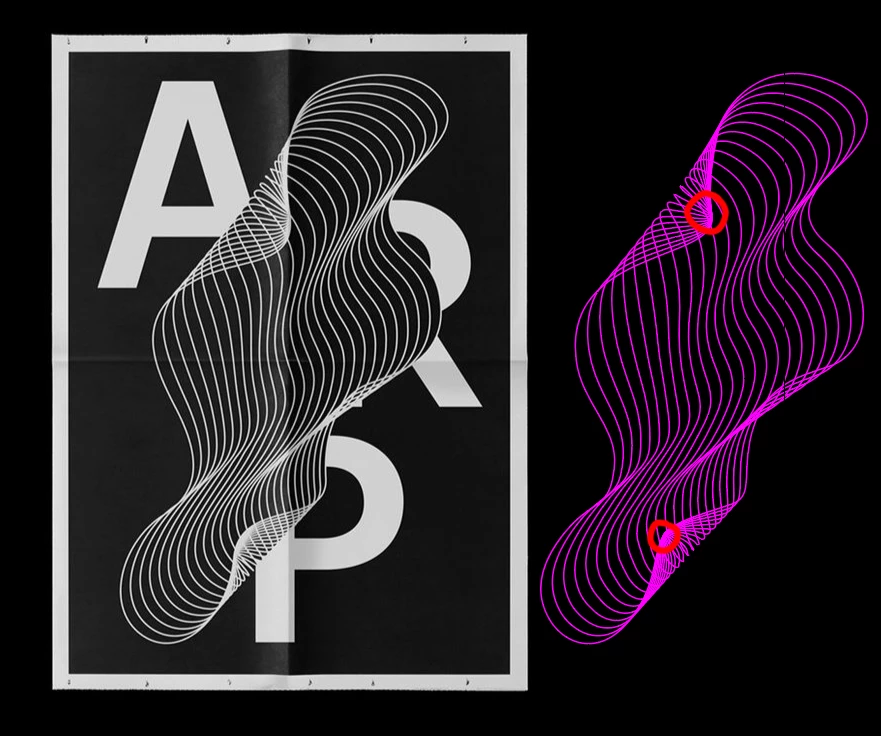
Wondering if anyone else can help me and give me some advice on how I'd create something similar to this (just the middle shape).

I have tried two methods so far. Creating two paths (different shapes) then blended between them. The result isn't like the example.

I've also tried 1 path, splitting it into two shapes, and blending, again this doesn't result in the graphic below.

So my question is, if you had to remake this, how would you do so?

Thanks in advance

This topic has been closed for replies.
Correct answer Doug A Roberts

I agree that a blend should work. I marked the points where I cut the path in this example:

2 replies

Doug A Roberts
Community Expert
Doug A RobertsCommunity ExpertCorrect answer
Community Expert
January 16, 2019

I agree that a blend should work. I marked the points where I cut the path in this example:

joshgrazier17
Participant
January 16, 2019

Thanks alot! Slowly getitng there.

So I made the shape then clipped the path at the two points you highlighted, the fold looks messy though rather than a nice flow like your example. Any tips?

Silkrooster
Legend
January 16, 2019

Looks like a blend to me. Place the two lines apart, but move the end points so they are touching.
That's my thought on it anyway.