


Participating Frequently
February 5, 2019
Question

Graphics to split over 4 store front windows in AI

  • February 5, 2019
  • 1 reply
  • 1446 views

Hi all

First time posting and I'm fairly new to ai, so pls provide full descriptions in your answer so I can follow 🙂

I'm using Illustrator cs6 on a windows laptop.


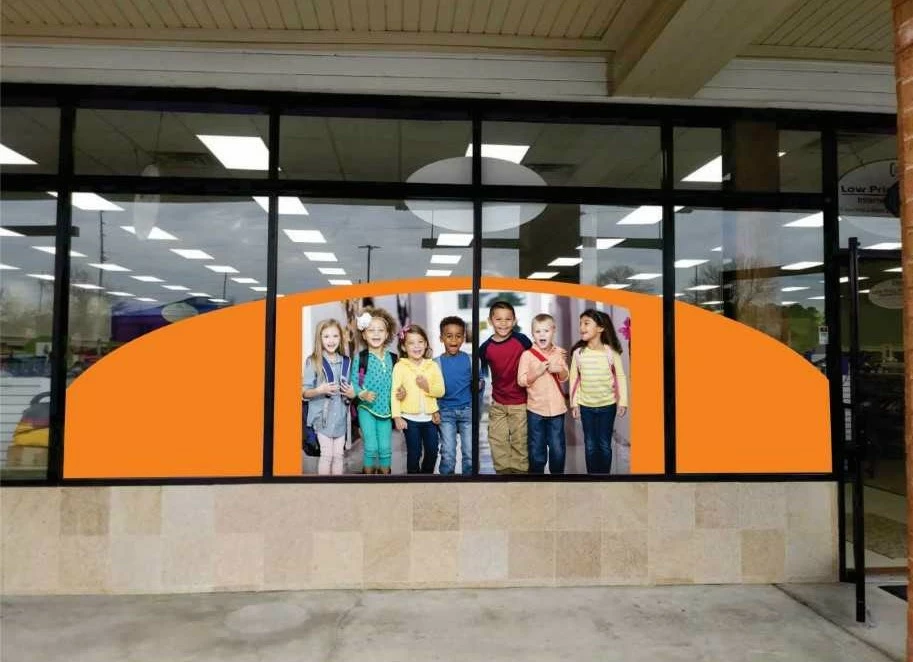
A customer looking for graphics on his store front window exactly as per the attached image.

I need to create the background shape, as the image illustrates, that will be split over the 4 windows.
The picture will be split over the 2 central windows.

The background shape will be curved at top, just as the illustration shows.

The pic will also need to be curved at top to flow with background shape.

I then need to create a cut file.

I already have the pic.

It's seem to be an easy task but I just don't know how to do it.

Any instructions on how to achieve this would be greatly appreciated.

Thank you in advance!
This topic has been closed for replies.

1 reply

Community Expert
February 5, 2019

It looks like a pretty easy job to me. The first thing you need to do is physically measure the window panes and the width of the bars separating them. Window pane sizes alone will not work; the curving edges of the orange background shape will not line up. If you can't measure those details someone else will have to do the work. Sometimes clients can be trusted to do that work, but most often not.

Once you have the measurements needed, create a new Illustrator document and create the window panes and frame details numerically sized to the measurements taken on the job site. Those window graphics look like they would fit within Illustrator's max art board size. So you should be able to create the design at full size. Re-create the client's design, composing in the window panes the way the client desired. You can use the Pathfinder tools to knock out parts of the orange background where the window frame lines are hitting. You'll have to use the clipping mask function for the photo image, making at least two copies of the image to isolate in a clipping mask for each window. Cut lines for a plotter can be made just from the orange background shape. I would stick the cut lines on their own layer.

shahid-hAuthor
Participating Frequently
February 5, 2019

Thanks Bobby

I have the measurements.

That's the problem, it's an easy job but I just don't know how to actually do it in AI.

What you've described sounds fine but I don't have the technical ability to use pathfinder and clipping mask, I'm very new to AI.
Are there no step by step guide to achieve that or maybe a youtube video.
I've done some search but not found anything that's very helpful, well to me anyway.