
Participant
September 13, 2024
Question

Hatched and colored box on Matplotlib, empty on Illustrator

  • September 13, 2024
  • 1 reply
  • 1058 views

Hi everyone,


I am pretty new to Illustrator but my issue is not experience-related (at least it does not seem on a first approach).


I am using Matplotlib to plot some figures. Specifically, I perform a boxplot with seaborn and I use matplotlib features to color the box and hatch it. I then save it in svg. It looks like this (and it also looks like this in Inkscape):
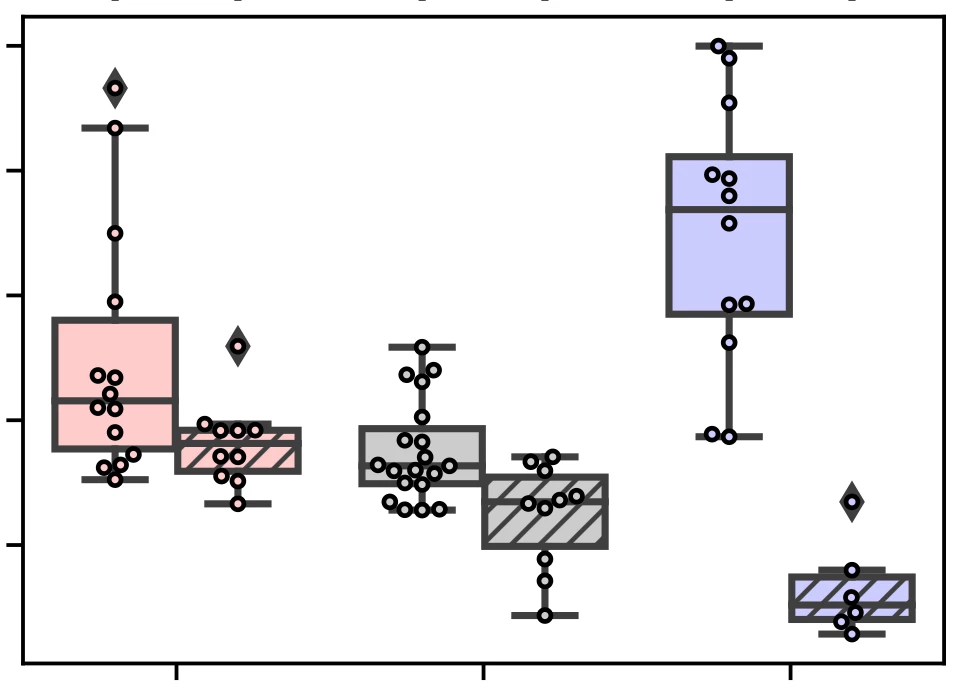
Then I move to Illustrator and insert it using the File-> Place command. I obtain this:
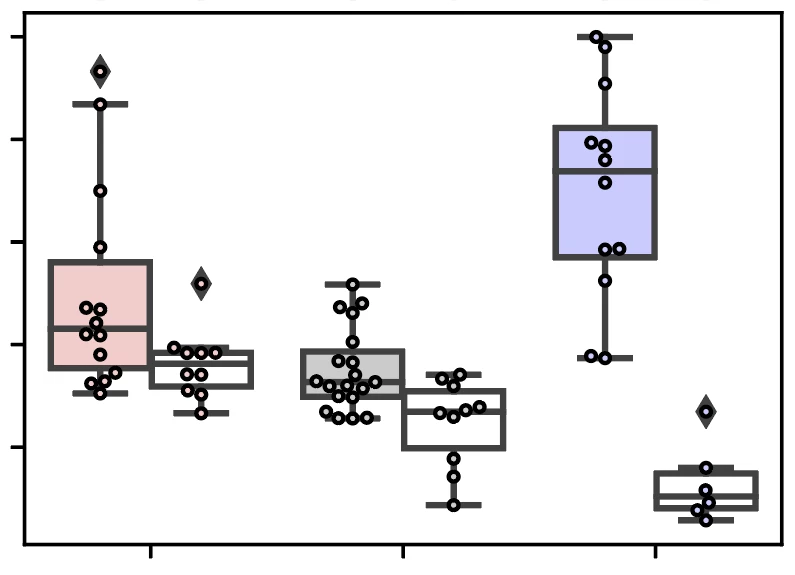
As you can see, the hatching and the color of the previously hatched boxes has disappeared.

Any idea of where the problem comes from and how I can solve it?

Thanks!

This topic has been closed for replies.

1 reply

Monika Gause
Community Expert
Community Expert
September 13, 2024

Exactly how is the hatching made? Can you share a demo file?

Participant
September 14, 2024

Thanks for your answer. Please find below the sequence of code I use to generate the plot in python. I use python 3.7.

        plt.subplots()
        ax = sns.boxplot(data=data_table_AI, x='data', y='quantitative data', order=['foo', 'bar', 'spam'],
                         hue='sub-data', hue_order=['eggs', 'parrot'], dodge=True)
        sns.swarmplot(data=data_table_AI, x='data', y='quantitative data', order=['foo', 'bar', 'spam'],
                      hue='sub-data', hue_order=['eggs', 'parrot'], dodge=True,
                      size=2.5, linewidth=1)
        # Set box colors based on tissue and box hatching for basal side
        hatch_pattern = '////'
        list_color = ['#FFCCCC', '#FFCCCC', '#CCCCCC', '#CCCCCC', '#CCCCFF', '#CCCCFF', None, None]
        i_box = 0
        for patch in ax.patches:
            if patch.__class__.__name__ != 'Rectangle':
                patch.set_facecolor(list_color[i_box])
                # The hue order is 'apical' then 'basal', so every second patch (i.e., odd-indexed) is basal
                if i_box % 2 == 1:
                    patch.set_hatch(hatch_pattern)  # Set hatching for basal boxes
                i_box += 1
        # Set points color and edge color
        for i, collection in enumerate(ax.collections):
            collection.set_edgecolor('k')
            collection.set_facecolor(list_color[i])
        # Capitalize the first letter of tissue labels
        tissue_labels = [label.get_text() for label in ax.get_xticklabels()]
        tissue_labels = [label.capitalize() for label in tissue_labels]
        ax.set_xticklabels(tissue_labels)
        # Set labels and title
        plt.xlabel('Data')
        plt.ylabel('Quantitative data')
        plt.legend().remove()
        plt.tight_layout()
        # Set statistical tests
        pairs = [(('foo', 'eggs'), ('foo', 'parrot')),
                 (('bar', 'eggs'), ('bar', 'parrot')),
                 (('spam', 'eggs'), ('spam', 'parrot'))]
        annotator = Annotator(ax, pairs, data=data_table_AI, x='data', y='quantitative data',
                              order=['foo', 'bar', 'spam'], hue='sub-data', hue_order=['eggs', 'parrot'])
        annotator.configure(test='Mann-Whitney', text_format='star', loc='outside')
        annotator.apply_and_annotate()
        plt.show()


Monika Gause
Community Expert
Community Expert
September 14, 2024

So that is code, but what does it create? A clipping mask?