


Participant
October 12, 2023
Answered

Illustrator 28 Retype selection not recognized, text recognition failed. Try another selection

  • October 12, 2023
  • 16 replies
  • 21058 views

Hello, 


I was so exited when I discoverd the Retype-tool, however, I can't get it to work at all. I select the image (or the outlined text if it's in vector), and I click enter and all I get is this: 
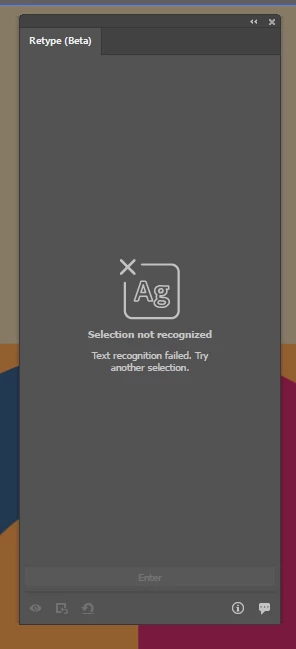
Super bummed, cause it would be so usefull if I could get it to work. Any suggestions?

Correct answer Anshul_Saini

Thank you all for providing the information. I've consulted with the product team, and they suggest trying to incorporate English OCR. Here are the steps to follow:

  1. Click the "Start" button on your Windows system and navigate to "Settings."
  2. Choose "Time & Language" and then select "Language."
  3. Under "Preferred languages," click on "Add a language."
  4. Select the language you'd like to install, choose "English (United States)," and click "Next."
  5. Check all the checkboxes except for "Set as my Windows display language," and then click "Install."


After completing these steps, please check if the issue still persists.


Best regards,

Anshul Saini

@AstrantiaMajor @Vadim274907060f3j @Topeich @forme24654414hwer @Filip Bl. @Magic Plants @Leszek2019 

16 replies

Participating Frequently
August 24, 2024

Personally, I click the download icon to 'download to edit' and a download dialog comes up and the progress bar never moves, despite having internet and having tried at mutiple physical locaitons on different networks. I am logged in and up-to-date on Creative Cloud and latest application version.

Participating Frequently
January 10, 2024

Hello, any update? 

I just installed Illustrator on my new machine and this feature does not work. 

Is it Adobe's agenda to discriminate against users who don't use English as their language?


Monika Gause
Community Expert
Community Expert
January 10, 2024

I'm not sure - is that Polish?

I have just tried a Polish text (rasterized) in my German Illustrator version. No problem with that. https://youtu.be/gtjGNlNxGAY


If you have outlined text, try and rasterize it. That sometimes works better. 

Participating Frequently
January 10, 2024

It is Czech. The problem is not the language of the text. It cannot recognize ABC in Helvetica. It cannot recognize anything since my macOS is in Czech and so is the UI of my Adobe apps with the latest updates. Adobe developers have admitted that this feature announcement is misleading, as it only works correctly on certain configurations.

MartijnVerduin
Participating Frequently
December 8, 2023

Well, at least in the new version that was released today, the suggestion to install English OCR is made by the Retype tool:

Doesn't help me offcourse, still going to have to wait until it gets available for my language.


Omachi
Legend
December 6, 2023
Participant
November 7, 2023

I have windows 11 Pro. There is not selection for "preferred language".  I have done all the other steps listed (it was already setup that way so no changes in language were needed/allowed)  Even if i just type something with a system font and create outlines, it still doesnt identify or show any selections. Anybody else have this problem and create a work around?


Anshul_Saini
Community Manager
Community Manager
November 7, 2023

Hi @peter30576124lur6 @danielt57738565,


I am sorry to hear about that. I just wanted to reconfirm with you both if you have tried the steps to add an English language module for OCR to work in Retype on your system. Here are the steps with screenshots:

  1. Click the “Start” button on your Windows system and navigate to “Settings.”
  2. Choose “Time & Language” and then select “Language.”
  3. Under “Preferred languages,” click on “Add a language.”
  4. Select the language you’d like to install, choose “English (United States),” and click “Next.”
  5. Check all the checkboxes except for “Set as my Windows display language,” and then click “Install.”


After completing these steps, please let me know if the issue still persists.


Best regards,

Anshul Saini

MartijnVerduin
Participating Frequently
November 8, 2023

This is a very good guide to install an extra language in Windows. However, if you're not the Administrator on your PC (I'm using Adobe Creative Cloud in my company's account) and if they have closed this option off for all employees, it will not be possible to add an extra OCR language. So I guess I will not be able to check it out as long as it's still in beta, and that's Just too bad, was looking forward to this. Can we do it using firefly or something (cloud based) for the time being or is it only an Illustrator feature?

@cesarqueb_
Known Participant
November 7, 2023

Same issue here! Retype (beta) feature does not work with latest version of AI (28.0). Using Windows 11 Pro x64 and 16 GB RAM, SSD. Previous version working fine.

Monika Gause
Community Expert
Community Expert
November 7, 2023

@@cesarqueb_  schrieb:

Same issue here! Retype (beta) feature does not work with latest version of AI (28.0). Using Windows 11 Pro x64 and 16 GB RAM, SSD. Previous version working fine.


Did you already try what has been mentioned in this thread?

@cesarqueb_
Known Participant
November 7, 2023

Hello! 👋 


Thank you  for you reply! 
I was missing to update my latest impressions. Yes I did! Installing the English package language in my OS, fix the isssue. The big issue here is... what if the text is in Spanish or another language?


TIA

Anshul_Saini
Community Manager
Anshul_SainiCommunity ManagerCorrect answer
Community Manager
October 17, 2023

Thank you all for providing the information. I've consulted with the product team, and they suggest trying to incorporate English OCR. Here are the steps to follow:

  1. Click the "Start" button on your Windows system and navigate to "Settings."
  2. Choose "Time & Language" and then select "Language."
  3. Under "Preferred languages," click on "Add a language."
  4. Select the language you'd like to install, choose "English (United States)," and click "Next."
  5. Check all the checkboxes except for "Set as my Windows display language," and then click "Install."


After completing these steps, please check if the issue still persists.


Best regards,

Anshul Saini

@AstrantiaMajor @Vadim274907060f3j @Topeich @forme24654414hwer @Filip Bl. @Magic Plants @Leszek2019 

Participating Frequently
October 18, 2023

Wow, that works for me. Thanks for your effort! @Anshul_Saini 

Anshul_Saini
Community Manager
Community Manager
October 18, 2023

You're welcome! I'm glad to hear that the solution I provided worked for you. If you have any more questions or need further assistance, feel free to ask.


Best,

Anshul Saini

Participant
October 17, 2023

Same isue, no matter what text I use, it recognise none.

Anshul_Saini
Community Manager
Community Manager
October 16, 2023

Hi @Filip Bl. @forme24654414hwer @AstrantiaMajor @Vadim274907060f3j,


I've logged a bug with the product team, and they are currently investigating the issue. They have requested a few details which would be really helpful in depicting the issue like:

  • Exact version of OS, including build number
  • System details (RAM, CPU, GPU generation, and make & model)
  • Device make & model
  • Is this an intermittent issue, or is it happening all the time?
  • Would you mind sharing a sample image or file?
  • A small screen recording demonstrating the issue.


Also, do you recall downloading the Retype module initially? After the download is complete, you'll receive a confirmation message indicating a successful installation.


Additionally, I would recommend you all upvote the UserVoice (https://illustrator.uservoice.com/forums/601447-illustrator-desktop-bugs/suggestions/47341301-retype-does-not-work-at-all-in-czech-version-of-il) and add your comment there.


Thank you for your cooperation & patience.


Best,

Anshul Saini

Participating Frequently
October 17, 2023

Operációs rendszer neve Microsoft Windows 11 Pro
Verziószám 10.0.22621 build 22621
Egyéb op. rendszer leírás Nem érhető el
Operációs rendszer gyártója Microsoft Corporation
Rendszer neve FORME
Rendszer gyártója Micro-Star International Co., Ltd.
Rendszer modellje MS-7B87
Rendszer típusa x64-based PC
Rendszerváltozat To be filled by O.E.M.
Processzor AMD Ryzen 5 3600 6-Core Processor, 3600 Mhz, 6 mag, 12 logikai processzor
BIOS-verzió/-dátum American Megatrends International, LLC. 1.F5, 2022. 01. 20.
SMBIOS verziója 2.8
Beágyazott vezérlő verziója 255.255
BIOS-mód UEFI
Alaplap gyártója Micro-Star International Co., Ltd.
Alaplaptermék B450M GAMING PLUS (MS-7B87)
Alaplapverzió 1.0
Platformszerepkör Asztali gép
Biztonságos rendszerindítás állapota Ki
PCR7-konfiguráció A megtekintéshez emelt jogosultsági szint szükséges
Windows könyvtár C:\Windows
Rendszerkönyvtár C:\Windows\system32
Rendszerindító eszköz \Device\HarddiskVolume1
Területi beállítások Magyarország
Hardverabsztrakciós réteg verziószám = "10.0.22621.1413"
Felhasználónév forme\szoko
Időzóna Közép-európai nyári idő
Telepített fizikai memória (RAM) 16,0 GB
Teljes fizikai memória 15,9 GB
Szabad fizikai memória 6,61 GB
Teljes virtuális memória 38,9 GB
Szabad virtuális memória 22,8 GB
Lapozófájl mérete 23,0 GB
Lapozófájl C:\pagefile.sys
Rendszermag DMA-védelme Ki
Virtualizálásalapú biztonság Nincs engedélyezve
Windows Defender alkalmazásvezérlés – házirend Érvénybe léptetve
Windows Defender alkalmazásvezérlés – felhasználói üzemmódú házirend Ki
Eszköztitkosítás támogatása A megtekintéshez emelt jogosultsági szint szükséges
Hyper-V - virtuális gép figyelő módjának bővítményei Igen
Hyper-V - második szintű címfordítás bővítményei Igen
Hyper-V - a virtualizálás engedélyezett a belső vezérlőprogramban Nem
Hyper-V - adatvégrehajtás-védelem Igen


1 computer sometimes working  on this pc nothing dosent metter the pic type or quality.

Participating Frequently
October 16, 2023

Something was changed on server side i think, becouse start working without any change or update for me.