



AODA_Developer
Inspiring
September 14, 2016
Answered

Illustrator CC SDK: Can't compile samples

  • September 14, 2016
  • 1 reply
  • 986 views

Hello all,

I'm new to writing plugins and I'm trying to learn the ropes via the samples in the Illustrator SDK 2015.3. My development environment is on a Mac using Xcode 8.0.

When I open one of the sample projects (EmptyPanel for instance) and try to build the plugin I get a series of errors about unknown type names (SInt16, OSType, UInt16, Point, Rect, etc.). It looks like these types should be defined in MacTypes.h.
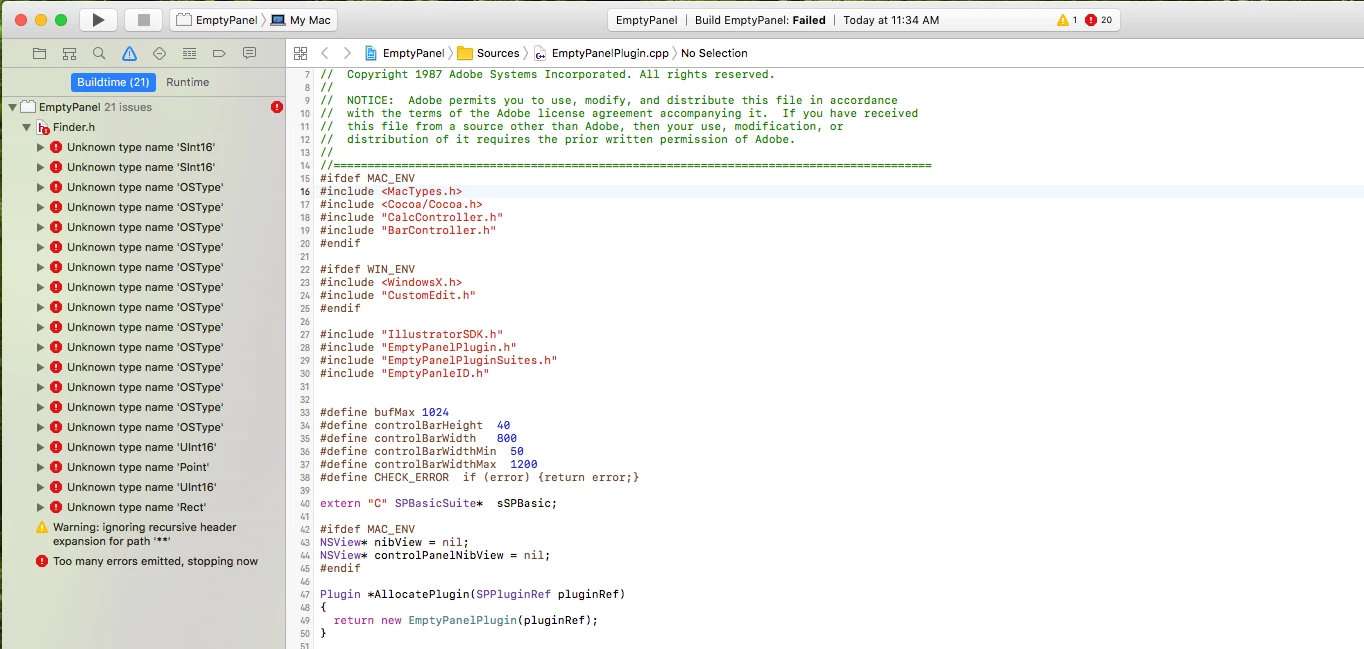
I can build and run the example "Creating a plug-in in Mac OS" from the "Getting Started" document:

http://wwwimages.adobe.com/content/dam/Adobe/en/devnet/illustrator/sdk/CC2015_3/getting-started-guide.pdf

Has anyone else found and solved this problem? It must be a build setting or something that I'm missing?

This topic has been closed for replies.
Correct answer AODA_Developer

I've found my problem: in the project's build settings under "Header Search Paths" you need to remove the entry for "/Developer/Headers/FlatCarbon", it's no longer needed.

And as for the warning, "ignoring recursive header expansion for path ** ", you need to change the "." path in the same settings entry (Header Search Paths) from recursive to non-recursive (i.e. change "./**" to "." .

I'm disregarding netiquette and posting an answer to my own question in the hopes that it saves someone else from banging their head against the same wall in the future.

1 reply

btempleton1982
Inspiring
September 14, 2016

That #include <MacTypes.h> line is not in my copy of the SDK. Did you add that?

Make sure your header search paths are set correctly. The "ignoring recursive expansion" warning should not be there.

AODA_Developer
Inspiring
September 14, 2016

Yes, I did add that line to see if it would help (it didn't).

I'll double check the header search paths, I know that at some point I saw the "ignoring recursive expansion" warning but haven't seen it recently. Thanks for the info!

AODA_Developer
AODA_DeveloperAuthorCorrect answer
Inspiring
September 15, 2016

I've found my problem: in the project's build settings under "Header Search Paths" you need to remove the entry for "/Developer/Headers/FlatCarbon", it's no longer needed.

And as for the warning, "ignoring recursive header expansion for path ** ", you need to change the "." path in the same settings entry (Header Search Paths) from recursive to non-recursive (i.e. change "./**" to "." .

I'm disregarding netiquette and posting an answer to my own question in the hopes that it saves someone else from banging their head against the same wall in the future.