JGAF63384
Participant
October 20, 2017
Answered

Illustrator cc18 Bounding Box Behavior

  • October 20, 2017
  • 1 reply
  • 511 views

Hello!

Yesterday I updated to Illustrator cc2018.

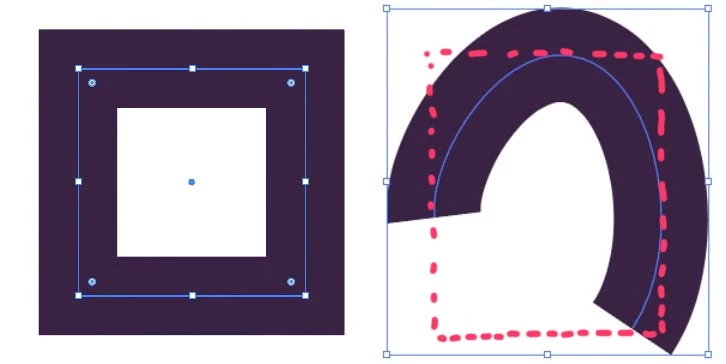
When I draw a rectangle, the bounding box is congruent with the path of the rectangle. That’s fine.

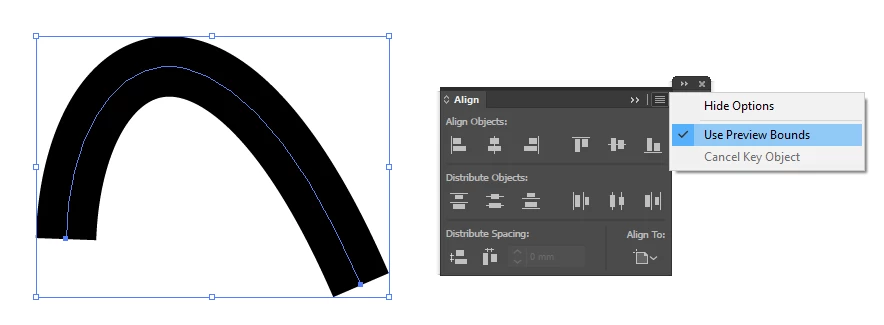
When I draw a free line with the pen tool, the bounding box is placed around the outer edges of the outline. That’s bad. I need a bounding box that is placed around the path.

I think that’s a new behavior of the bounding box in cc2018? Am I wrong? I never noticed that before.

Is there a way to change that?

Take a look at the picture to see the problem.

Thanks in advance!
    This topic has been closed for replies.
    Correct answer Doug A Roberts

    how does 'use preview bounds' affect both/either situation? i haven't updated to 2018 yet so can't test this myself.

    1 reply

    Doug A Roberts
    Community Expert
    Doug A RobertsCommunity ExpertCorrect answer
    Community Expert
    October 20, 2017

    how does 'use preview bounds' affect both/either situation? i haven't updated to 2018 yet so can't test this myself.

    JGAF63384
    JGAF63384Author
    Participant
    October 20, 2017

    THAT’S IT!

    That was fast!

    Thanks, Doug!