


Known Participant
December 9, 2021
Question

Illustrator colour management RGB profiles

  • December 9, 2021
  • 1 reply
  • 213 views

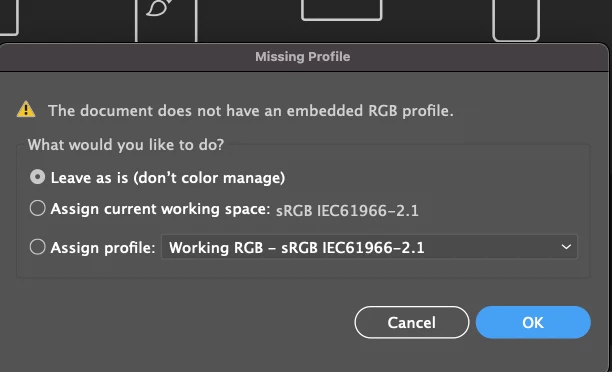
This message has popped up on my illustrator? I don't know what it means? my workspace is set to RGB? so i dont understand why it's saying there is no embedded RGB profile? how do i avoid getting this pop up message? 


my workspace is always set up to this > sRGB IEC61966-2.1


how do i ensure the colour managment is set up the same on all workspace?
This topic has been closed for replies.

1 reply

c.pfaffenbichler
Community Expert
Community Expert
December 9, 2021

You might be misunderstanding something here. 


The alert clearly states that the document you are opening has no embedded profile. 

What your RGB Working Space is has no relevance so far, it is the document that lacks a clear definition as to what a given combination of RGB numbers should actually look like. 


If you definitely want don’t want to get the alert you can set up your Color Settings accordingly (Color Management Policies > Missing Profiles). 

Known Participant
December 9, 2021

well thats why Im asking because I dont understand clearly.

c.pfaffenbichler
Community Expert
Community Expert
December 9, 2021

The image does not have an embedded profile. 

Which means its color appearance would be essentially meaningless at the moment unless you know what its original Color Space was and assign that profile. 


If you want to work on unprofiled images you can suppress the alert in the Color Settings (Color Management Policies > Missing Profiles)