


Participant
May 30, 2018
Answered

Issues with squished text

  • May 30, 2018
  • 3 replies
  • 17185 views

Hi, i have a problem with my squished text.

I don't know how to revert it back to normal like i was copying text from a google doc into illustrator and the text ended to be very long in length. So i resized it down so i could read it on a A3 document setup normally. ANNDDD..... i don't know why but my text got squished and there's nothing wrong with my spacing and size. Now every textbox and text i make in Illustrator ends up being squished. I need helpp
    This topic has been closed for replies.
    Correct answer Jeff Witchel, ACI

    Just a guess here.

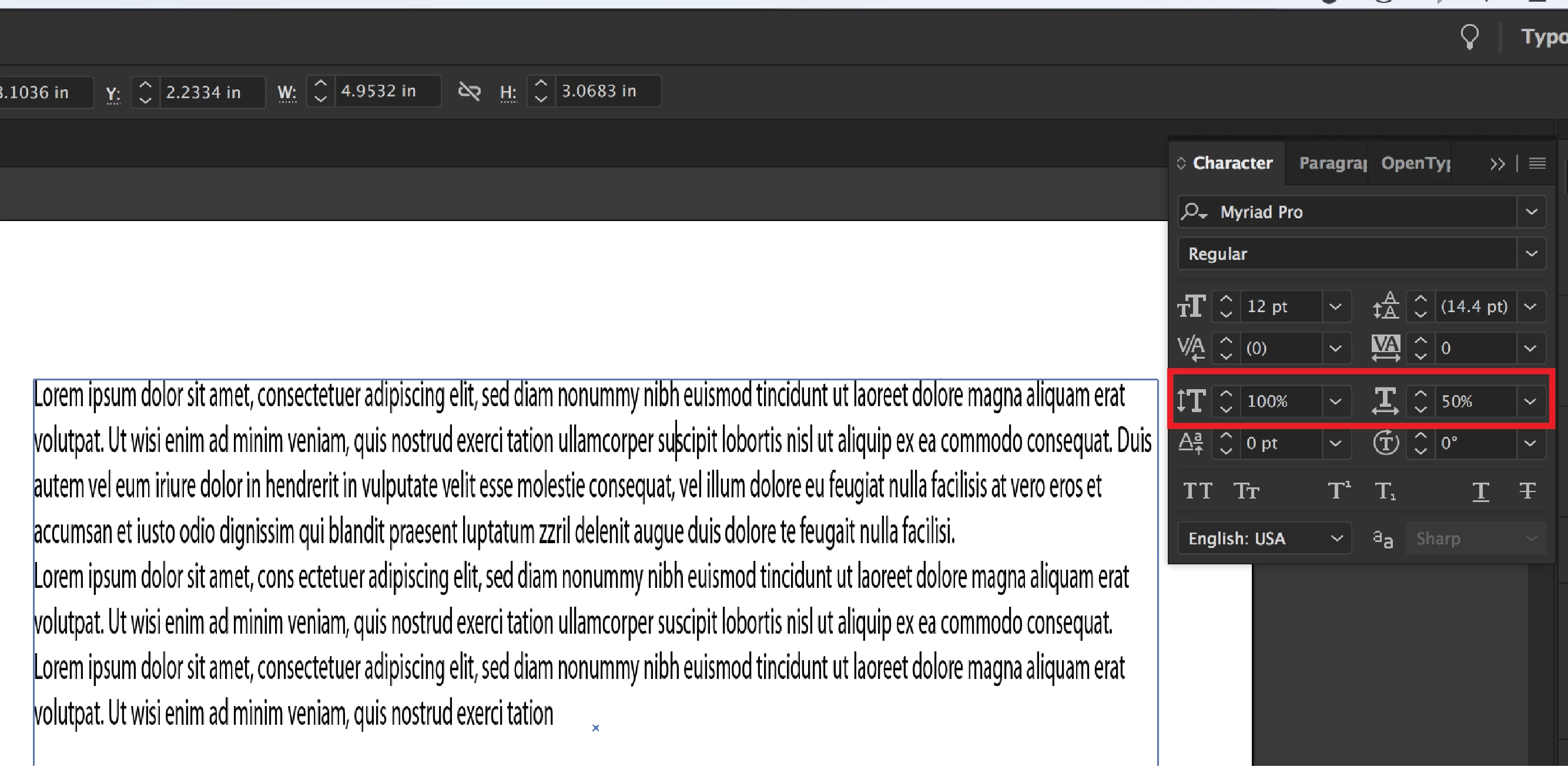
    Sounds like you're using Horizontal or Vertical Scale in the Character panel. Just change the Percent back to 100% and you'll be good to go. (see screenshot below)

    3 replies

    John Mensinger
    Community Expert
    Community Expert
    May 30, 2018

    I suspect Jeff has it right.^

    It's worth mentioning (and remembering) that any setting you change in Illustrator while nothing is selected becomes the default for all new items.

    Monika Gause
    Community Expert
    Community Expert
    May 30, 2018

    https://forums.adobe.com/people/John+Mensinger  schrieb

    It's worth mentioning (and remembering) that any setting you change in Illustrator while nothing is selected becomes the default for all new items.

    That would be in InDesign.

    John Mensinger
    Community Expert
    Community Expert
    May 30, 2018

    https://forums.adobe.com/people/Monika+Gause  wrote

    That would be in InDesign.

    Hmmm...yes, it's true of InDesign. But it's also true of Illustrator, perhaps in a different way, so I'll refine my statement.

    It's worth mentioning (and remembering) that any setting that is available to be changed in Illustrator while a document is open, and nothing is selected, becomes the document-level default for applicable new items created during the session.

    In other words, for example, if the user changes font scaling while nothing is selected, new text will assume the setting.

    Jeff Witchel, ACI
    Community Expert
    Jeff Witchel, ACICommunity ExpertCorrect answer
    Community Expert
    May 30, 2018

    Just a guess here.

    Sounds like you're using Horizontal or Vertical Scale in the Character panel. Just change the Percent back to 100% and you'll be good to go. (see screenshot below)

    ShakeN93
    Inspiring
    May 30, 2018

    Can you show a screenshot ? btw in my opinion every time when i copy a text from internet first time i paste in Notepad and after i copy again from Notepad and put in Ilustrator/PowerPoint/Word, etc.