


charlesn79540358
Inspiring
March 22, 2019
Question

Layer naming

  • March 22, 2019
  • 4 replies
  • 1215 views

Hello,

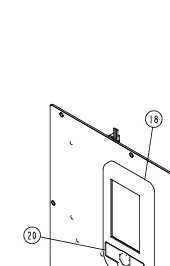
I converted a .dwg file into svg file but there are no names for the paths so when I want to create classes for ID's in an outside program I can't. So say we have a circle 20 but the path id is blank unless I go into Adobe illustrator and tell it that this is circle 20. Can I write a program that will add the id names to the corresponding circle?

So right now when I click on circle 18 the path id is a random generated name but I want it to have the id of hotbtn18 but the only I can think of right is that I have to manually change the path id name.
Thank you,

This topic has been closed for replies.

4 replies

renél80416020
Inspiring
May 7, 2019

Bonjour charlesn79540358 ,

Je peux faire le script (si les numéros sont des textes 'textFrame')

me contacter par mail (voir le profil)

LR

charlesn79540358
Inspiring
May 2, 2019

That is the challenge that I am having. It's like we would have an in house user that goes and set up all the path id's. I wish I could find a simpler way.

CarlosCanto
Community Expert
Community Expert
May 3, 2019

do you mind sharing a sample file? hopefully we can find some unique feature like stroke size to be able to tell them apart

charlesn79540358
Inspiring
May 9, 2019

Sorry for the late response the so we get a dwg file that is created. I converted it to a svg. But when you try to isolate a circle on the svg it just has circle. I think we would have to have an user that manual rename the layers.

CarlosCanto
Community Expert
Community Expert
March 23, 2019

you could write a program to name paths in Illustrator or to go straight into the svg and change/add IDs. The challenge would be the logic, how would you tell the program that path x should be path18?

Srishti Bali
Community Manager
Community Manager
March 22, 2019

Hi Charles,

I think it could be possible through scripting, hence moving this discussion to Illustrator Scripting​ forum.

Regards,

Srishti