Inspiring
January 5, 2017
Answered

Messed up H and Y values

  • January 5, 2017
  • 1 reply
  • 710 views

Hello,

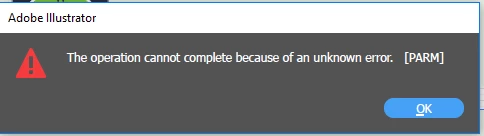
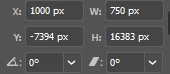
I'm having a serious issue with Illustrator; I have a group which its inner content has a fixed height/width, however when exiting isolation mode, the Height and Y position get completely skewed (but only in the transform panel), when I try to manually set it it returns an unknown error:

This is very problematic for me, any reason why this is happening?

Thank you

This topic has been closed for replies.
Correct answer Splaticuss

Can you post a screenshot of the layer panel with the hierarchy ob this object?

And please mark, which parts of it are causing the trouble.

Some files are old from recent versions. Some might have a legacy of bugs inherited. It's bad, but it happened in the past.

Is there perhaps Avast Antivirus instlled on your computer? It has been causing issues with messing values in panels.


Well Monika, I'm an idiot.

It I had a hidden guide in there, this was driving me nuts (thankfully not for too long), but opening the layers panel (which I should do more often!!!) thanks to you pointed out the guide which was taking all that space

Thanks a bunch, I have another issue on a separate thread, should you want to have a look at it I would be very grateful

Workstation running very slow since installing creative cloud


Cheers

Sam

1 reply

Monika Gause
Community Expert
Community Expert
January 5, 2017

Will be impossible to solve without knowing:

- your version

- system

- the history of the file

- the exact nature of the objects

- any third party plugins?

and maybe a couple other questions.

You should definitely show the artwork and the layers panel (fully opened).

Inspiring
January 5, 2017

Hello Monika,

My version is the latest (2017 release)

Windows 10 anniversary edition

What do you mean by history? It was made from scratch by me

The objects are basic shapes and text grouped up inside a container

No third party pluggins

Here's a screenshot of the artwork:

Transform panel (which others do you need?)

As you see on the artwork, the height of of the chosen element cannot be 16383px high... in fact here's a screenshot of the inner bounding box, which is fine when in isolation mode

Hope this answers all/most of your questions

Cheers

Inspiring
January 5, 2017

Update:

I just found out that its this specific element:

that's causing the trouble, now when I pick ONLY these elements you see on the screenshot, it's fine


HOWEVER

When doing "CTRL+A" (select all), it goes back to the weird value, this is the only element in the document that does this, I looked around to see if there's any hidden pixel anywhere in the canvas but nothing, I think I can solve it just by ungrouping and regrouping, but question is, why is this happening in the first place?

Thanks