


Answered
MRAP issue on multiple script runs
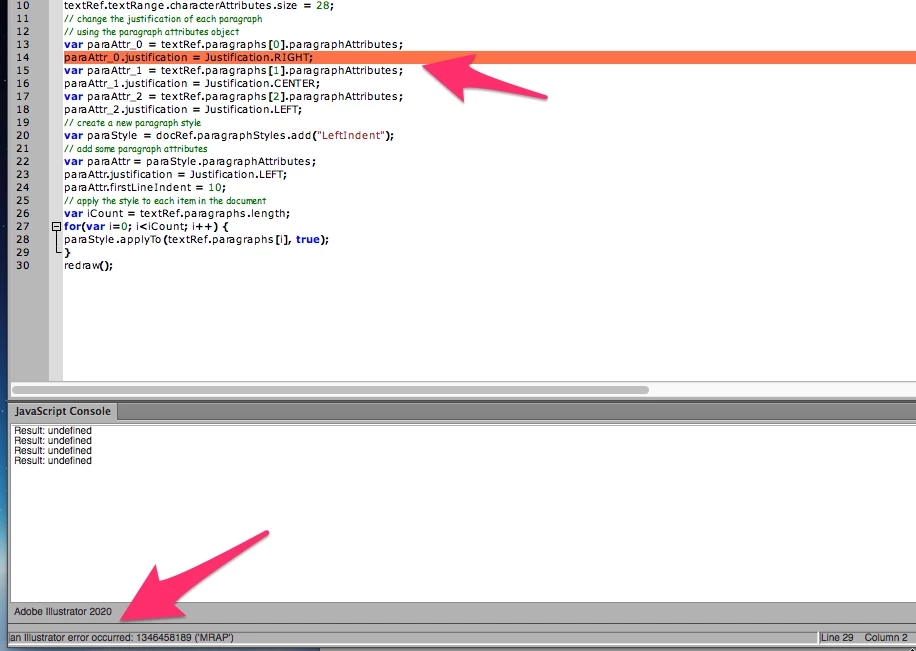
I have MRAP error when I run the script second time and it's happening inside the "For loop", when I try to change text alignment. I thought it's my code first, but was not able to find an error. So I did try with the example from the Adobe JS script guide. And on the seond run in the ExtendScruipt tool I had the same issue. Here is the code from the Adone PDF. It's probably an issue in AI it self. Please help.
// Creates a new document with 1 text frame and 3 paragraphs
// gives each paragraph a different justification, then creates
// a paragraph style and applies it to all paragraphs
var docRef = documents.add();
var pathRef = docRef.pathItems.rectangle(600, 200, 200, 400);
var textRef = docRef.textFrames.areaText(pathRef);
textRef.paragraphs.add("Left justified paragraph.");
textRef.paragraphs.add("Center justified paragraph.");
textRef.paragraphs.add("Right justified paragraph.");
textRef.textRange.characterAttributes.size = 28;
// change the justification of each paragraph
// using the paragraph attributes object
var paraAttr_0 = textRef.paragraphs[0].paragraphAttributes;
paraAttr_0.justification = Justification.RIGHT;
var paraAttr_1 = textRef.paragraphs[1].paragraphAttributes;
paraAttr_1.justification = Justification.CENTER;
var paraAttr_2 = textRef.paragraphs[2].paragraphAttributes;
paraAttr_2.justification = Justification.LEFT;
// create a new paragraph style
var paraStyle = docRef.paragraphStyles.add("LeftIndent");
// add some paragraph attributes
var paraAttr = paraStyle.paragraphAttributes;
paraAttr.justification = Justification.LEFT;
paraAttr.firstLineIndent = 10;
// apply the style to each item in the document
var iCount = textRef.paragraphs.length;
for(var i=0; i<iCount; i++) {
paraStyle.applyTo(textRef.paragraphs[i], true);
}
redraw();
 AdChoices