


Participant
April 19, 2018
Question

Pattern brush preview problem

  • April 19, 2018
  • 1 reply
  • 845 views

Hello everybody!

I have a problem that I can not solve. I created a simple pattern brush in illustrator. Brush works fine but after saving the file and reopening it preview box in brush menu is blank white box. Brush is working fine. If I replace the brush ornament it becomes visible but after saving and reopening it is gone again.
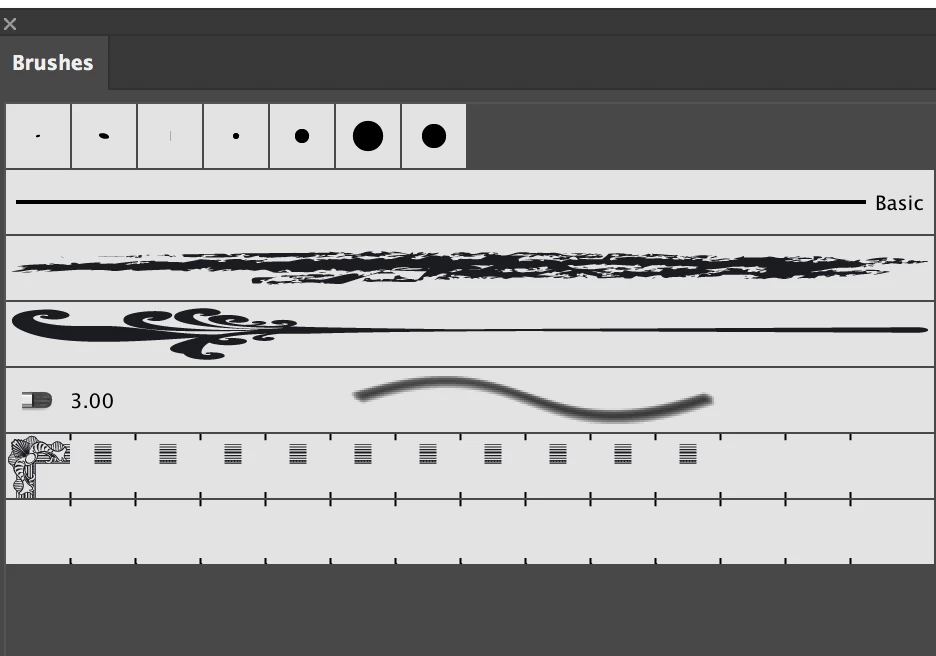
Here is also link to the file with problematic brush.
https://drive.google.com/open?id=1BoYdHe2zLcj13fCYjNpEaSNrhxi6upJ8

    This topic has been closed for replies.

    1 reply

    Andrei Koziakov
    Inspiring
    April 19, 2018

    Hi
    I can't say what exactly is wrong with graphics, but what you can do and it works in my case:
    — save the document as PDF

    — then open this PDF in Illustrator and copy graphics from PDF
    — paste the graphics back into the first document and create a new pattern brush from it

    — the preview of this new pattern brush will be visible after reopening

    Copying graphics into InDesign for example and then copying back to Illustrator also can be useful.

    Participant
    April 19, 2018

    Thank you to showing the right direction.
    Saving to PDF and copying to first document did not work for me. workflow that worked was
    — Save as PDF. Open PDF in Illustrator

    — Copy graphic from PDF to InDesign

    — Copy graphic from InDesign to Illustrator

    — Remove clipping paths

    — Create new pattern brush

    tromboniator
    Community Expert
    Community Expert
    April 20, 2018

    I have not figured out what's going on with your brush, but if you put a filled, closed path (such as a rectangle) behind the ornament, select it all, choose Pathfinder > Minus Front, then Object > Compound Path > Release and make a brush from the result, it stays visible in the Brushes panel when you reopen the document.

    Peter