

Practice script to convert art to "permanent outlines" drawing anchors and handles, what's wrong?
Just for practice I wrote a basic script that would loop through all document.pageItems then replace it's appearance with a stroke while attempting to draw each of it's pathPoint anchors/handles manually. I'm getting unexpected results, though.
On a simple shape, there are no problems. Left is the script result, right is the actual path:
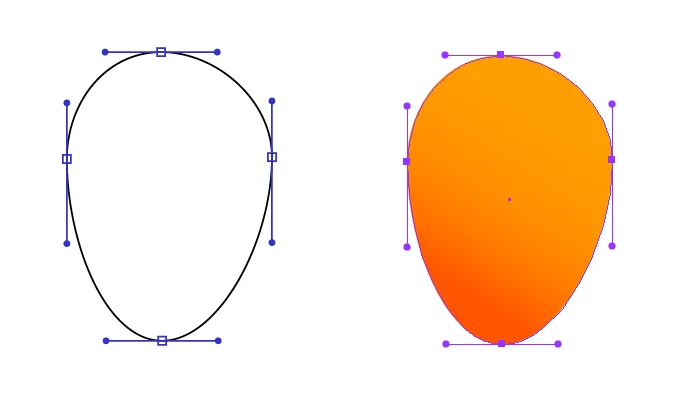
Looks great. But once I try a more complex file like a character, I get strange results:
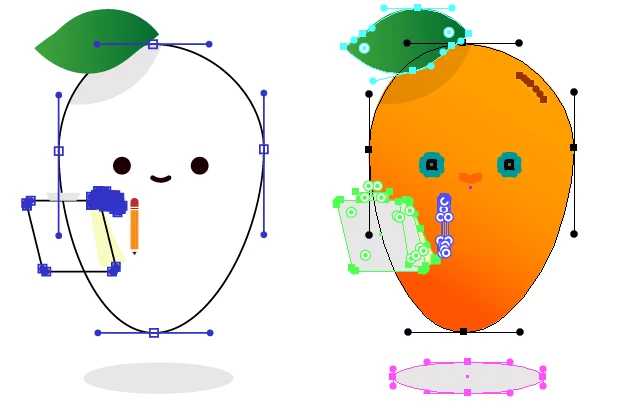
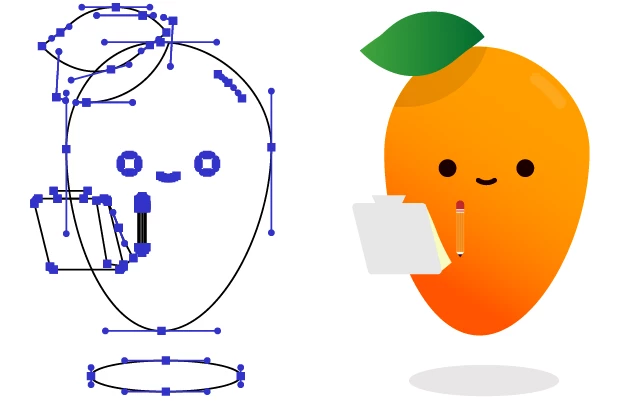
The left script results produces a bundled group of anchors where there should be none (between the pencil and the clipboard, beneath the left eye). It looks as though it stops executing at this point, because it doesn't continue to the leaf, shadow, eyes, mouth, etc. When I comment out the section that draws handles, all is fine, it strips the appearance just as expected:
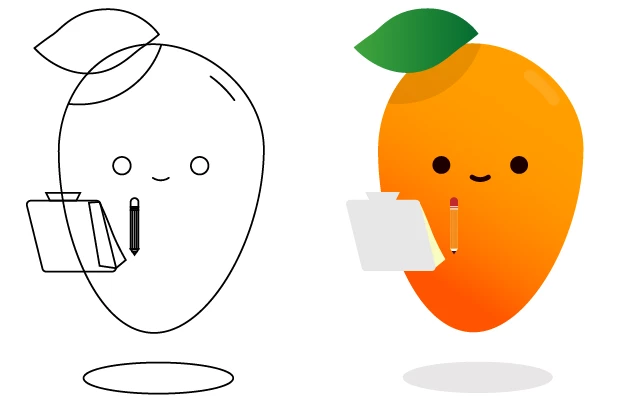
Can I get some help here? What am I doing wrong? How can this be done better overall?
//
// Barebones script to convert all paths in current document to permanent Outlines, including handles and anchors.
// This action can be undone with a single Edit > Undo command.
//
var anchorWidth = 1; // number in pixels, width of stroke
var anchorSize = 5; // number in pixels, height/width of rectangle
var handleSize = 4; // number in pixels, size of ellipse/orb where handle is grabbed
var anchorColor = newRGB(50, 50, 200); // RGB values, currently blue
//
var outlineWidth = 1; // number in pixels, width of stroke
var outlineColor = newRGB(0, 0, 0); // The RGB value of color ([0,0,0] = black)
//
var forceOpacity = true; // Boolean (false or true) if true, force all paths to have full opacity

function convertToOutlines() {
  for (var i = app.activeDocument.pageItems.length - 1; i >= 0; i--) {
    var item = app.activeDocument.pageItems[i];
    if (/path/i.test(item.typename)) {
      if (item.stroked || item.filled) {
        replaceAppearance(item);
        // If I comment out the code below, all objects convert appearance exactly as expected.
        // But certain parts (leaf, shadow, eyes/mouth) aren't affected by this?
        if (item.pathPoints.length)
          for (var p = 0; p < item.pathPoints.length; p++) {
            var point = item.pathPoints[p];
            drawAnchor(point);
            if (point.leftDirection) drawHandle(point, "left");
            if (point.rightDirection) drawHandle(point, "right");
          }
        // ---------------
        item.opacity = forceOpacity ? 100.0 : item.opacity;
      }
    }
  }
}
convertToOutlines();

function drawAnchor(point) {
  var childpos = point.anchor;
  var anchor = app.activeDocument.pathItems.rectangle(
    point.anchor[1] + anchorSize / 2,
    point.anchor[0] - anchorSize / 2,
    anchorSize,
    anchorSize
  );
  setAnchorAppearance(anchor);
}
function drawHandle(point, direction) {
  var handle = app.activeDocument.pathItems.add();
  handle.setEntirePath([point.anchor, point[direction + "Direction"]]);
  setAnchorAppearance(handle);
  var handleBar = app.activeDocument.pathItems.ellipse(
    point[direction + "Direction"][1] + handleSize / 2,
    point[direction + "Direction"][0] - handleSize / 2,
    handleSize,
    handleSize
  );
  handleBar.stroked = false;
  handleBar.filled = true;
  handleBar.fillColor = anchorColor;
}

function setAnchorAppearance(item) {
  item.filled = false;
  item.stroked = true;
  item.strokeWidth = anchorWidth;
  item.strokeColor = anchorColor;
}

function replaceAppearance(item) {
  item.filled = false;
  item.stroked = true;
  item.strokeWidth = outlineWidth;
  item.strokeColor = outlineColor;
}

function newRGB(r, g, b) {
  var color = new RGBColor();
  color.red = r;
  color.green = g;
  color.blue = b;
  return color;
}


 AdChoices