Participant
August 14, 2020
Answered

Problem exporting DXF file with clipping mask from Illustrator

  • August 14, 2020
  • 3 replies
  • 1847 views

sorry for bad english first.

my boss order to me product drawing in autocad but I don't know how to you cad and time is very tight.. so I drawed product in illustrator and export to dxf file. but when I open that dxf file in cad, there is no clipping mask at all! like I just drawing line at one layer and not setting clipping mask!

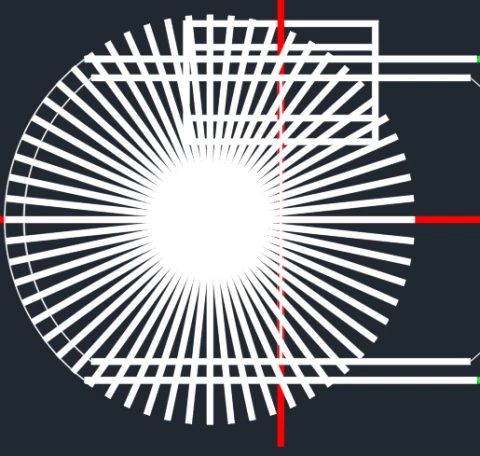
here's before and after exporting.. help me please!!  Did I doing something wrong?? Or some option to solve this??
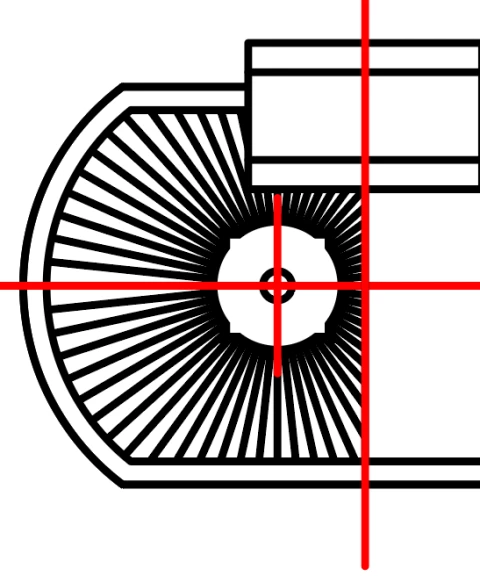
 

{Renamed by MOD}

This topic has been closed for replies.
Correct answer John Mensinger

This will never work because AutoCAD and the DXF format have no support for Illustrator clipping masks or any equivalent feature that would be correctly interpreted by AutoCAD.


  1. To get clean export to DXF and accurate read-into AutoCAD, you'd have to produce a drawing that isn't dependent upon any software-specific features; just the lines and shapes exactly as they are to appear.
  2. Even if you achieve a., and it opens in AutoCAD with the correct appearance, it won't be an AutoCAD drawing. The purpose of AutoCAD is relational data at scale. In other words, if you draw 2 rectangles in AutoCAD, AutoCAD "knows" and tracks the relative sizes and positions of the 2 objects, and every other subsquent thing that's drawn or edited in its environment. That data is utilized for engineering and manaufacturing purposes. A DXF exported from Illustrator won't have that "intelligence," and may be effectively worthless in a product development role. Considering your boss asked specifically for an AutoCAD drawing, it's possible your DXF export from Illustrator would be of no use anyway.

3 replies

John Mensinger
Community Expert
John MensingerCommunity ExpertCorrect answer
Community Expert
August 24, 2020

This will never work because AutoCAD and the DXF format have no support for Illustrator clipping masks or any equivalent feature that would be correctly interpreted by AutoCAD.


  1. To get clean export to DXF and accurate read-into AutoCAD, you'd have to produce a drawing that isn't dependent upon any software-specific features; just the lines and shapes exactly as they are to appear.
  2. Even if you achieve a., and it opens in AutoCAD with the correct appearance, it won't be an AutoCAD drawing. The purpose of AutoCAD is relational data at scale. In other words, if you draw 2 rectangles in AutoCAD, AutoCAD "knows" and tracks the relative sizes and positions of the 2 objects, and every other subsquent thing that's drawn or edited in its environment. That data is utilized for engineering and manaufacturing purposes. A DXF exported from Illustrator won't have that "intelligence," and may be effectively worthless in a product development role. Considering your boss asked specifically for an AutoCAD drawing, it's possible your DXF export from Illustrator would be of no use anyway.
Monika Gause
Community Expert
Community Expert
August 24, 2020

Does AutoCAD support masks at all?


Srishti Bali
Community Manager
Community Manager
August 16, 2020

Hi there,


Thanks for reaching out. Please try selecting  "Preserve Appearance" option and share your observatiosn with us.


Let us know if this helps or if you have any further questions.


Regards,

Srishti

Participant
August 24, 2020

When using these options I recieve a dxf file that simply has two embedded raster images inside of it. Not very helpful.