Participant
November 25, 2019
Question

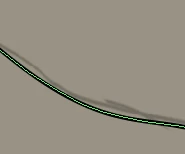
Remove green lines in the middle of the black lines in Illustrator

  • November 25, 2019
  • 2 replies
  • 304 views


{Renamed by MOD}


This topic has been closed for replies.

2 replies

Ashutosh_Mishra
Inspiring
November 25, 2019

Hi there,


Thanks for reaching out. Earlier reponse is absolutely correct.

You need to deselct the object in order to remove the green line. Green color is the layer color which comes up when the layer objects are highlighted.
I have attched a GIF as well for your reference.

Hope it helps.
If there is any other concern, feel free to contact us. We'll be glad to assist.

 

Regards,

Ashutosh

Ton Frederiks
Community Expert
Community Expert
November 25, 2019

Deselect? The green may be caused by the layer color .