jiay352227
Participant
October 15, 2017
Question

Separating a section of a graphic

  • October 15, 2017
  • 2 replies
  • 471 views

I've found a vector that I would like to use as border (i.e. be able to have it turn round corners).
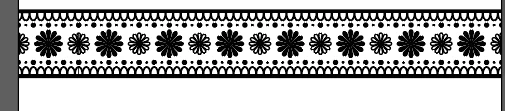
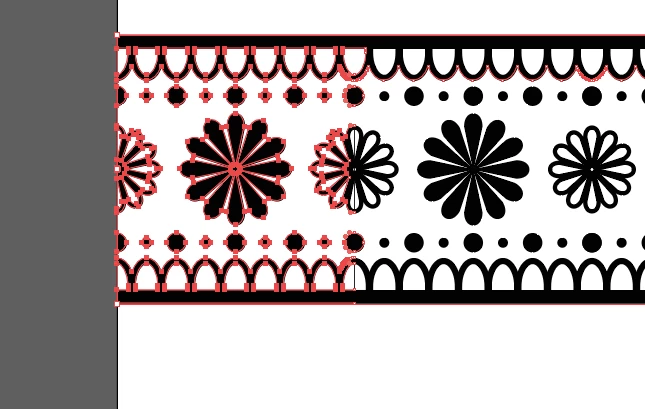
In order to do this I need to separate a section of it (otherwise the border function will have to create this whole strip before it can turn).  I've tried to ungroup the elements and use scissors and knife and use the direct selection tool to try and isolate a smaller section of the design - but it always seems to select an unwanted section of the vector (the black part) - and when I try and drag it away it goes all funky.  Can anyone suggest a way to cleanly isolate a minimal section of this pattern?
    This topic has been closed for replies.

    2 replies

    Participating Frequently
    October 16, 2017

    Draw a box around the exact section you want and use it as a clipping mask. Then use the trim option from the pathfinder panel.

    Ray Yorkshire
    Participating Frequently
    October 15, 2017

    One way- use the Add Anchor Point Tool (lives under the pen tool group)

    And add anchor points, on the top black rectangles, will need 2 if it's a shape and not a single line.

    Hover the tool over, using smart guides to line up, and click which adds an anchor point, ready for the break.

    and another at the bottom of the rectangle

    Use the Direct Select tool and drag a selection rectangle over the stuff you want to delete. ie almost to the centre.

    hit the keyboard delete key. Don't try and drag stuff away or it will take it's neighbours along for the ride as you found out.

    drag  over release and delete, then tidy up

    Srishti Bali
    Community Manager
    Community Manager
    November 3, 2017

    Hi jiay,

    I would like to know if the steps suggested by Dan worked for you, or the issue still persists.

    Kindly update the discussion if you need further assistance with it.

    Thanks,

    Srishti