
Inspiring
January 10, 2018
Answered

swatches in RGB instead of CMYK

  • January 10, 2018
  • 4 replies
  • 52158 views

hello,

lately im opening a CMYK file, it is in color mode of CMYK,

and still:

my palette of color swatches at RGB!!

how can it be?

ans what do i do to fix it?

    This topic has been closed for replies.
    Correct answer Doug A Roberts

    CMYK


    that's a colour mode, not a document profile. document profiles are here:
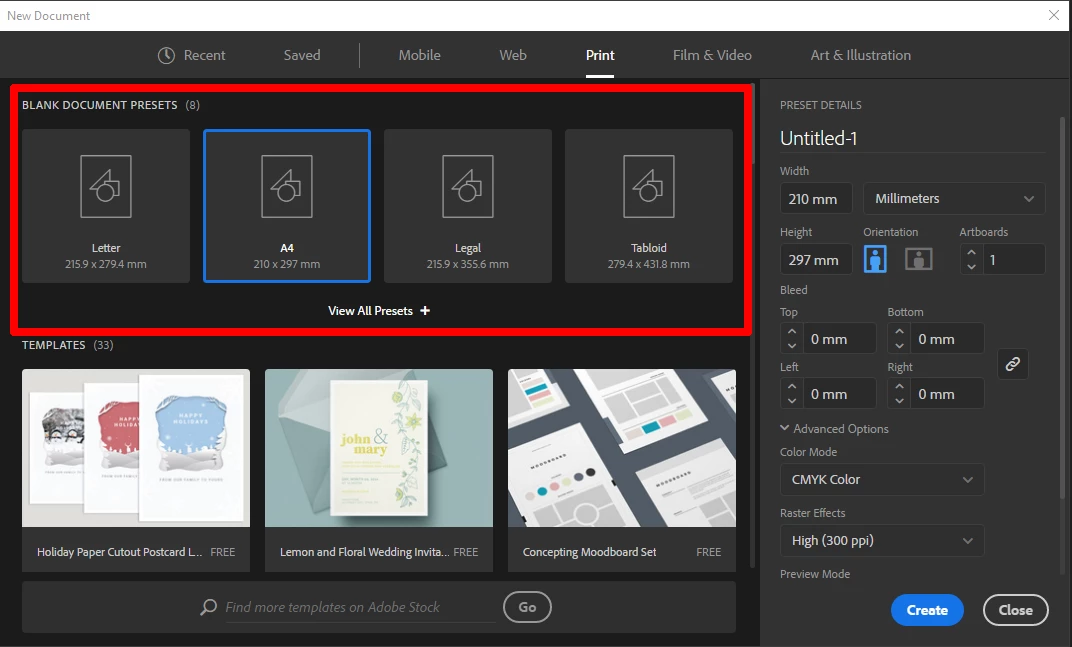
    or here, in less obfusticating terms, in the old style window:
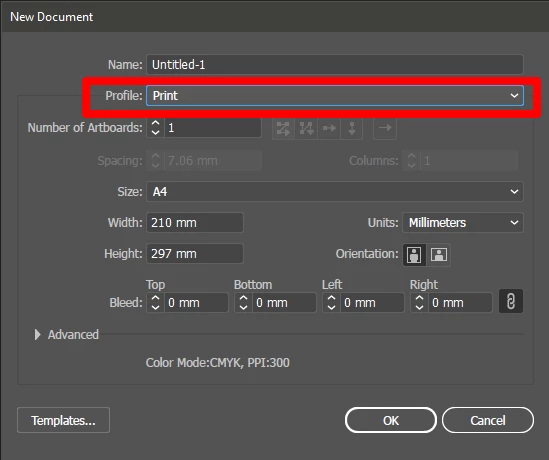
    every new document is derived from a document profile whether you know it or not, and every document profile already has a colour mode. thus if you pick a document profile based on Print (CMYK), or change the settings to Custom after picking one based on it, you're using a document with swatches defined in CMYK, even if you change the colour mode to RGB.

    4 replies

    Participant
    January 18, 2023

    I am experiencing the same issue with Illustrator CC 27.2 (64-bit)

    1.) Opened "Art & Illustration.ai" located in the Presets folder. (Swatch Library)
    2.) Changed document to CMYK.

    3.) Edited and added swatches to the swatch library. New swatches added were created using CMYK.

    4.) Save the AI file, exit Illustrator, open new document from Print category (making sure CMYK is color mode).

    5.) The Art & Illustration Swatch Library converted my CMYK swatches to RGB. 

    Cannot figure out went happened.

    Participant
    January 18, 2023

    So, I figured out what happened. It appears as if the Art & Illustration Swatch Library cannot be changed to CMYK. This library must be linked deeper in software. I am now using the "Print" Swatch Library, which defaults to CMYK.

    Participant
    August 16, 2020

    I'm having this same issue. I open a new document and choose CMYK for my mode but when I open my swatches palette I find all the preset colors (that are normally there) are all RGB. How do you switch the swatches (preset) palette to CMYK without having to add every single new swatch in CMYK?

    Monika Gause
    Community Expert
    Community Expert
    August 16, 2020

    Does the correct answer not help you?

    Participant
    September 23, 2020

    Sorry no. 😕😕


    I'm now having the opposite problem (reversing CMYK preset swatches to RGB preset swatches... different computer/printer and needing RGB presets).


    As you can see in my first screenshot I am in the Print mode and setting it to RGB. The second screenshot shows that I'm in RGB color mode but the last screenshot still shows CMYK preset color swatches. Is there a way to just change the swatches preset? 


    Monika Gause
    Community Expert
    Community Expert
    January 10, 2018

    btride  schrieb

    lately im opening a CMYK file, it is in color mode of CMYK,

    and still:

    my palette of color swatches at RGB!!

    How do you conclude that your swatches are RGB? Can you please show us screenshots?

    LisaLa
    Known Participant
    December 16, 2019

    I am having a similar issue. Didn't have this problem before the last update. See my screen shot when I go to create a new document.  And no matter what my color swatches are defaulting to RGB. I design for print not the web, this is no good if I have to keep opening old documents deleting old stuff from that doc and resizing the art board. 

    LisaLa
    Known Participant
    December 16, 2019

    It should allow you to set your default to print. Yet I am not seeing that anywhere to change my default.

    barbara_a7746676
    Community Expert
    Community Expert
    January 10, 2018

    When a document is created in CMYK, the swatches are also CMYK.

    If a document is created as RGB and then converted to CMYK, the swatches are also converted to CMYK, however they retain the original swatch names.

    Rather than going through the swatches and renaming and changing any color definitions, you could create a new CMYK document. Copy all the artwork from the first document and paste it into the new one. That way the document color mode and the swatch names will all be CMYK.

    btrideAuthor
    Inspiring
    January 10, 2018

    but no!

    i would not ask if it was that easy/

    this is the problem:

    new doc at cmyk, ans still- swatches at RGB!

    another new doc- and still!

    Doug A Roberts
    Community Expert
    Community Expert
    January 10, 2018

    what document profile are you using?