


Inspiring
May 27, 2016
Answered

Unlocking sublayers

  • May 27, 2016
  • 3 replies
  • 1597 views

I am trying to resize some art to specific dimensions. The script ran fine except for 1 file and it drove me crazy trying to find why 1 layer would not resize. I checked to make sure the layer wasn't locked:
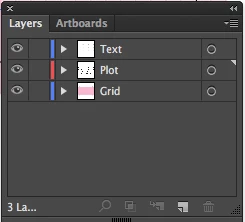
and it looked fine. I used the line currentLayer.locked=false; to unlock any locked ones. Finally, I checked the sublevels and, sure enough, there was a level locked.
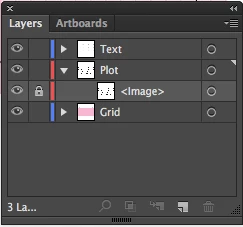
Is there a way to unlock all sublayers?

This topic has been closed for replies.
Correct answer Alexander Ladygin

function unlock ( items ) {

    var i = items.length;

    if ( i ) {

        while ( i-- ) {

            items.locked = false;

            if ( items.typename === 'GroupItem' ) {

                unlock( items.pageItems );

            }

                else if ( items.typename === 'Layer' ) {

                    unlock( items.layers );

                    unlock( items.pageItems );

                }

        }

    }

}

unlock( activeDocument.layers );

3 replies

Alexander Ladygin
Alexander LadyginCorrect answer
Inspiring
May 28, 2016

function unlock ( items ) {

    var i = items.length;

    if ( i ) {

        while ( i-- ) {

            items.locked = false;

            if ( items.typename === 'GroupItem' ) {

                unlock( items.pageItems );

            }

                else if ( items.typename === 'Layer' ) {

                    unlock( items.layers );

                    unlock( items.pageItems );

                }

        }

    }

}

unlock( activeDocument.layers );

mikeAtJBAuthor
Inspiring
May 28, 2016

Thanks alexander and silly-v.

Silly-V
Legend
May 27, 2016

Matter of fact that doesn't look like a locked sub-layer, it looks like a locked raster item!

Alexander Ladygin
Inspiring
May 27, 2016

As an option:

function unlockedSubLayers ( layers ) {

    var i = layers.length;

    if ( i ) {

        while ( i-- ) {

            layers.locked = false;

            unlockedSubLayers( layers.layers );

        }

    }

}

unlockedSubLayers( activeDocument.layers );

mikeAtJBAuthor
Inspiring
May 28, 2016

I had tried something very similar and it didn't work.

mikeAtJBAuthor
Inspiring
May 28, 2016

You're right. Could explain why my unlock function didn't work. New to javascript. How would I unlock a locked raster item?